Using imagePROGRAF Printmonitor (Mac OS)
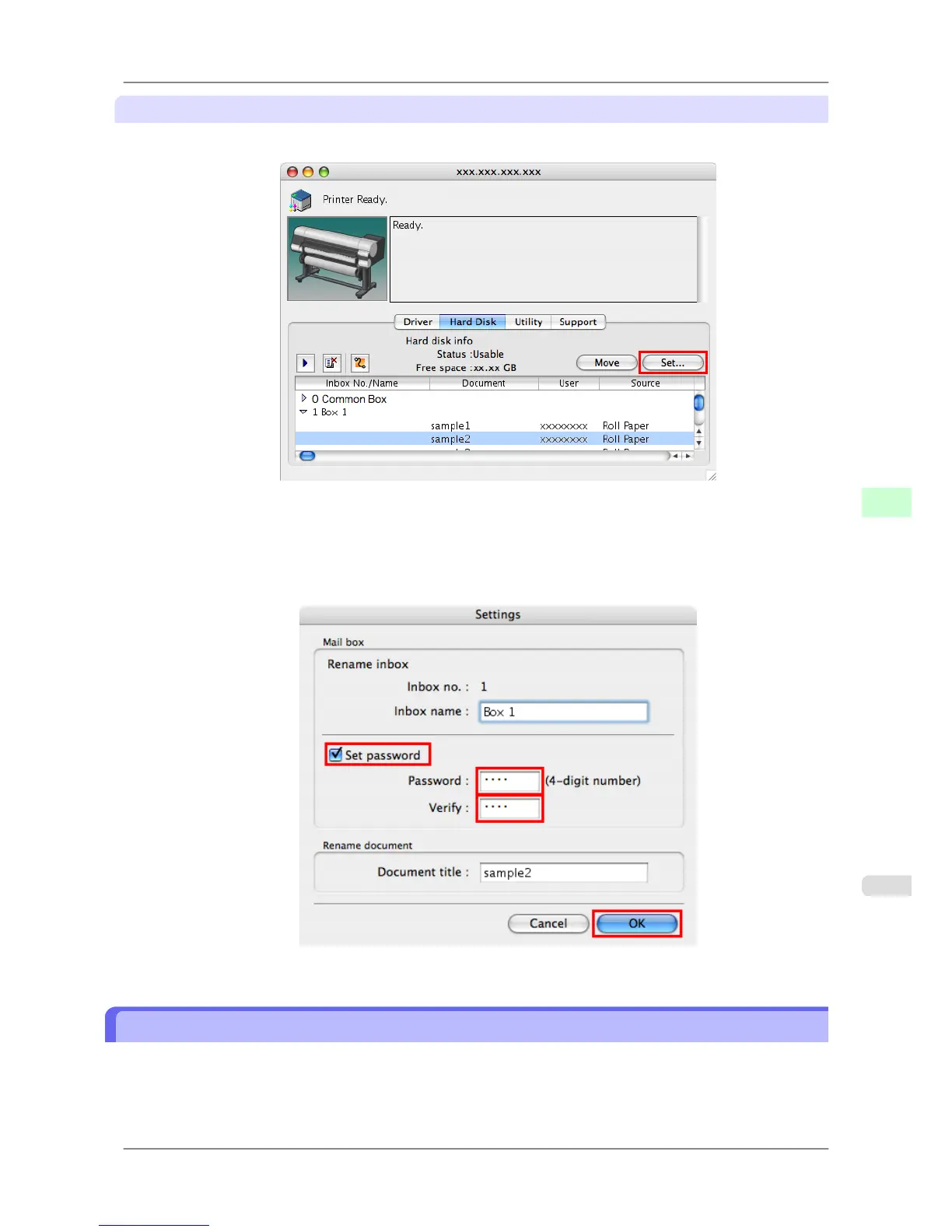
1. In the Hard Disk pane, click ▶ next to Inbox No./Name to list saved jobs. Select a saved job and click Set.
2. In the Settings dialog box, specify the password and click OK.
•
Set password : Select the check box.
• Password : Enter the password. (This field is limited to four digits in the range 0001–9999.)
• Verify : Re-enter the password to confirm it.
For details, refer to the imagePROGRAF Printmonitor help file.
Naming Personal Boxes
By default, personal boxes are unnamed. You can name them for easier management.
You can assign a name to a personal box as follows.
• Using RemoteUI
• Using imagePROGRAF Status Monitor (Windows)
Print Jobs
>
Advanced Print Job Operations
>
iPF825 Naming Personal Boxes
6
559














 To Next Page