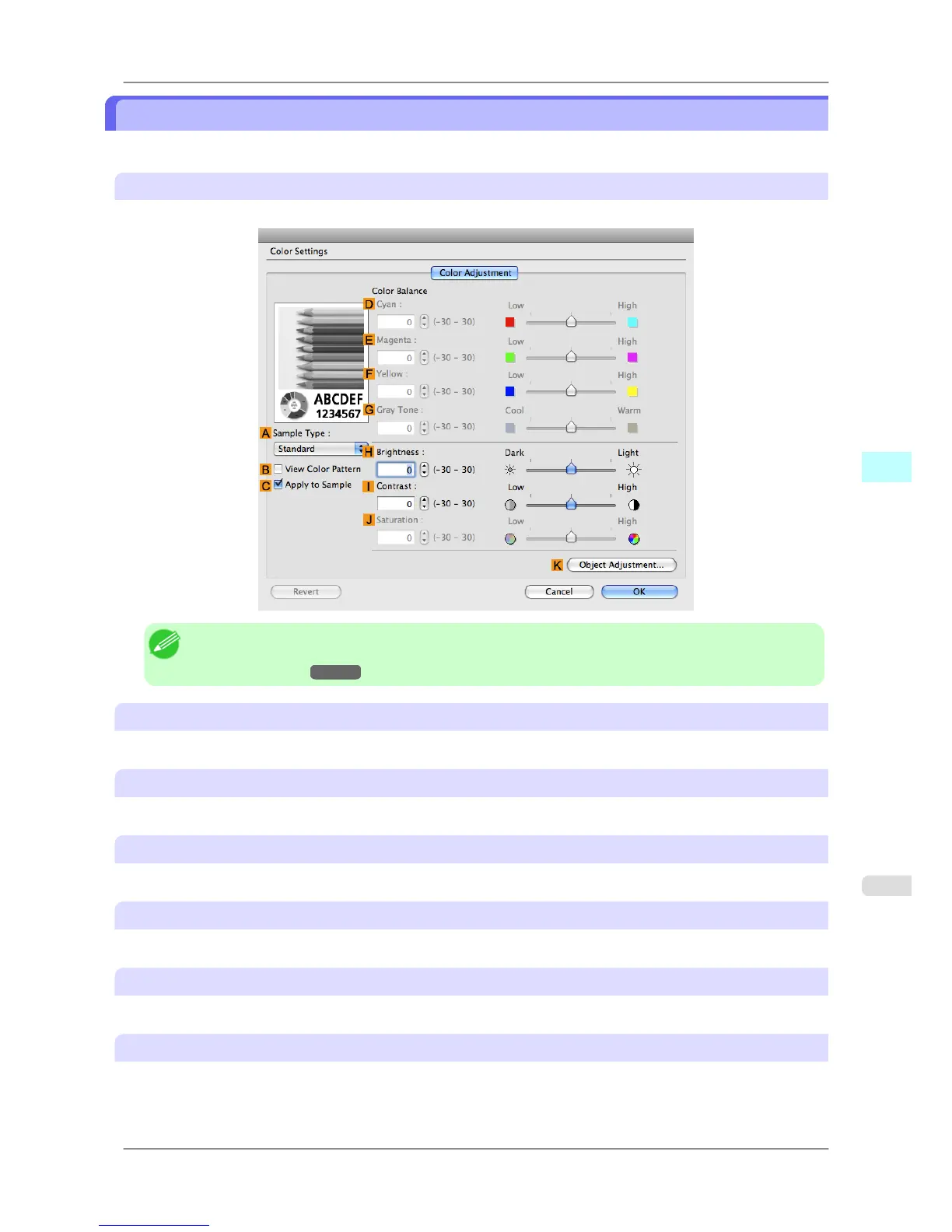
Color Settings Pane: Monochrome
The following settings are available on the Color Settings pane for monochrome printing.
Color Adjustment pane: Monochrome
On the Color Adjustment pane for monochrome printing, you can adjust the brightness and contrast.
Note
• To
display the Color Adjustment pane, on the Main pane, click Color Settings in Advanced Settings.
(See "Main Pane
→P.411 ")
A Sample Type
Choose a sample image from Standard, Portrait, Landscape, or Graphics.
B View Color Pattern
Select this checkbox to display the color pattern.
C Apply to Sample
Select this checkbox to apply the changed settings to the sample image.
D Cyan
/ E Magenta / F Yellow
Not available.
G Gray Tone
Not available.
H Brightness
Adjust the overall image brightness as desired. You can adjust the brightness if the printed document is lighter or darker
than the original image (that is, the original photo that was scanned or the original graphic as it appears on the computer
screen).
Mac OS X Software
>
Printer Driver
>
iPF825 Color Settings Pane: Monochrome
5
421














 To Next Page