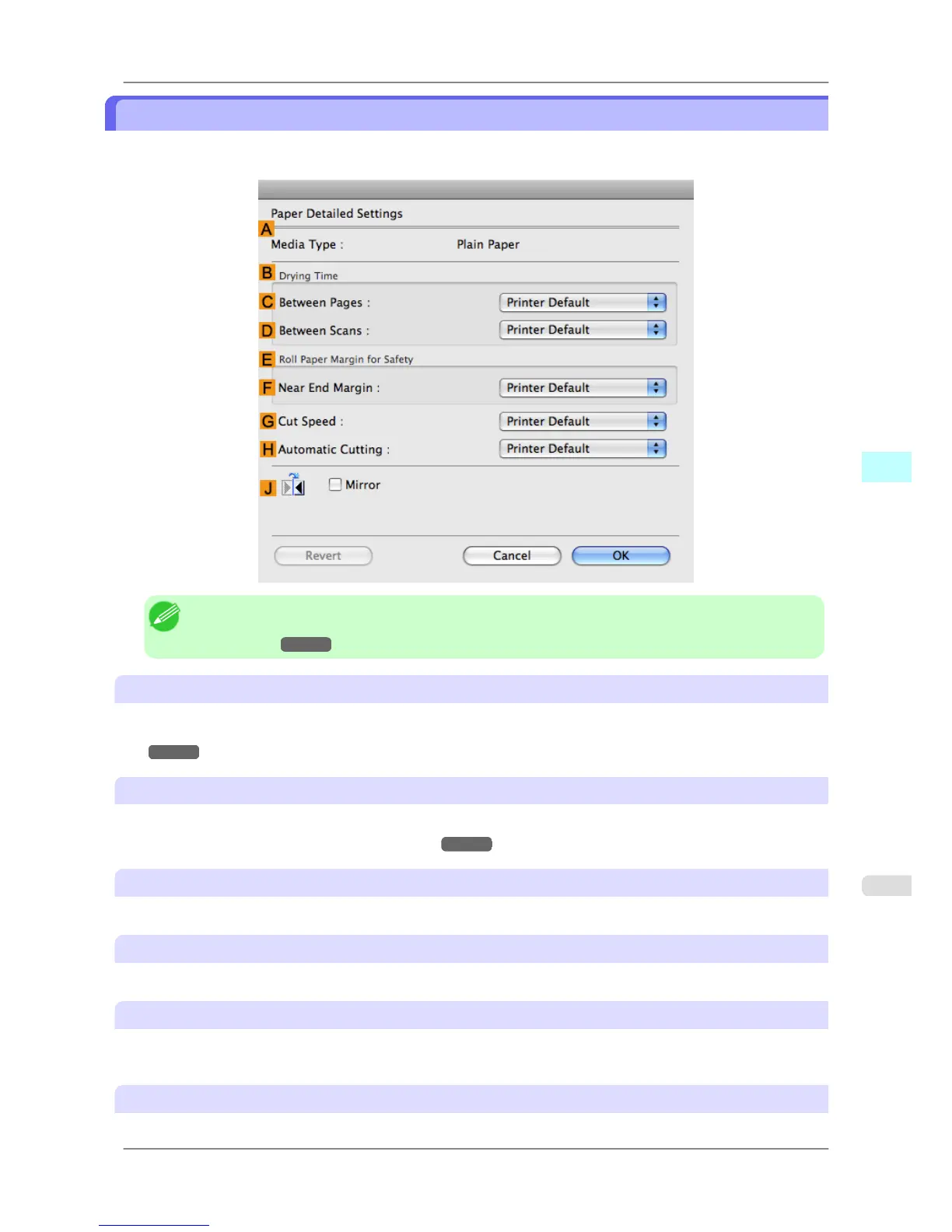
Paper Detailed Settings Dialog Box
The Paper Detailed Settings dialog box offers the following settings. For details on settings items, refer to the printer
driver help.
Note
• To
display the Paper Detailed Settings dialog box, on the Main pane, click Set by Media Type.(See
"Main Pane
→P.411 ")
A Media Type
Select the paper type.
For information on the types of paper the printer supports, refer to the Paper Reference Guide.(See "Types of Pa-
per →P.578 ")
B Drying Time
Specify the time that the printer waits for ink to dry, as needed. The Drying Time setting is only valid for rolls.
• (See "Specifying the Ink Drying Time for Rolls →P.604 ")
C Between Pages
Specify the time the printer waits after printing a page until ejecting the paper, as needed.
D Between Scans
Specify the time the printer waits after printing a line on the page until printing the next line, as needed.
E Roll Paper Margin for Safety
You can specify the length of a margin on the leading edge of paper to ensure that paper susceptible to curling is held
firmly against the Platen.
F Near End Margin
Specify the length of the Near End Margin (the leading edge margin) of the roll, as needed.
Mac OS X Software
>
Printer Driver
>
iPF825 Paper Detailed Settings Dialog Box
5
415














 To Next Page