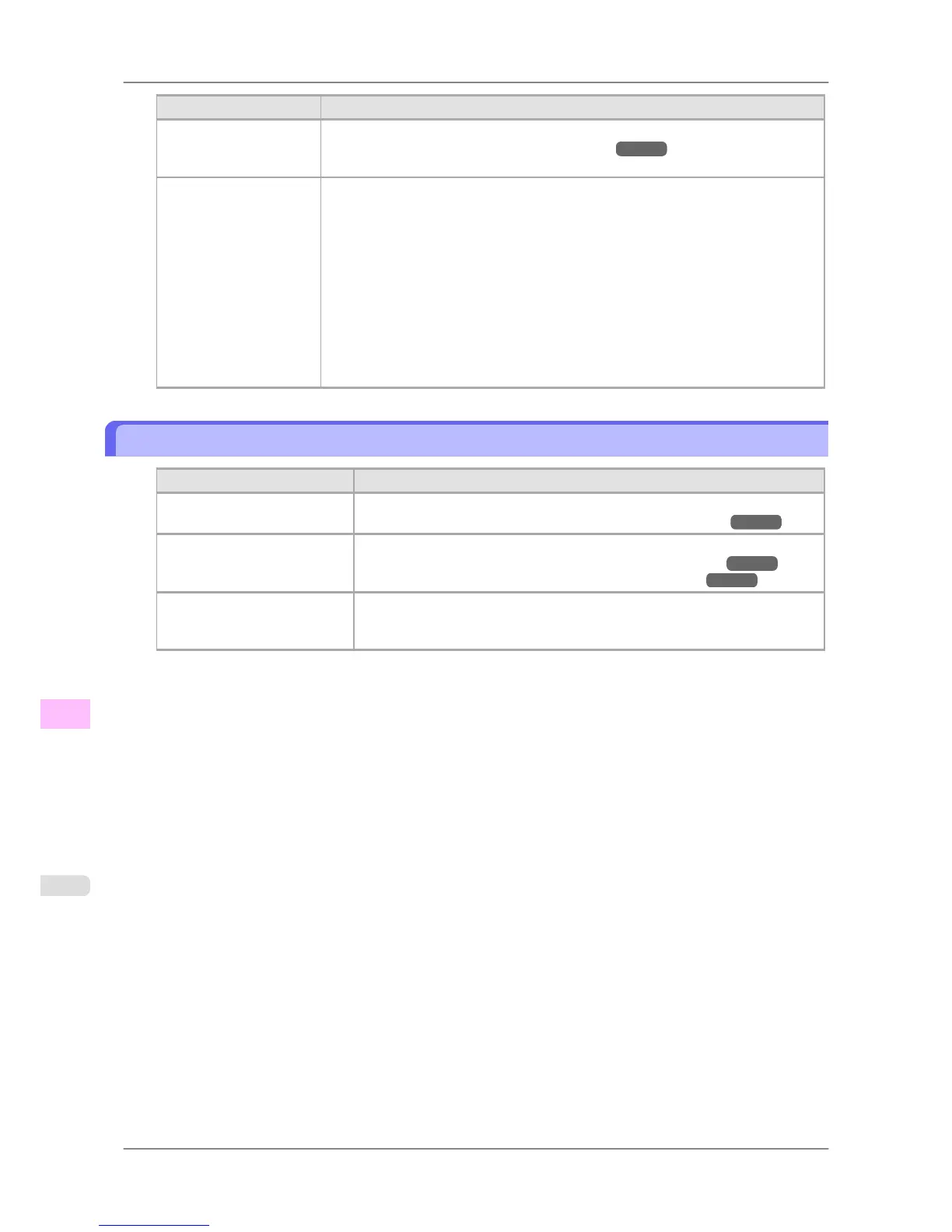
Cause Corrective Action
The computer you are try-
ing to print from is not
configured correctly.
Make sure the computer's NetWare settings are configured correctly.
(See "Configuring NetWare Network Settings.") →P.730
The NetWare server and
services are not config-
ured correctly.
Check the following points.
1. Make sure the NetWare file server is running.
2. Make
sure there is enough free disk space on the NetWare file server. Insufficient
disk space may prevent you from processing large print jobs.
3. Start NWADMIN or PCONSOLE and confirm that the print service is configured
correctly and the print queue is available.
4. If data transmission to a printer on another subnet fails, deactivate NCP burst mode
in that printer's network protocol settings.
5. If the printer is used in queue server mode, specify Other/Unknown as the printer
type.
Cannot print over AppleTalk or Bonjour networks
Cause Corrective Action
The AppleTalk protocol is not
enabled on the printer.
Activate AppleTalk on the printer.
(See "Configuring the Printer's AppleTalk Network Settings.") →P.732
The computer you are trying to
print from is not configured
correctly.
Make sure the computer's AppleTalk settings are configured correctly.
(See "Configuring the Destination for AppleTalk Networks .") →P.733
(See "Configuring the Destination for Bonjour Network .") →P.738
The computer and printer are
not on the same network.
Due to the nature of Bonjour, you cannot print if the printer is on another net-
work behind a router. Make sure the computer and printer are on the same net-
work. For information about network settings, ask your network administrator.
Troubleshooting
>
Cannot print over a network
>
Cannot print over AppleTalk or Bonjour networks iPF825
12
810














 To Next Page