• Displays the ink level of every color in the printer. An icon and warning message will notify you when ink levels
are low.
• The type of paper loaded in each media source is identified. You can also check to see if paper has run out.
• This way, the utility enables you to check printer information and take care of printer maintenance for optimal
printing results.
• You can also set up automatic email notification of any printer problems or errors to email addresses you designate
in advance.
• You can check the status of the hard disk and the documents saved on the hard disk.
• You can use the Accounting Manager to collect the print job logs for the printers and check information such as
the printing costs.
For details of the Accounting Manager, see Accounting Manager →P.369 .
Note
• For details, refer to the imagePROGRAF Status Monitor help.
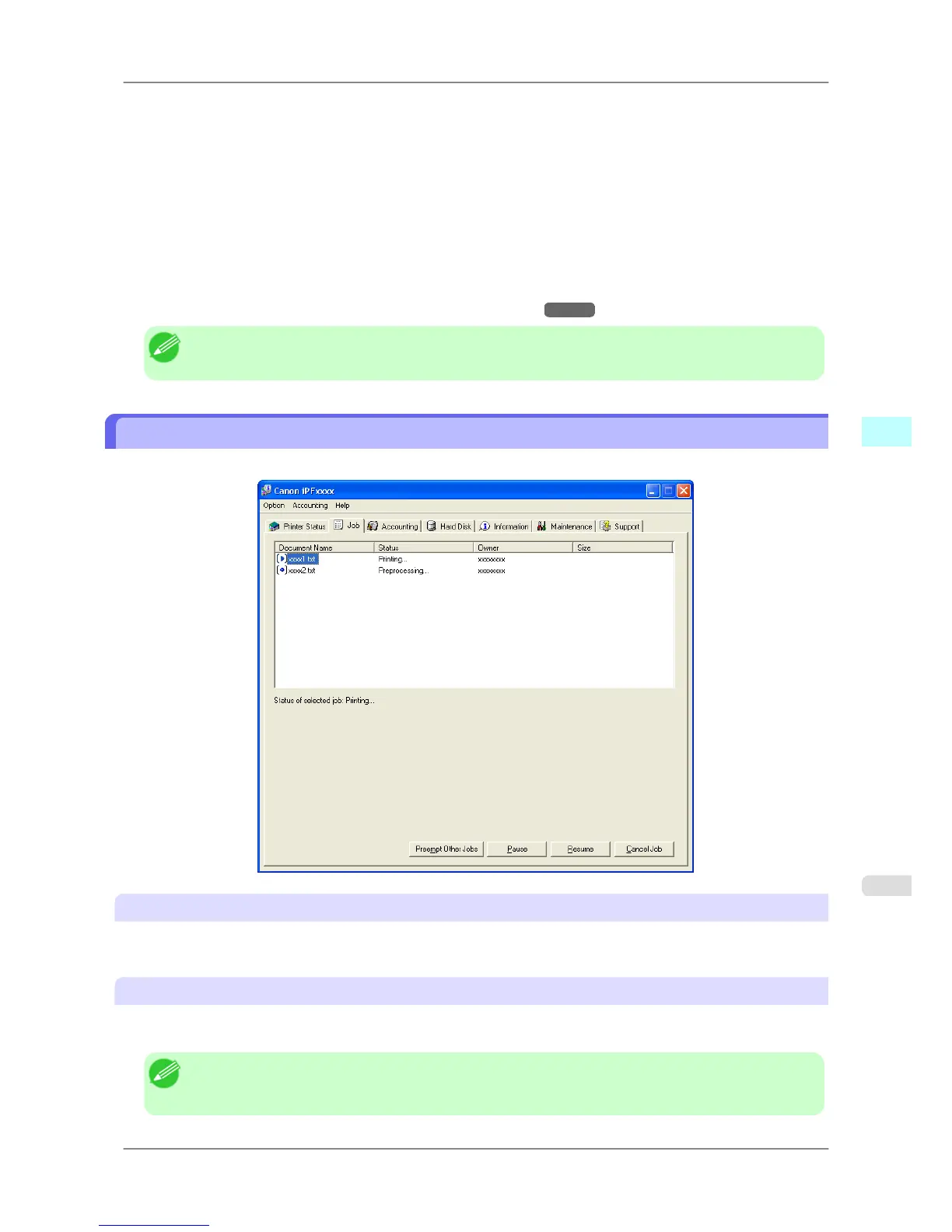
Job Management Using imagePROGRAF Status Monitor
You can use the Job sheet in imagePROGRAF Status Monitor for operations such as pausing and canceling print jobs.
Preempting Other Jobs
If you select a print job and click the Preempt Other Jobs button, the selected job is printed ahead of the job that
currently precedes it in the print queue.
Pausing/Resuming Print Jobs
Selecting a print job and clicking the Pause button pauses printing of the selected job.
To resume printing of a paused print job, select the print job and click the Resume button.
Note
• Once
all the print data for a print job has been sent to the printer, the job can no longer be paused/re-
sumed.
Windows Software
>
Status Monitor
>
iPF825 Job Management Using imagePROGRAF Status Monitor
4
367














 To Next Page