Problems Regarding Paper
Clearing Jammed Roll Paper .................................................................................................................... 786
Clearing a Jammed Sheet ......................................................................................................................... 790
Troubleshooting When Paper Jams are not Found .................................................................................. 792
Roll Paper Cannot be Inserted into the Paper Feed Slot .......................................................................... 795
Cannot Load Sheets
.................................................................................................................................. 795
Paper is not cut straight ............................................................................................................................. 795
Paper is not cut ......................................................................................................................................... 795
The size of clear film cannot be detected .................................................................................................. 796
Clearing Jammed Roll Paper
If roll paper jams, follow the steps below to remove jams.
Note
• If you do not find any scraps or jams, see "Troubleshooting When Paper Jams are not Found."
→P.792
1. Turn the printer off. (See "Turning the Printer On and Off.")
→P.652
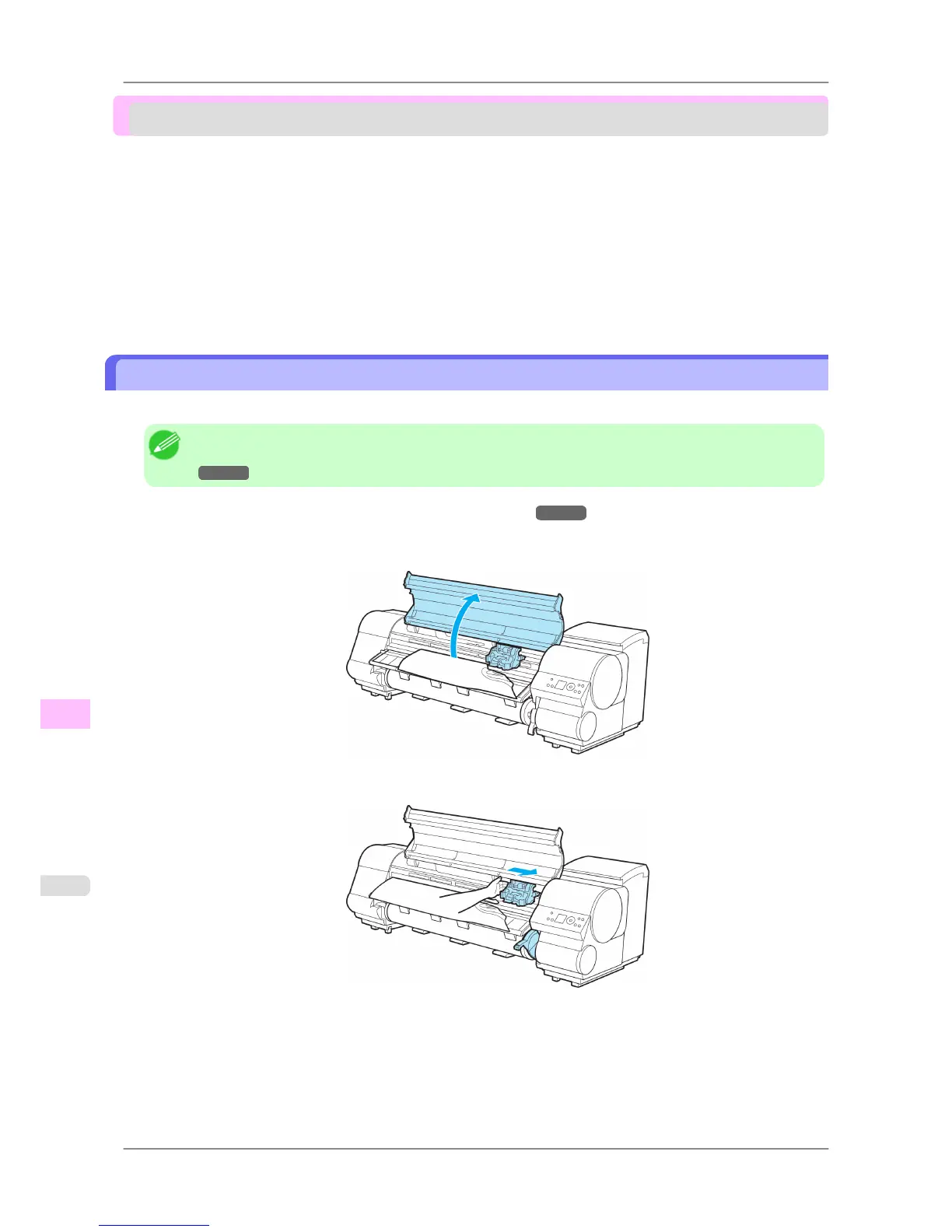
2. Open the Top Cover.
3. If the Carriage is out, move the Carriage out of the way, away from the paper.
Troubleshooting
>
Problems Regarding Paper
>
Clearing Jammed Roll Paper iPF825
12
786














 To Next Page