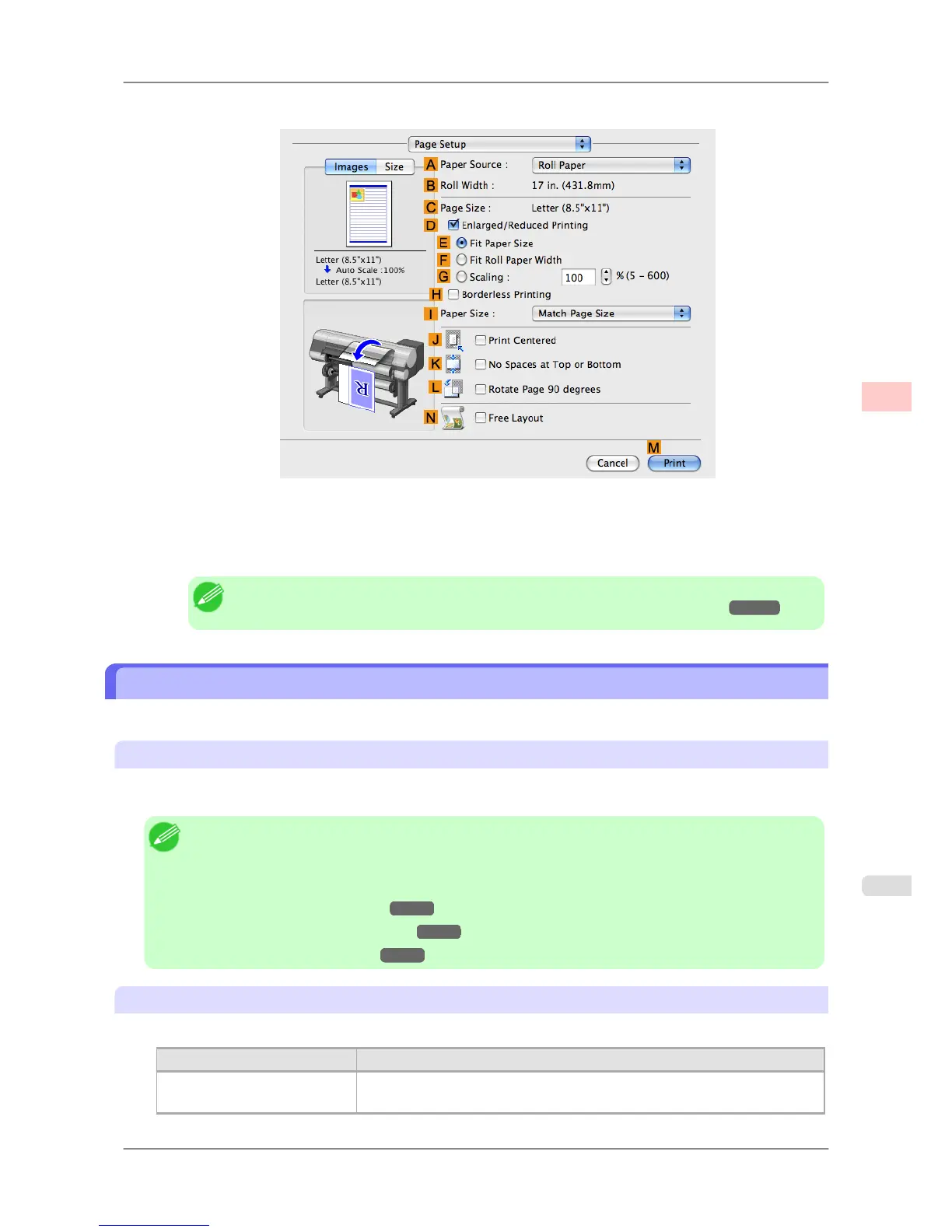
12. Access the Page Setup pane.
13. Confirm the settings of APaper Source and C Page Size.
14. Confirm the print settings, and then click MPrint to start printing.
Note
• For tips on confirming print settings, see "Confirming Print Settings (Mac OS X)
→P.407 "
Giving Priority to Particular Graphic Elements and Colors for Printing
You can specify detailed print settings as desired for the quality level, colors, and other criteria.
Advanced Settings
For printing results that appear just as expected for your original, you can specify which graphic elements and colors to
prioritize for printing.
Note
• Easy
Settings are also available, providing convenient presets. To use the presets, simply choose the
printing application.
For details on Easy Settings, refer to the following topics.
• Printing Photos and Images
→P.29
• Printing Line Drawings and Text →P.19
• Printing Office Documents →P.37
Print Priority
Choose the graphic elements that you want to emphasize for printing.
Print Priority (*1) Description
Image A setting for posters or other documents made up mainly of photos or images, or
for emphasizing photos or images in printed documents.
Enhanced Printing Options
>
Adjusting Images
>
iPF825 Giving Priority to Particular Graphic Elements and Colors for Printing
3
53














 To Next Page