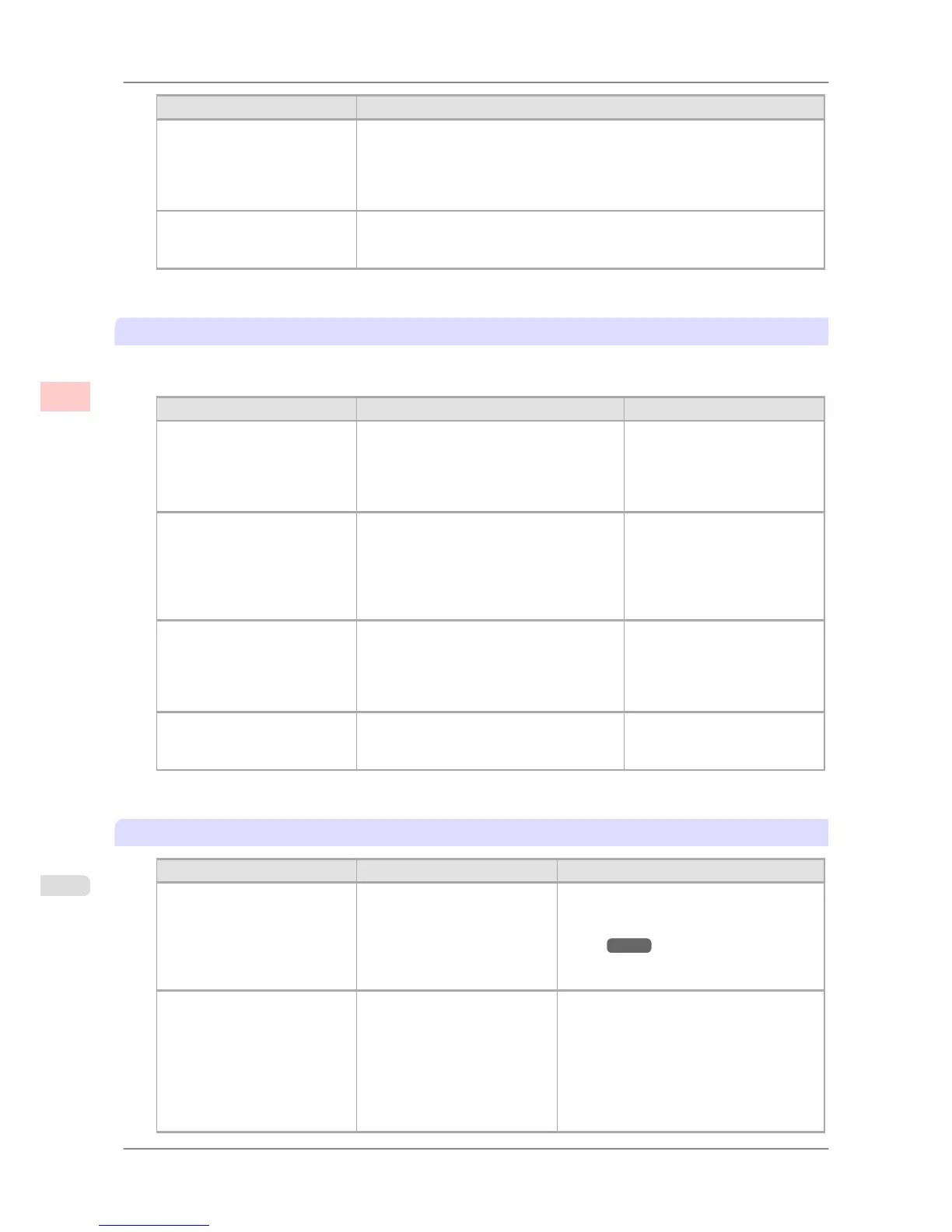
Print Priority (*1) Description
Line Drawing/Text Choose this setting for CAD drawings made up mainly of intricate lines, or wall
newspapers and other notices with a large amount of text. Suitable for empha-
sizing detailed text in printed documents.
However, the quality may not be sufficient when printing photos or images that
require a lot of color coverage. In this case, choose Image instead.
Office Document Choose this setting for better legibility of documents combining text and graph-
ics, such as documents and presentation material created with typical office ap-
plications.
*1: Options suitable for the selected type of paper are listed under Print Priority.
Print Quality
Choose the print quality.
The printing mode is determined by a combination of the print quality and resolution.
Print Quality (*1) Description Print Priority
Highest A setting for printing at the highest resolu-
tion when quality is most important. Print-
ing takes longer and consumes more ink
than in other modes, but this mode offers
superior printing quality.
Image
High Choose this setting to print at high resolu-
tion when quality is most important.
Printing takes longer and consumes more
ink than in Standard or Draft modes, but
this mode offers exceptional printing quali-
ty.
Image
Line Drawing/Text
Standard Choose this setting to print at standard reso-
lution when quality and speed are both im-
portant.
Printing takes less time than in Highest or
High mode.
Image
Line Drawing/Text
Office Document
Draft Choose this setting to print faster.
Printing in draft mode can help you work
more efficiently when checking layouts.
Image
Line Drawing/Text
*1: Options suitable for the selected Print Priority are listed under Print Quality.
Color Settings
Setting Item Options Description
Color Mode (*1) Color
Monochrome
Color (CAD)
Monochrome (BK ink)
Monochrome Bitmap
No color correction
Choose whether to print in color or mono-
chrome.
(See "Adjusting the Color in the Printer
Driver →P.44 ")
Color Adjustment Cyan
Magenta
Yellow
Gray Tone
Brightness
Contrast
Saturation
You can adjust the levels of cyan, magenta,
and yellow as well as the brightness, con-
trast, saturation, and gray tones.
If you choose Monochrome or Mono-
chrome (BK ink) in Color Mode only
Brightness and Contrast can be adjusted.
Image, Graphics, and Text are available as
Object Adjustment options.
Enhanced Printing Options
>
Adjusting Images
>
Giving Priority to Particular Graphic Elements and Colors for Printing iPF825
3
54














 To Next Page