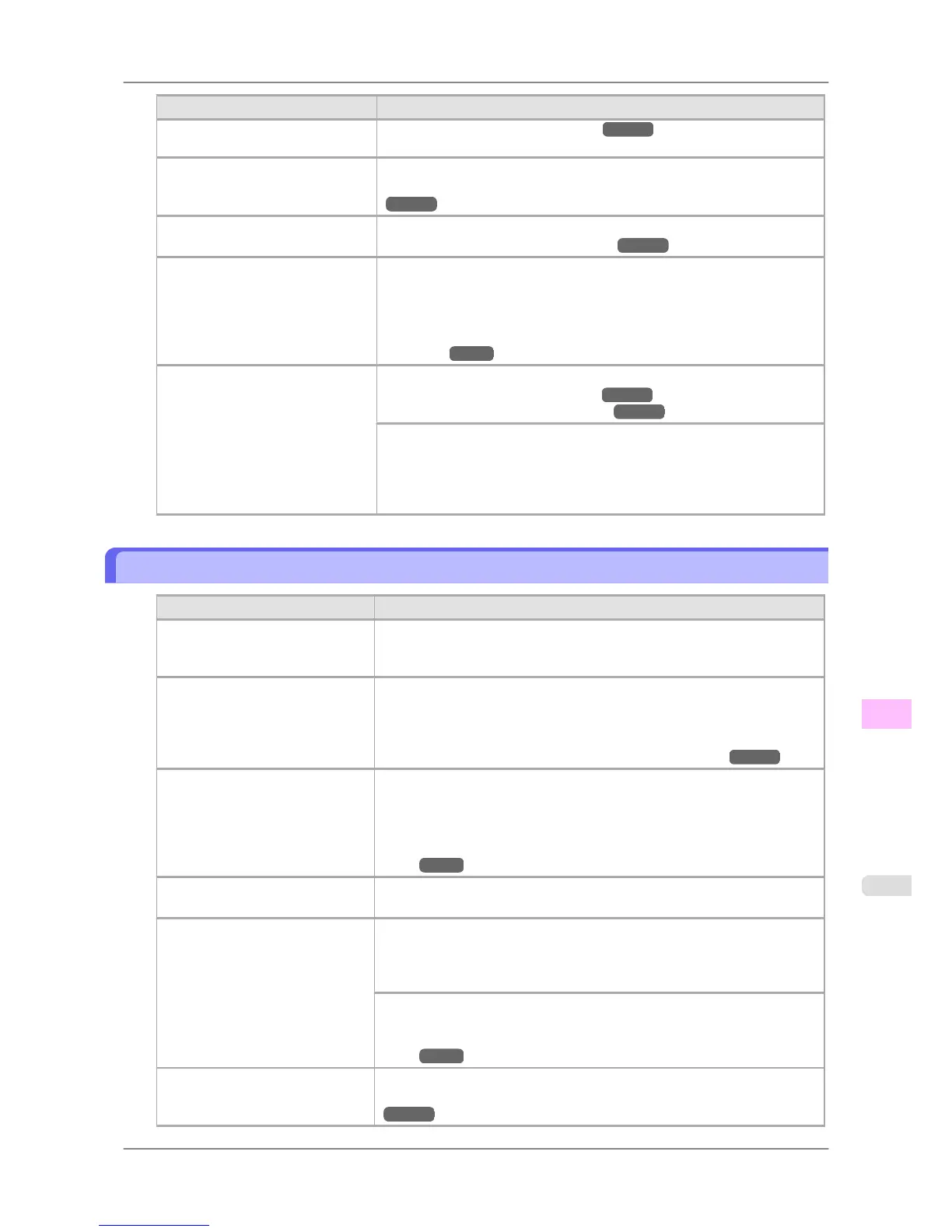
Cause Corrective Action
In the printer menu, Print Length
is specified in Feed Priority.
(See "Adjusting the Feed Amount.") →P.635
The Printhead is out of alignment. Adjust the Printhead alignment.
(See "Automatic Straightening of Lines and Colors (Auto Head Adj.).")
→P.627
The Printhead nozzles are clogged. Print a test pattern to check the nozzles and see if they are clogged.
(See "Checking for Nozzle Clogging.") →P.754
Streaks may occur if you set the
Print Quality too low.
Choose a higher level of Print Quality in the Advanced Settings of the
printer driver and try printing again.
Printing in Draft or Standard mode is faster and consumes less ink than in
Highest or High modes, but the printing quality is lower.
(See "Giving Priority to Particular Graphic Elements and Colors for
Printing.") →P.53
The type of paper specified in the
printer driver does not match the
type loaded in the printer.
Load paper of the same type as you have specified in the printer driver.
(See "Loading Rolls in the Printer.") →P.588
(See "Loading Sheets in the Printer.") →P.616
Make sure the same type of paper is specified in the printer driver as you
have loaded in the printer.
1. Hold down the Stop button for a second or more to cancel printing.
2. Change the type of paper in the printer driver and try printing again.
Colors in printed images are uneven
Cause Corrective Action
Line Drawing/Text is selected
when printing images in many sol-
id colors.
Specify Image in the printer driver.
You are printing on paper that curls
easily.
Printed colors may appear uneven on the leading edge of paper that is sus-
ceptible to curling. Increase the level of vacuum holding the paper against
the Platen or specify a margin of 20 mm (0.79 in.) or more for the leading
edge.
(See "Adjusting the Vacuum Strength (VacuumStrngth).") →P.642
Printed colors may be uneven if
you set the Print Quality too low.
Choose a higher level of Print Quality in the Advanced Settings of the
printer driver.
Printing in Draft or Standard mode is faster and consumes less ink than in
Highest or High modes, but the printing quality is lower.
(See "Giving Priority to Particular Graphic Elements and Colors for Print-
ing.") →P.53
Color may be uneven between dark
and light image areas.
Select Unidirectional Printing in the Advanced Settings of the printer driv-
er.
When borderless printing is used,
the edge of the paper is cut during
printing. Thus, ink density may be
uneven at the edges.
Specify No in Auto Cut in the printer driver before printing. In this case, the
paper can be printed without borders on the left and right sides only. Cut the
printed document ejected from the printer, then use scissors to cut away the
edges on the top and bottom.
Choose a higher level of Print Quality in the Advanced Settings of the
printer driver.
(See "Giving Priority to Particular Graphic Elements and Colors for Print-
ing.") →P.53
The Printhead is out of alignment. Adjust the Printhead alignment.
(See "Automatic Straightening of Lines and Colors (Auto Head Adj.).")
→P.627
Troubleshooting
>
Problems with the printing quality
>
iPF825 Colors in printed images are uneven
12
803














 To Next Page