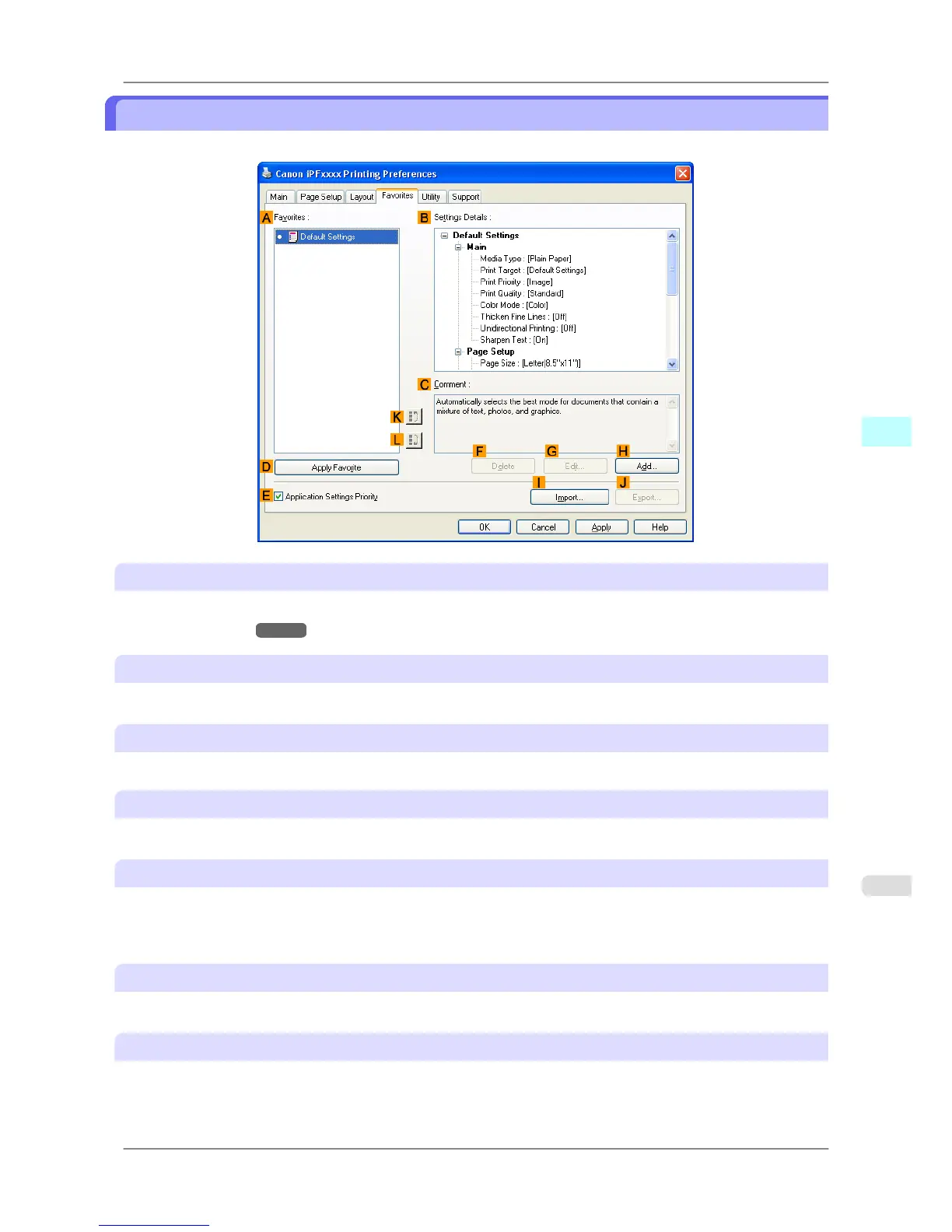
Favorites Sheet
The following settings are available on the Favorites sheet. For details on settings items, refer to the printer driver help.
A Favorites
Printing favorites you have created are listed with Default Settings favorites.
• Using Favorites →P.184
B Settings Details
Displays details of the favorite selected in the AFavorites.
C Comment
Displays notes registered in the favorite.
D Apply Favorite
Click to change the current print settings to those of the favorite selected in the AFavorites.
E Application Settings Priority
Activate this setting to use settings values specified in the source application in preference to favorite settings selected
in the AFavorites, when clicking D Apply Favorite. For details on the settings items used in preference, refer to the
printer driver help.
F Delete
Click to delete the selected favorite from the AFavorites list.
G Edit
Click to display the Edit dialog box, which enables you to change the name and icon for the favorite selected in the
A Favorites list.
Windows Software
>
Printer Driver
>
iPF825 Favorites Sheet
4
225














 To Next Page