Information
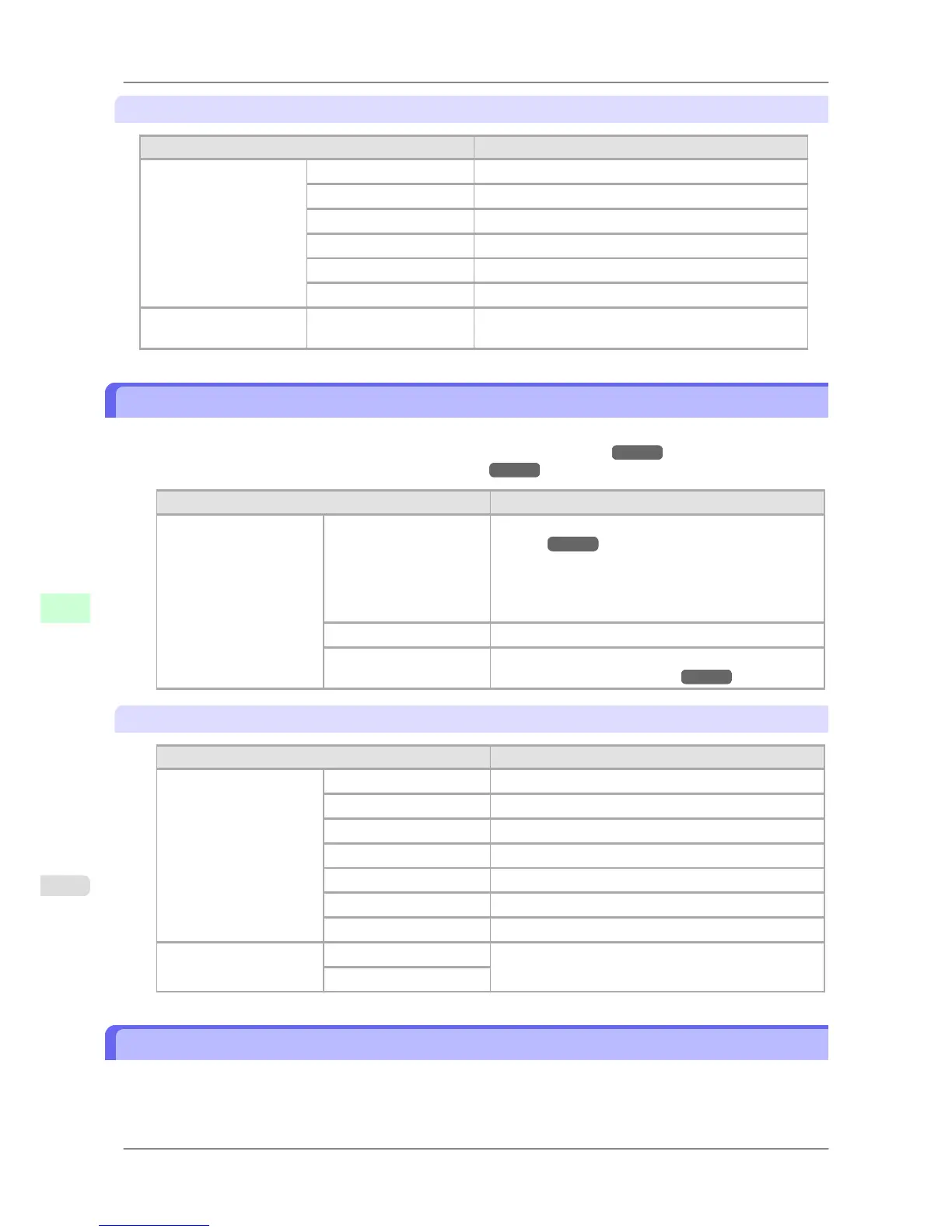
Setting Item Description, Instructions
System Info Firmware Displays the printer firmware version.
Boot Displays the version of the boot ROM.
MIT Displays the version of the MIT database format.
s/n Displays the printer's serial number.
MAC Displays the MAC address of the printer.
IP Displays the printer's IP address.
Error Log 1: xxxxxxxx-xxxx
2: xxxxxxxx-xxxx
Displays the most recent error messages (up to two).
Main Menu Settings (During Printing)
Main menu
items during printing are described in the following tables.
For instructions on selecting or setting menu items, see "Main Menu Operations."
→P.663 .
For details on menu levels and values, see "Menu Structure." →P.666
Setting Item Description, Instructions
Menu Durng Prtng Head Cleaning Printhead cleaning options. (See "Cleaning the Print-
head.") →P.755
Choose Head Cleaning A if printing is faint, oddly col-
ored, or contains foreign substances.
Choose Head Cleaning B if no ink is printed at all, or if
printing is not improved by Head Cleaning A.
Fine Band Adj. Fine-tune the feed amount manually.
Information Displays the information about the printer and history of
print jobs. (See "Information.") →P.690
Information
Setting Item Description, Instructions
System Info Firmware Displays the version of the printer and firmware.
Boot Displays the version of the boot ROM.
MIT Displays the version of the MIT database format.
s/n Displays the printer's serial number.
MAC Displays the MAC address.
IP Displays the IP address.
HDDSpace Displays the space available on the printer's hard disk.
Error Log 1: xxxxxxxx-xxxx Displays the two most recent error message numbers,
most recent first.
2: xxxxxxxx-xxxx
Submenu Display
Press the Information button to display this information, one after another: the Maintenance Cartridge capacity and
remaining ink levels, paper information, printer information, and HP-GL/2 settings information.
Each time you press the Information button, the following submenus are displayed.
Printer Parts
>
Control Panel
>
Main Menu Settings (During Printing) iPF825
9
690














 To Next Page