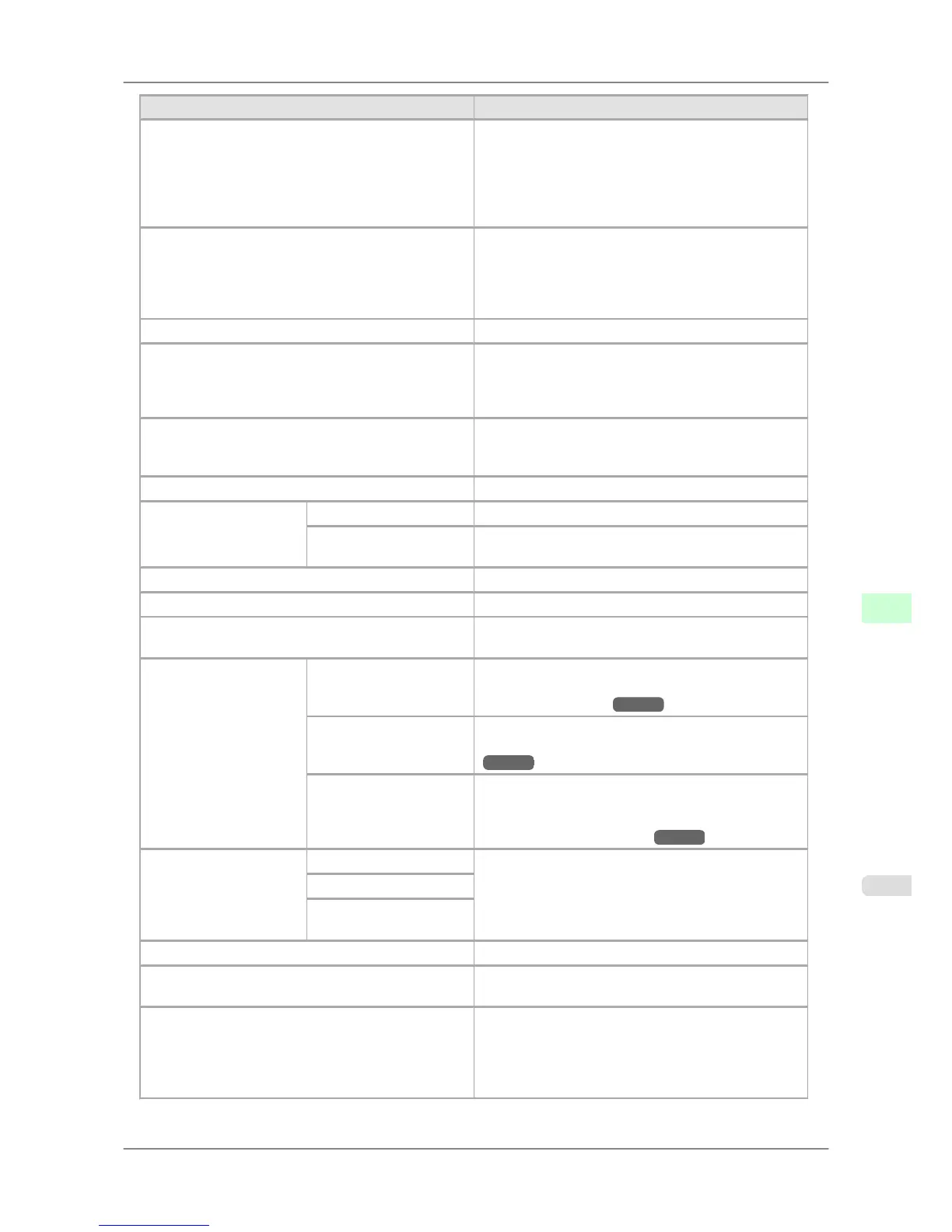
Setting Item Description, Instructions
Noz. Check Freq. Specify the timing for automatic checks of nozzle clog-
ging. Choose 1 page to check once per printed page.
Choose 10 pages to check once per ten printed pages.
Choose Automatic to have the printer automatically ad-
just the timing for checks based on the frequency of
nozzle use.
CarriageScanWdth For specifying the carriage scan width during printing.
Select Automatic for movement equivalent to the width
of paper loaded. Selecting Fixed will reduce any soiling
on the back of the paper, although printing may take a
little longer.
Sleep Timer Specify the period before the printer enters sleep mode.
Length Unit Choose the unit of measurement when roll length is dis-
played. You can switch the unit for the value in Roll
Length Set and the amount of paper left as indicated in
the submenu.
Time Zone Specify the time zone. Time zone options indicate a
main city in this time zone and the difference from
Greenwich Mean Time.
Date Format Specify the date format.
Date & Time Date Set the current date.
Time Set the current time. Available only if the Date setting is
specified.
Language Specify the language used on the Display Screen.
Contrast Adj. Adjust the Display Screen contrast level.
Reset PaprSetngs Restores settings that you have changed with Media
Configuration Tool to the default values.
Erase HDD Data High Speed Erases file management data for print job data stored on
the printer's hard disk. (See "Erasing Data on the
Printer's Hard Disk.") →P.705
Secure High Spd. Overwrites the entire hard disk with random data. (See
"Erasing Data on the Printer's Hard Disk.")
→P.705
Secure Overwrites the entire hard disk with 00, FF, and random
data (one time each). Verification is performed to check
if the data was correctly written. (See "Erasing Data
on the Printer's Hard Disk.") →P.705
Output Method Print Select the output method.
To print as usual, select Print. Selecting Print (Auto
Del) will print the job and then delete the data from the
printer's hard disk. Selecting Save: Box 01 will only
save the print job in the box, without printing it.
Print (Auto Del)
Save: Box 01
Save and Print Select On to print the job after it has been saved.
Save: Shared Box Select Off to print without saving jobs in the box shared
among multiple users.
Show Job Log Selecting Off prevents display of the log in Job Menu >
Job Log. Additionally, the log is not printed if you
choose Job Menu > Print Job Log. Note that because
job logs are not collected, the Status Monitor accounting
functions will not work correctly.
Printer Parts
>
Control Panel
>
iPF825 Main Menu Settings
9
689














 To Next Page