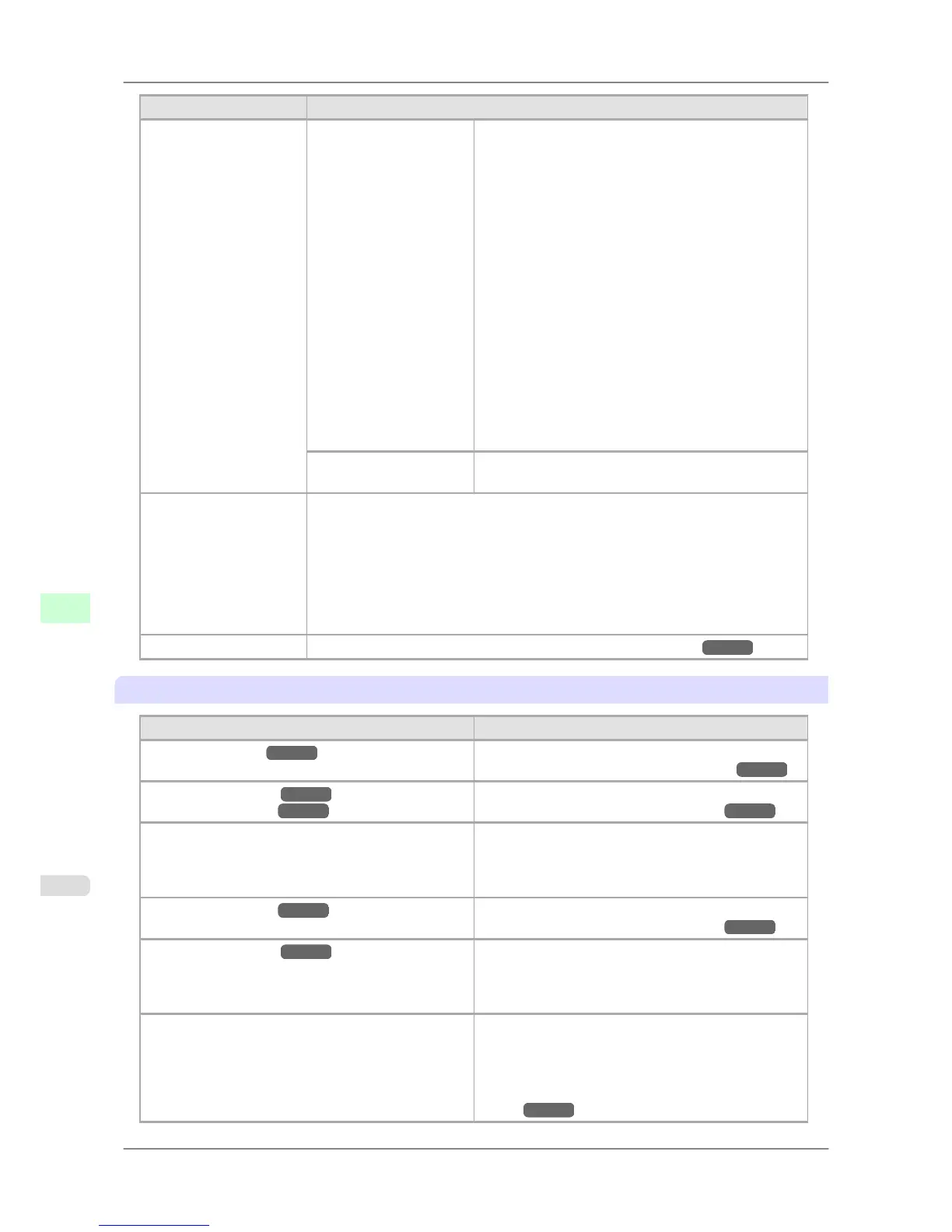
Setting Item Description, Instructions
Admin. Menu Change Password Return Defaults
Change Password
Init.Admin.Pswd
• Viewing
and configuration by administrators,
and only viewing by other users
Interface Setup settings (except IP Setting, Return
Defaults )
Time Zone
Date Format
Date & Time
Reset PaprSetngs
High Speed
Secure High Spd.
Secure
Save: Shared Box
Show Job Log
Admin. Menu
Init.Admin.Pswd Choose OK to restore the Admin. Menu password to
the default values.
Test Print Choose Status Print to print information about the printer.
Choose Paper Details to print the paper settings as specified in Paper Details.
Choose Print Job Log to print a record of print jobs, including the paper type and
size, amount of ink used, and so on. (Information on ink consumption is general, not
specific in nature.)
Choose Menu Map to print a list of the main menu options.
Choose Nozzle Check to print a test pattern for checking the nozzles.
Select Color Palette to print the GL2 color palette.
Information Displays printer information and an error log. (See " Information .")
→P.690
Paper Menu
Setting Item Description, Instructions
Cut Sheet Type (*1 →P.681 ) Choose the type of sheets.
(See "Selecting the Paper Type (Sheet).") →P.615
Roll1(Uppr) Type (*1 →P.681 )
Roll2 (Lwr) Type (*1 →P.681 )
Choose the type of roll.
(See "Selecting the Paper Type (Roll).") →P.595
Roll1(Uppr)Lngth
Roll2(Lwr) Lngth
Displayed if ManageRemainRoll is On.
If a barcode is not printed on rolls, specify the roll
length. The roll length is displayed in meters or feet, de-
pending on the setting in Length Unit.
Roll2 (Lwr) Type (*1 →P.681 ) Choose the type of roll.
(See "Selecting the Paper Type (Roll).") →P.595
Roll2(Lwr) Lngth (*1 →P.681 ) Displayed if ManageRemainRoll is On.
If a barcode is not printed on rolls, specify the roll
length. The roll length is displayed in meters or feet, de-
pending on the setting in Length Unit.
ManageRemainRoll Choose On to print a barcode at the end of a roll before
you remove it. The printed barcode can be used in man-
aging the amount of roll paper left. Choose Off if you
prefer not to print the barcode.
(See "Keeping Track of the Amount of Roll Paper
Left.") →P.603
Printer Parts
>
Control Panel
>
Main Menu Settings iPF825
9
680














 To Next Page