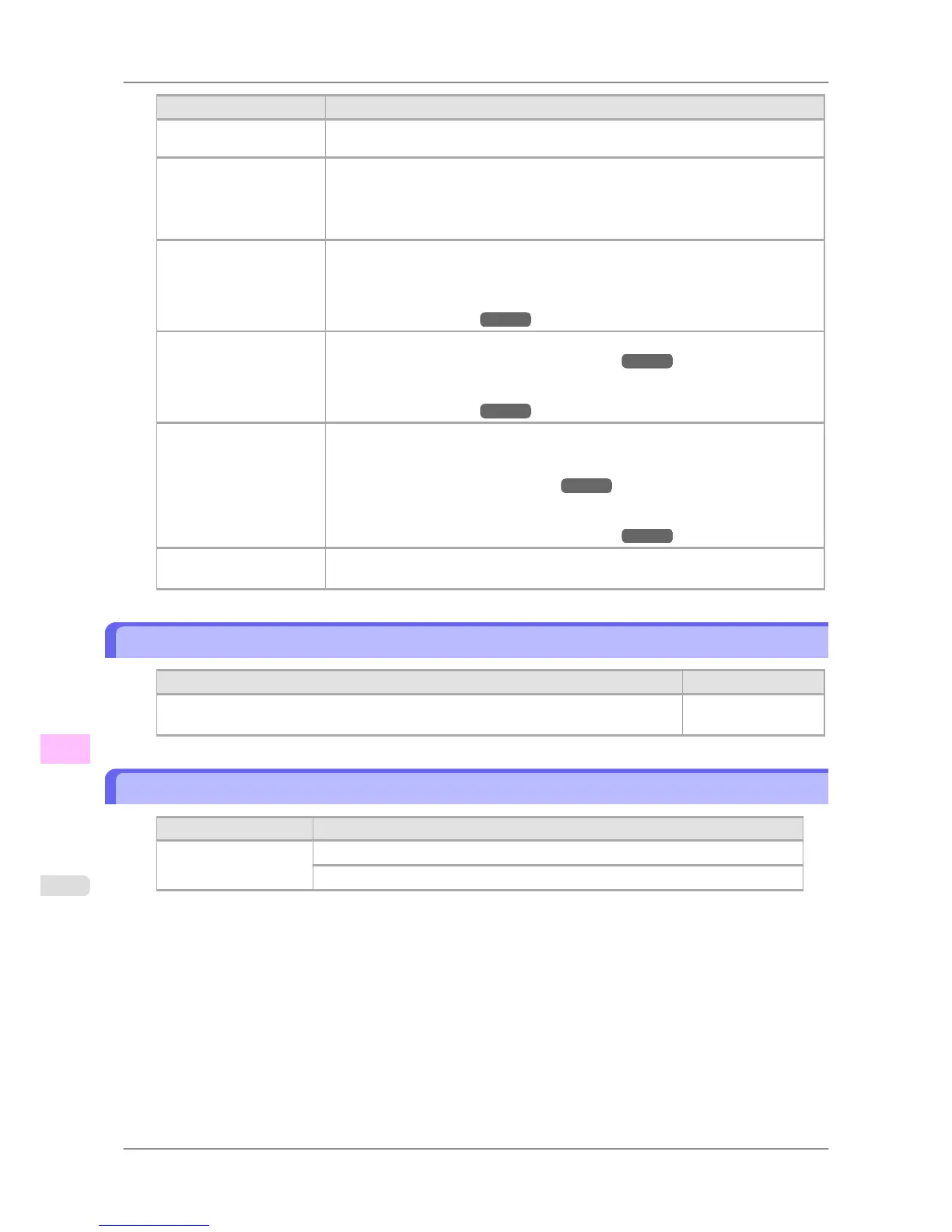
Cause Corrective Action
There are sheets left on the
Ejection Guide.
Printing will resume, starting from the page on which the error occurred.
There is a foreign object
by the Output Tray, ob-
structing the Cutter Unit.
1. Lift the Top Cover and remove the foreign object.
2. If "Not finished printing. Finish printing remaining jobs?" is shown on the Dis-
play Screen, press the OK button.
Printing will resume, starting from the page on which the error occurred.
You are not using the
printer under the recom-
mended environmental
conditions for the paper.
Use the printer only where the recommended environmental conditions for the paper
are met. Note that various environmental conditions are recommended for various
types of paper. For details on the recommended environmental conditions for paper,
see the Paper Reference Guide.
(See "Types of Paper.") →P.578
You are using paper that is
not compatible with auto-
matic cutting.
Specify Manual as the cutting method and cut the roll manually.
(See "Specifying the Cutting Method for Rolls.") →P.606
For information about paper that is compatible with automatic cutting, see the Paper
Reference Guide.
(See "Types of Paper.") →P.578
The Cutter Unit stops in
the middle of cutting.
If the Carriage is out, move the Carriage out of the way, away from the paper.
If the Cutter is out, move the Cutter to the right side (away from the paper) and re-
move the jammed paper.
(See "Clearing Jammed Roll Paper.") →P.786
If the paper cannot be cut using the Cutter Unit, specify Manual as the roll cutting
method and cut the roll manually.
(See "Specifying the Cutting Method for Rolls.") →P.606
In other cases, the Cutter
Unit may be damaged.
Contact your Canon dealer for assistance.
End of paper feed.
Cause Corrective Action
You are pressing the ▲ button on the Control Panel and trying to rewind the roll to the
edge.
Release the ▲ button.
Rel lever is in wrong position.
Cause Corrective Action
The Release Lever is up. Lower the Release Lever.
If the error occurs again, turn off the printer and wait a while before restoring power.
Error Message
>
Messages regarding paper
>
End of paper feed. iPF825
13
832














 To Next Page