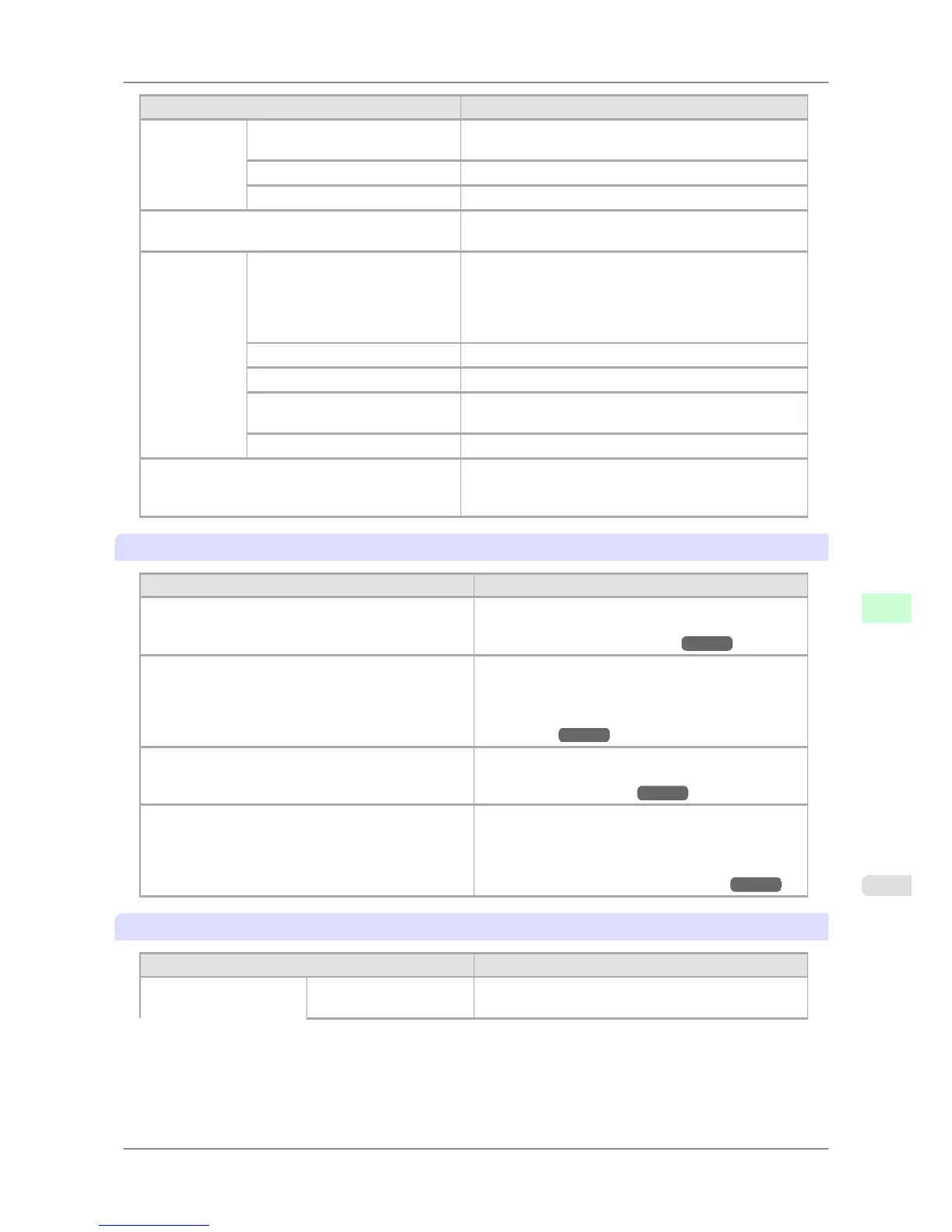
Setting Item Description, Instructions
NetWare NetWare Specify the NetWare protocol. To apply your changes,
choose Register Setting.
Frame Type Specify the frame type to use.
Print Service Choose the print service.
AppleTalk Specify whether to use the AppleTalk protocol. To apply
your changes, choose Register Setting.
Ethernet Driv-
er
Auto Detect Specify the communication method. To apply your
changes, choose Register Setting.
Choose On for automatic configuration of the LAN com-
munication protocol. Choose Off to use settings values of
Comm.Mode and Ethernet Type.
Comm.Mode Choose the LAN communication method.
Ethernet Type Choose the LAN transfer rate.
Spanning Tree Choose whether spanning-tree packets are supported over
the LAN.
MAC Address Displays the MAC address.
Return Defaults Return Defaults/Execute? is displayed if you press the ▼
button. Choose OK to restore the network settings to the
default values.
Maintenance
Setting Item Description, Instructions
Repl. maint cart When replacing the Maintenance Cartridge, choose Yes
and follow the instructions on the screen. (See "Replac-
ing the Maintenance Cartridge.") →P.763
Replace P.head Not displayed during a warning message that the re-
maining Maintenance Cartridge capacity is low.
When replacing the Printhead, choose Yes and follow
the instructions on the screen. (See "Replacing the
Printhead.") →P.756
Repl. S. Cleaner When replacing the Shaft Cleaner, choose Yes and fol-
low the instructions on the screen. (See "Replacing the
Maintenance Cartridge.") →P.763
Move Printer Not displayed during a warning message that the re-
maining Maintenance Cartridge capacity is low.
When transferring the printer to another location,
choose Yes and follow the instructions on the screen.
(See "Preparing to Transfer the Printer.") →P.776
System Setup
Setting Item Description, Instructions
Warning Buzzer Set the buzzer. Choose On for the buzzer to sound once
for warnings and three times for errors.
Printer Parts
>
Control Panel
>
iPF825 Main Menu Settings
9
687














 To Next Page