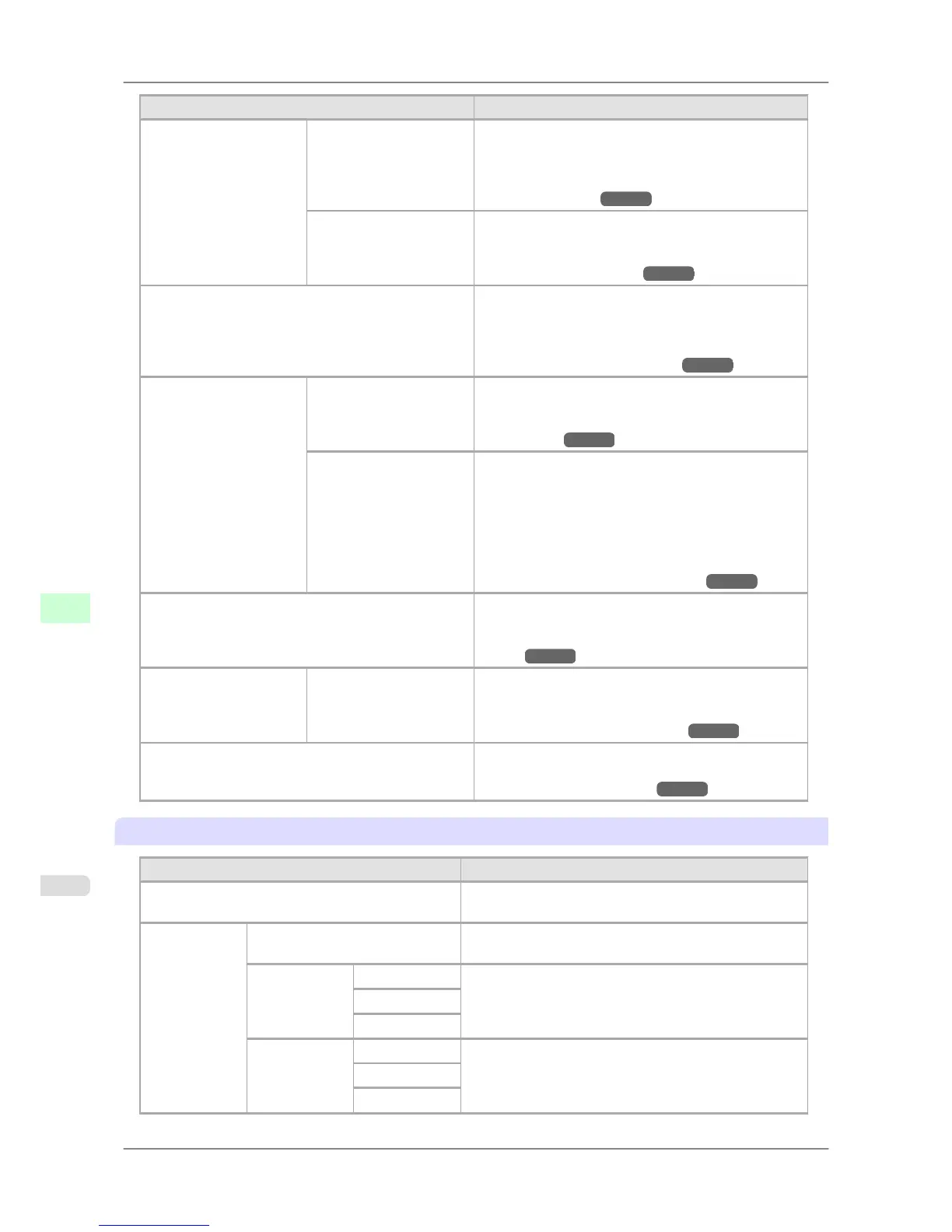
Setting Item Description, Instructions
Auto Head Adj.
Advanced Adj. Choose Yes to have the printer print and read a test pat-
tern for the automatic adjustment of Printhead alignment
relative to the nozzle, ink tank, and printing direction.
(See "Automatic Straightening of Lines and Colors
(Auto Head Adj.).") →P.627
Auto Print Choose On to have the printer automatically execute the
Advanced Adj. operations after you replace the Print-
head. (See "Automatic Straightening of Lines and
Colors (Auto Head Adj.).") →P.627
Manual Head Adj Choose Yes to print a test pattern for adjustment of
Printhead alignment relative to the printing direction.
Enter the adjustment value manually based on the re-
sulting pattern. (See "Manual Straightening of Lines
and Colors (Manual Head Adj).") →P.629
Auto Band Adj. Standard Adj. Choose Yes to have the printer print and read a band ad-
justment test pattern for automatic adjustment of the
feed amount. (See "Auto Band Adjustment (Auto
Band Adj.).") →P.636
Advanced Adj. Choose this option when using paper other than genuine
Canon paper or paper for which printing has been veri-
fied by Canon.
Choose Yes to have the printer print and read a band ad-
justment test pattern for automatic adjustment of the
feed amount. Note that this function takes more time
and requires more ink than Standard Adj. (See "Auto
Band Adjustment (Auto Band Adj.).") →P.636
Manual Band Adj Choose Yes to print a test pattern for adjusting the feed
amount based on the type of paper.
(See "Manual Band Adjustment (Manual Band
Adj).") →P.637
Adjust Length A:High ( Adjust Length
A )
B:Standard/Draft ( Ad-
just Length B )
Prints a test pattern for particular types of paper to com-
pensate for paper stretching or shrinkage, after which
you can enter the amount of adjustment. (See "Adjust-
ing Line Length (Adjust Length).") →P.640
Head Inc. Adj. Choose Yes to print a test pattern for adjusting the ori-
entation of the Printhead. (See "Adjusting Line Mis-
alignment (Head Inc. Adj.).") →P.630
Interface Setup
Setting Item Description, Instructions
EOP Timer Specify the timeout period before cancellation of print
jobs that cannot be received by the printer.
TCP/IP IP Mode Choose whether the printer IP address is configured auto-
matically or a static IP address is entered manually.
Protocol DHCP Specify the protocol used to configure the IP address auto-
matically.
BOOTP
RARP
IP Setting IP Address Specify the printer network information when using a stat-
ic IP address.
Enter the IP address assigned to the printer, as well as the
network subnet mask and default gateway.
Subnet Mask
Default G/W
Printer Parts
>
Control Panel
>
Main Menu Settings iPF825
9
686














 To Next Page