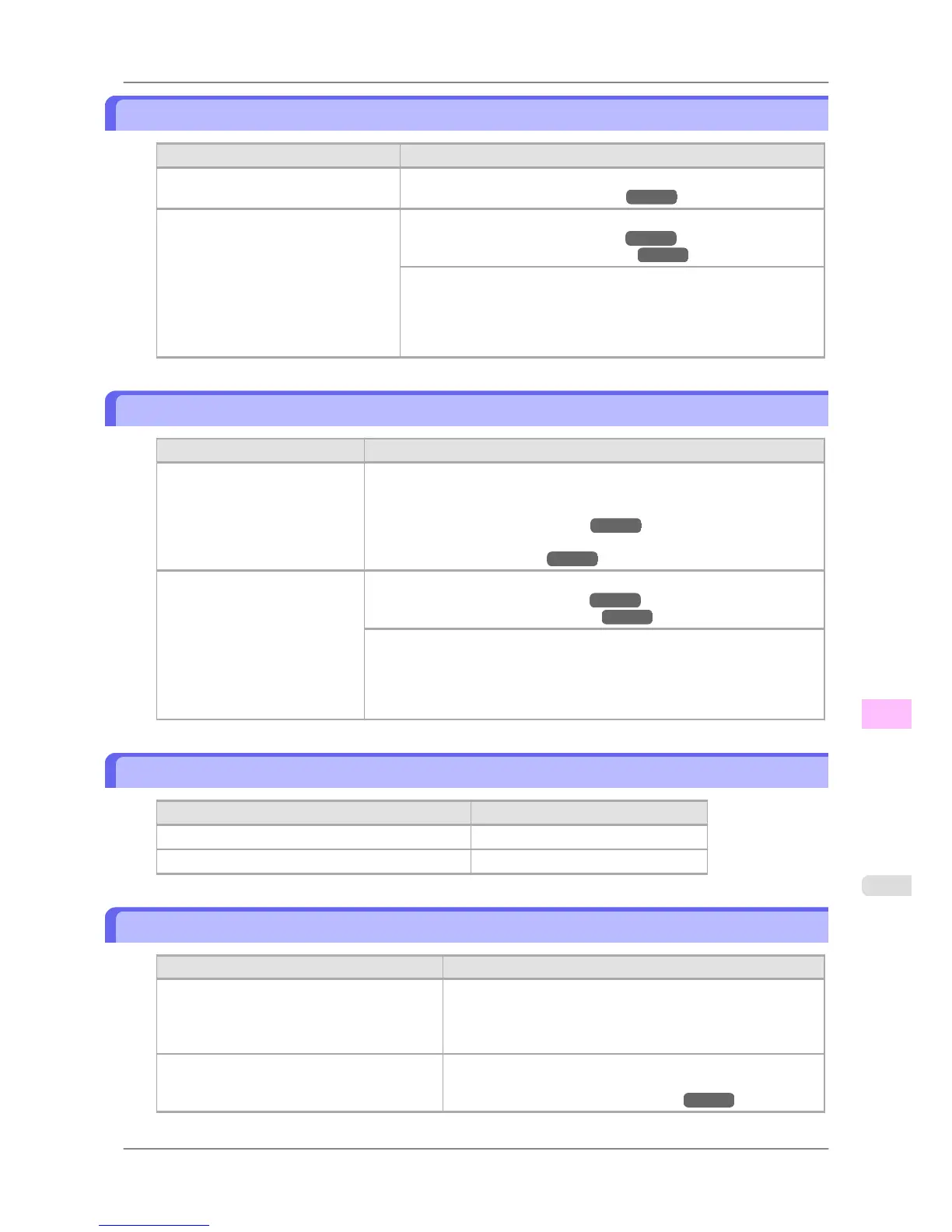
The contrast becomes uneven during printing
Cause Corrective Action
The paper feed amount is out of adjust-
ment.
Adjust the feed amount.
(See "Adjusting the Feed Amount.") →P.635
The type of paper specified in the print-
er driver does not match the type loaded
in the printer.
Load paper of the same type as you have specified in the printer driver.
(See "Loading Rolls in the Printer.") →P.588
(See "Loading Sheets in the Printer.") →P.616
Make sure the same type of paper is specified in the printer driver as you
have loaded in the printer.
1. Hold down the Stop button for a second or more to cancel printing.
2. Change the type of paper in the printer driver and try printing again.
The length of printed images is inaccurate
Cause Corrective Action
In the printer menu, Band Joint
is specified in Feed Priority.
To ensure the feed amount matches the paper size, select Print Length in
Feed Priority in the printer menu and enter the amount for adjustment in Ad-
just Length.
(See "Adjusting the Feed Amount.") →P.635
You can adjust the feed amount in 0.02% increments.
(See "Main Menu Settings.") →P.679
The type of paper specified in the
printer driver does not match the
type loaded in the printer.
Load paper of the same type as you have specified in the printer driver.
(See "Loading Rolls in the Printer.") →P.588
(See "Loading Sheets in the Printer.") →P.616
Make sure the same type of paper is specified in the printer driver as you have
loaded in the printer.
1. Hold down the Stop button for a second or more to cancel printing.
2. Change the type of paper in the printer driver and try printing again.
Documents are printed crooked
Cause Corrective Action
Skew Skew Check Lv. has been set to Loose or Off. Choose Standard in Skew Check Lv..
Width Detection has been set to Off. Choose On in Width Detection.
Documents are printed in monochrome
Cause Corrective Action
In the Advanced Settings of the printer driver,
Monochrome, Monochrome (BK ink), or
Monochrome Bitmap is specified in Color
Mode.
In the Advanced Settings of the printer driver, specify Color in
Color Mode and try printing again.
The Printhead nozzles are clogged. Print a test pattern to check the color ink nozzles and see if they
are clogged.
(See "Checking for Nozzle Clogging.") →P.754
Troubleshooting
>
Problems with the printing quality
>
iPF825 The contrast becomes uneven during printing
12
807














 To Next Page