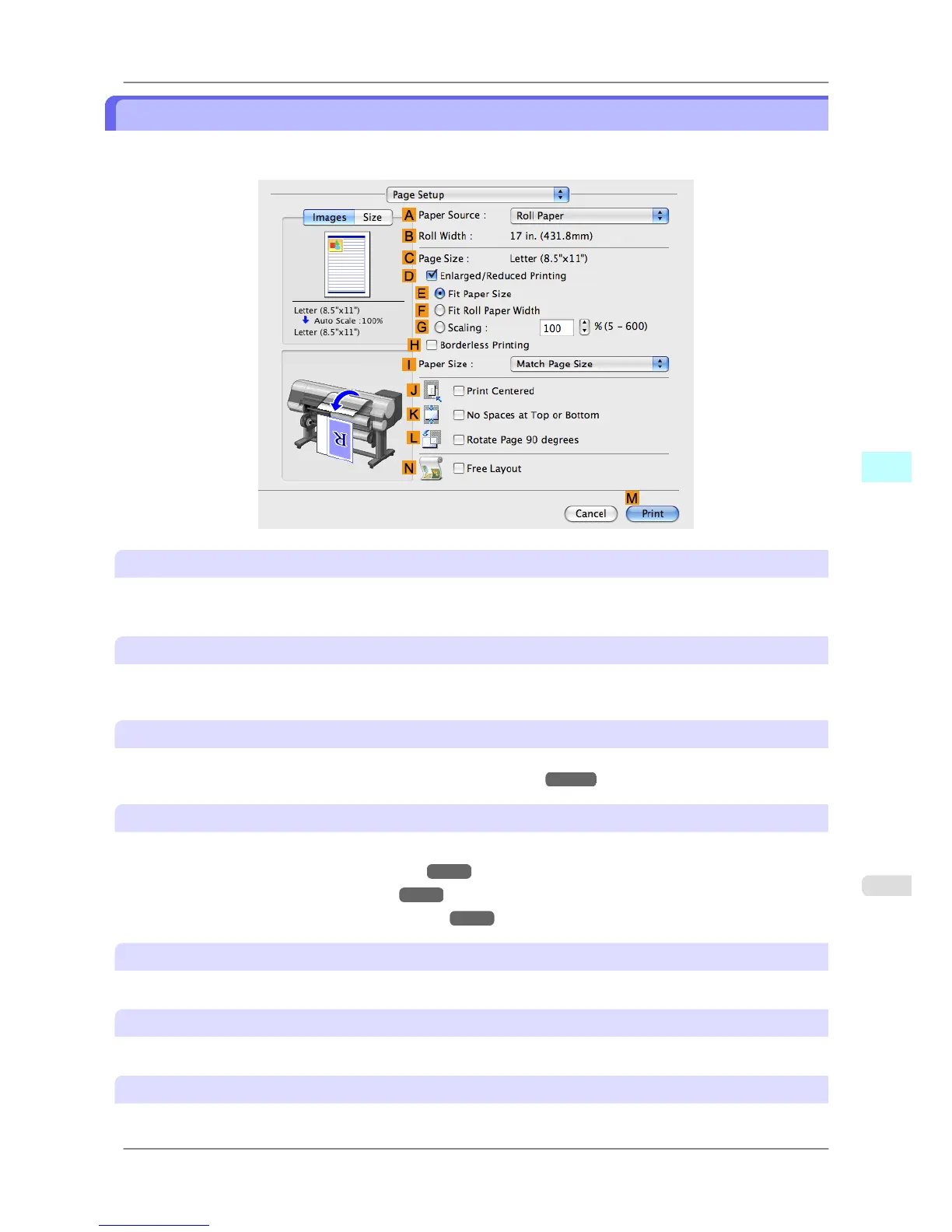
Page Setup Pane
The following settings are available on the Page Setup pane. For details on settings items, refer to the printer driver
help.
A Paper Source
Choose how paper is supplied.
Options displayed in the list vary depending on the selection in AMedia Type in the Main pane.
B Roll Width
Displays the paper width of the roll loaded in the printer. Unknown is displayed if the printer cannot detect the roll
paper width.
C Page Size
Displays the size of the original, as specified in the page settings of the application.
For details on page sizes available in the application. see "Paper Sizes →P.581 "
D Enlarged/Reduced Printing
Select this checkbox to choose the following options.
• Resizing Originals to Match the Paper Size →P.62
• Resizing Originals to Fit the Roll Width →P.68
• Resizing Originals by Entering a Scaling Value →P.73
E Fit Paper Size
Resizes the document image to match the paper size.
F Fit Roll Paper Width
Resizes the document image to match the roll width.
G Scaling
Resizes the document image based on a specified scaling value. Enter a value in a range of 5–600.
Mac OS X Software
>
Printer Driver
>
iPF825 Page Setup Pane
5
423














 To Next Page