I Thicken Fine Lines
Activate this option to print fine lines more distinctly.
J Unidirectional Printing
Select this checkbox to prevent problems such as misaligned lines and improve the print quality. However, the printing
speed becomes slower.
K Sharpen Text
Activate this option to print text more sharply.
T Economy Printing
Select this checkbox to reduce the amount of ink consumed during printing. However, the print quality is worse than for
normal printing.
Select this mode if you want to conserve ink when checking drawings, for example. Depending on the AMedia Type
and FPrint Quality settings, this mode may not be available.
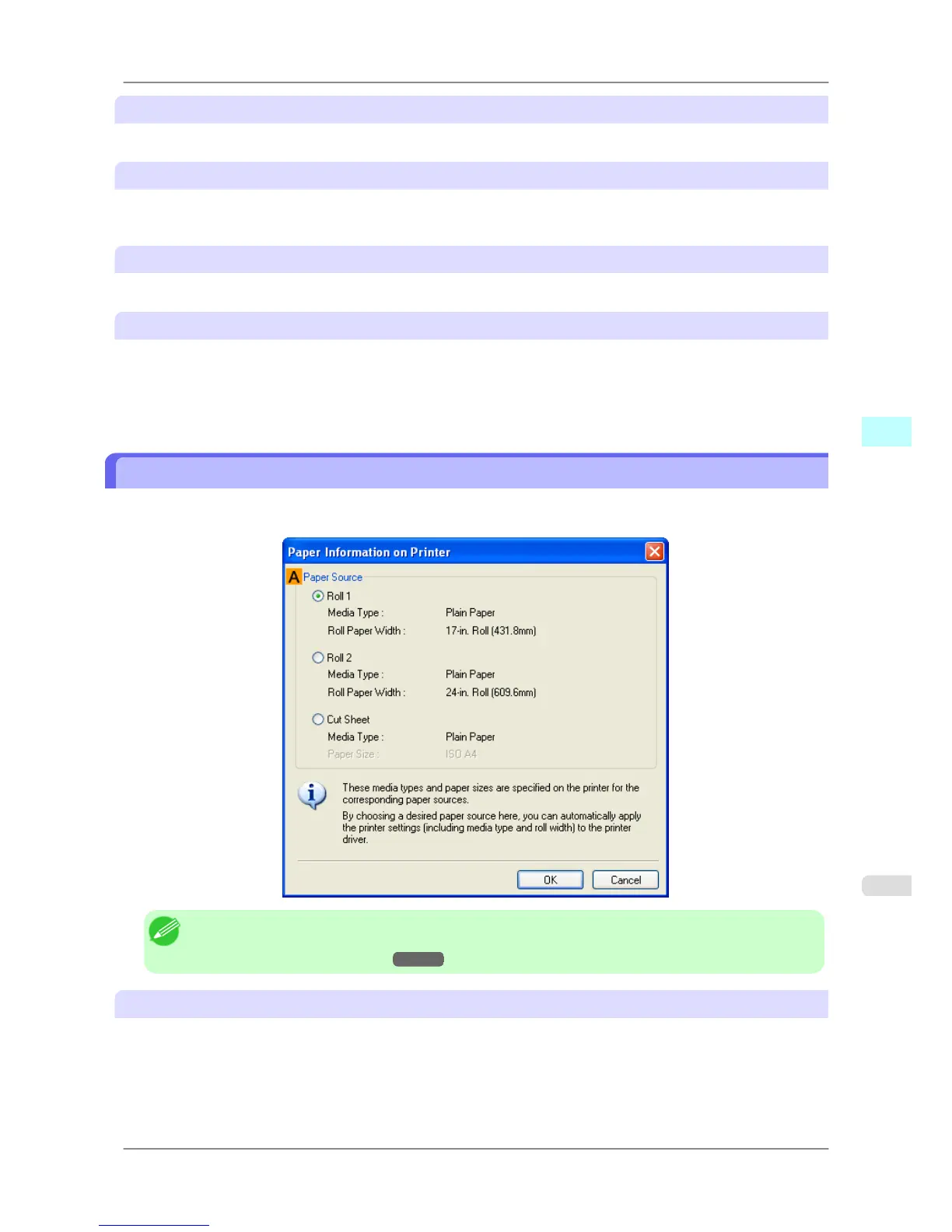
Paper Information on Printer Dialog Box
On the Paper Information on Printer dialog box, you can obtain information on the paper in the printer and configure
printer driver settings for the paper source and media type.
Note
• To
display the Paper Information on Printer dialog box, on the Main sheet, click Get Information by
Media Type.(See "Main Sheet
→P.204 ")
A Paper Source
Shows the paper source supported by the printer, as well as information about the loaded paper. To update the paper
source and media type settings in the printer driver, select the desired Paper Source option and click OK.
Windows Software
>
Printer Driver
>
iPF825 Paper Information on Printer Dialog Box
4
207














 To Next Page