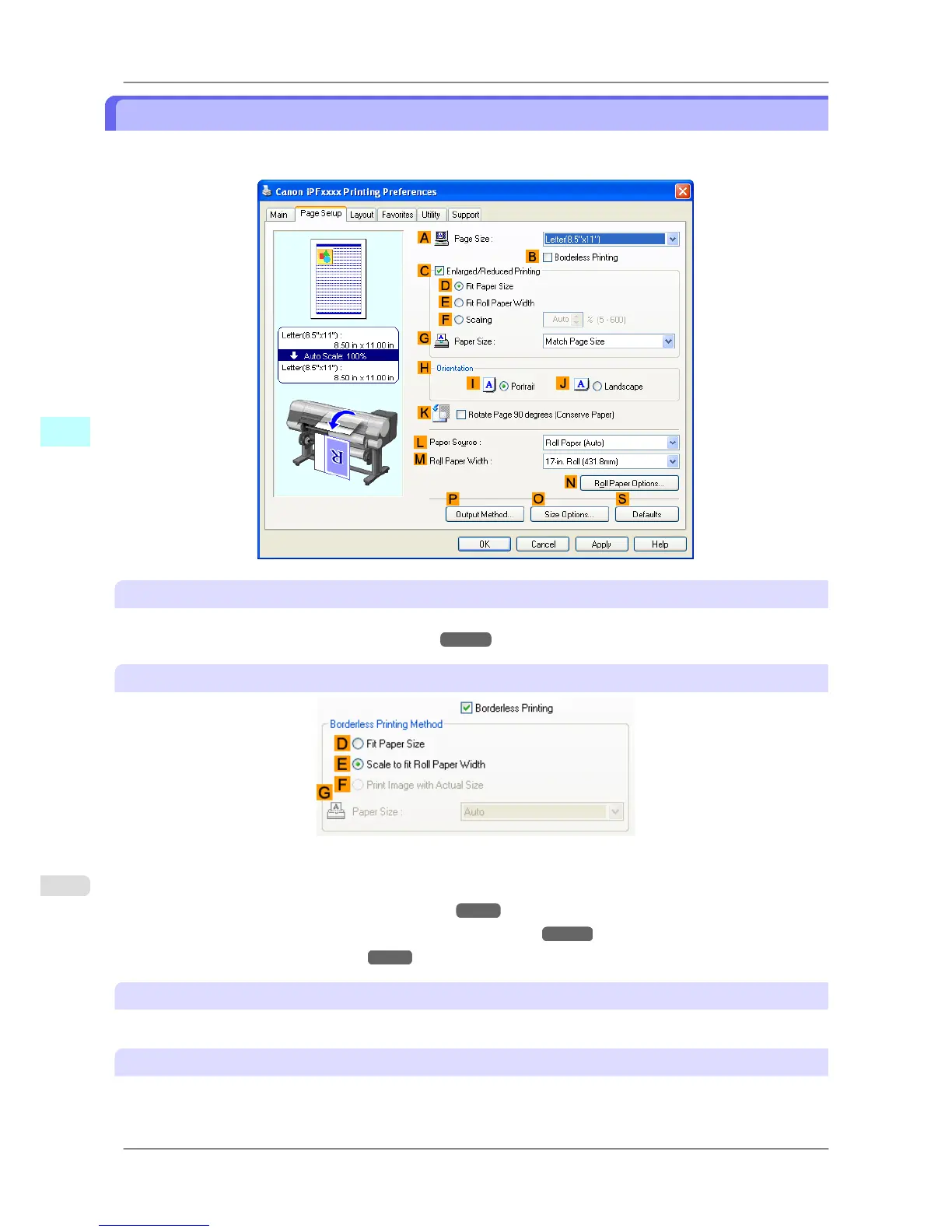
Page Setup Sheet
The following settings are available on the Page Setup sheet. For details on settings items, refer to the printer driver
help file.
A Page Size
Select the page size as specified in the source application.
For details on available page sizes, see "Paper Sizes →P.581 "
B Borderless Printing
Borderless printing is available if roll paper is selected in the LPaper Source list. Choose from the following options
when this setting is activated.
• Borderless Printing on Paper of Equivalent Size →P.94
• Borderless Printing by Resizing Originals to Fit the Roll Width →P.101
• Borderless Printing at Actual Size →P.87
D Fit Paper Size
Scales the document image to match the paper size.
E Scale to fit Roll Paper Width
Scales the document image to match the roll width.
Windows Software
>
Printer Driver
>
Page Setup Sheet iPF825
4
216














 To Next Page