Setting Details
Fit Roll Paper Width Prints by automatically enlarging or reducing the entire document so that the
width of the document matches the roll paper width.
Specify Folded Size Prints by automatically enlarging or reducing the entire document to match the
size of the paper. Select the actual size of the paper you want to print on in Fit
Paper Size.
Rotate Page 90 degrees (Con-
serve Paper)
Prints by rotating pages by 90 degrees. Pages are automatically rotated if they
will fit within the roll paper width when rotated, and are not rotated if they will
not fit within the roll paper width.
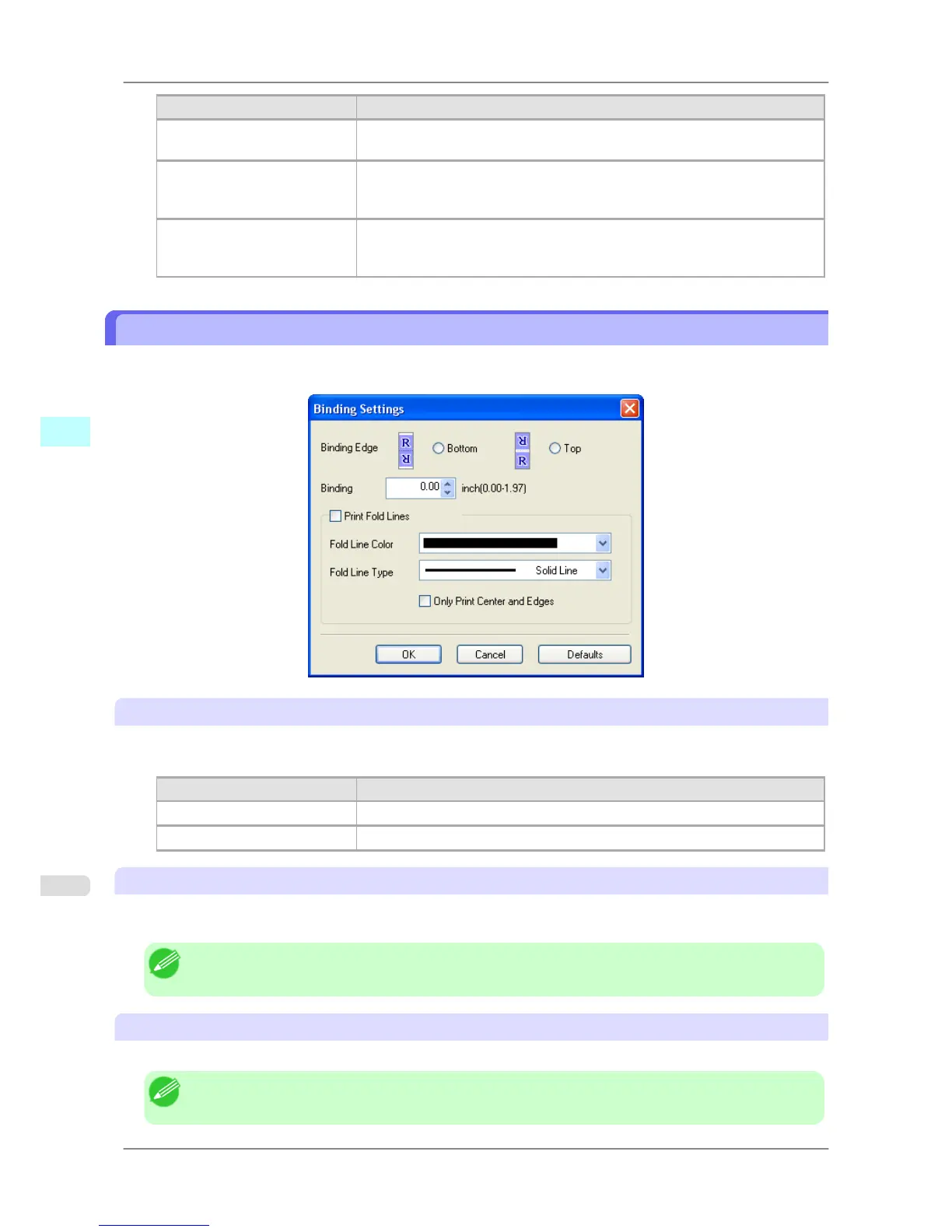
Binding Settings Dialog Box
This is displayed when you select Binding Settings from the Edit menu. This allows you to configure the binding edge
settings.
Binding Edge
Configures the binding edge when folding paper.
The following settings are available for the binding edge.
Setting Details
Bottom Prints by placing the binding margin (gutter) at the bottom of the document.
Top Prints by placing the binding margin (gutter) at the top of the document.
Binding
Configures the binding margin (gutter).
Prints by creating a binding margin (gutter) of the specified size. Enter the margin size as a number.
Note
• The values that can be entered are 0 to 50 (mm).
Print Fold Lines
Configures the color and type of fold lines.
Note
• To not print fold lines, clear the Print Fold Lines checkbox.
Windows Software
>
Free Layout
>
Binding Settings Dialog Box iPF825
4
270














 To Next Page