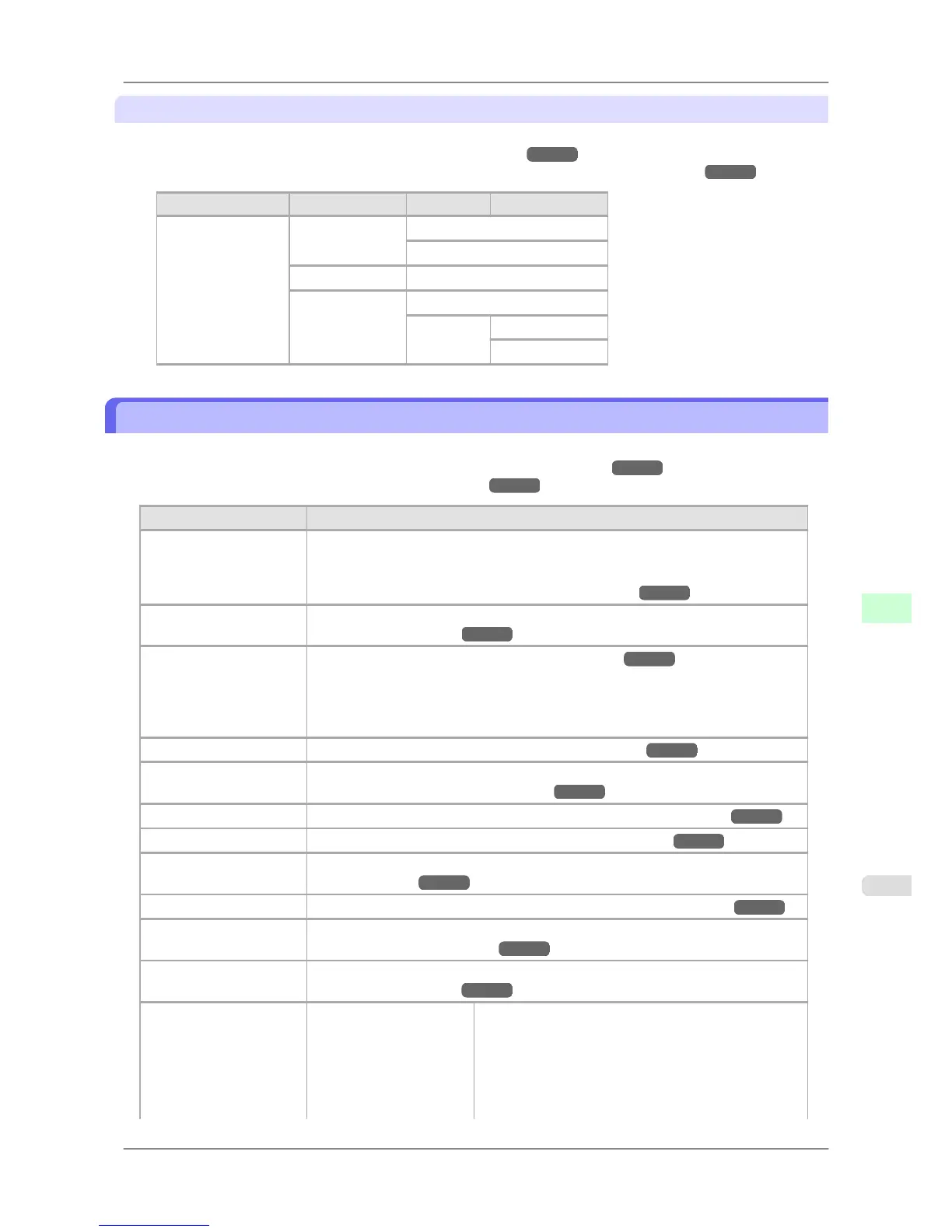
Main menu during printing
The structure of the main menu during printing is as follows.
For instructions on menu operations, see "Main Menu Operations." →P.663
For details on menu items available during printing, see "Main Menu Settings (During Printing)." →P.690
First Level Second Level Third Level Fourth Level
Menu Durng Prtng Head Cleaning * Head Cleaning A *
Head Cleaning B
Fine Band Adj. From –5 to 5
Information System Info
Error Log 1:xxxxxxxx-xxxx
2:xxxxxxxx-xxxx
Main Menu Settings
Main menu items are described in the following tables.
For instructions on selecting or setting menu items, see "Main Menu Operations." →P.663 .
For details on menu levels and values, see "Menu Structure." →P.666
Setting Item Description, Instructions
Paper Cutting This command is available only if a roll is loaded.
Choose Yes to cut the roll at the current position. However, if paper cannot be ad-
vanced to the cut position, it will not be cut. In this case, manually advance the roll
before cutting it. (See "Feeding Roll Paper Manually.")
→P.603
Rep. Ink Tank When replacing ink tanks, choose Yes and follow the instructions on the screen. (See
"Replacing Ink Tanks.") →P.741
Head Cleaning Clean the Printhead. (See "Cleaning the Printhead.") →P.755
Choose Head Cleaning A if printing is faint, oddly colored, or contains foreign sub-
stances.
Choose Head Cleaning B if no ink is printed at all, or if printing is not improved by
Head Cleaning A.
Paper Menu Specify the type and size of paper. (See " Paper Menu .") →P.680
Paper Details Specify detailed paper-related settings, including the ink drying time and borderless
printing options. (See " Paper Details .") →P.681
Job Management Manage print jobs on the printer's hard disk. (See " Job Management .") →P.682
GL2 Settings Specify settings for HP-GL/2 printing. (See " GL2 Settings .") →P.683
Adjust Printer Adjust the Printhead alignment or amount of feed by printing a test pattern. (See "
Adjust Printer .") →P.685
Interface Setup Configure the EOP timer and network settings. (See " Interface Setup .") →P.686
Maintenance Access maintenance settings when replacing the Printhead or preparing to move the
printer. (See "
Maintenance .")
→P.687
System Setup Specify the printer system settings, including the date format and display language.
(See " System Setup .") →P.687
Admin. Menu Change Password By setting a password, you can restrict menu display
and configuration as follows. You can input between 0
and 9999999.
• Viewing
and configuration by administrators
only
IP Setting
Printer Parts
>
Control Panel
>
iPF825 Main Menu Settings
9
679














 To Next Page