EasyManua.ls Logo

Canon iPF825 - Page 687

Canon iPF825
888 pages
Print Icon
To Next Page IconTo Next Page
To Previous Page IconTo Previous Page
Loading...
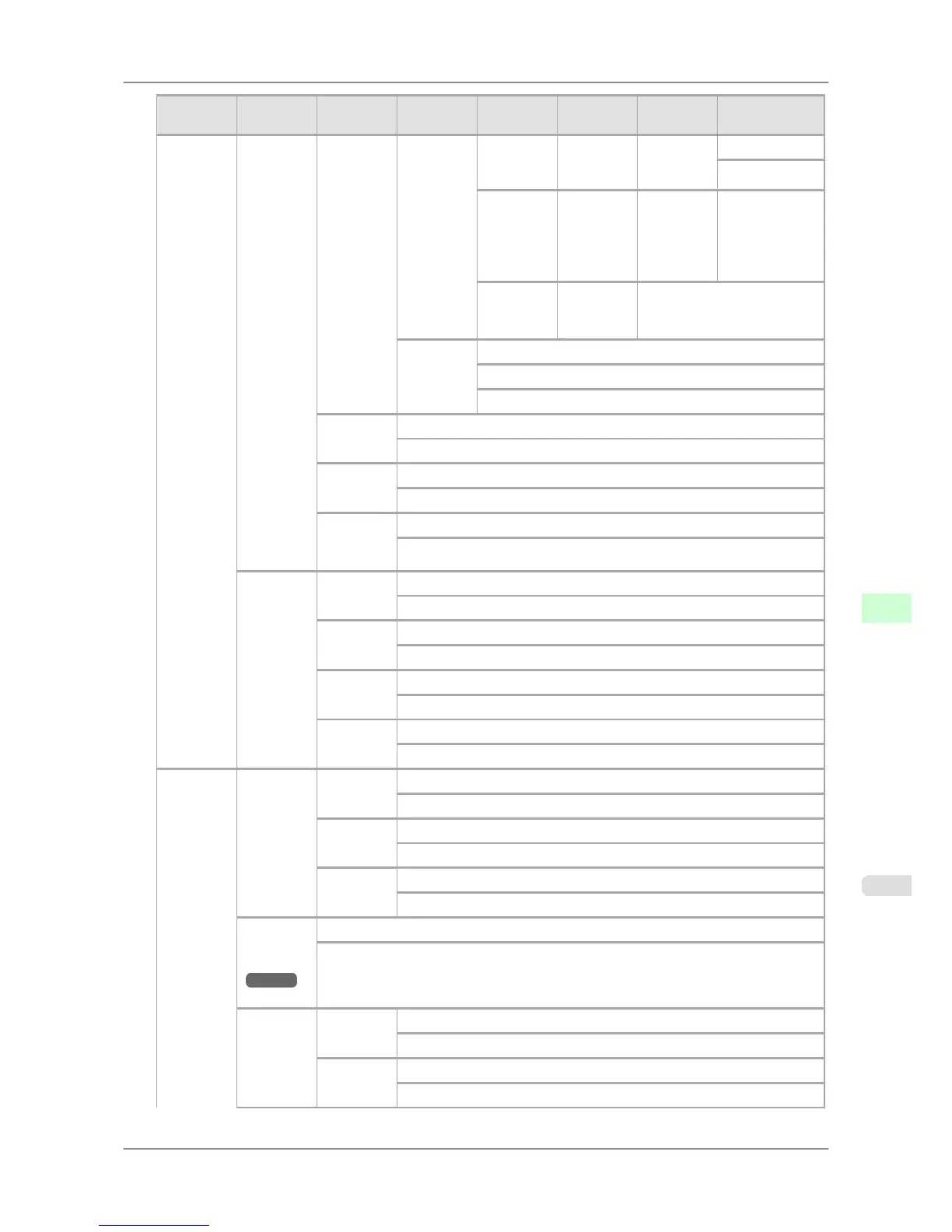
First Level
Second
Level
Third Lev-
el
Fourth
Level
Fifth Level
Sixth Lev-
el
Seventh
Level
Eighth Level
GL2 Set-
tings
Line &
Pen Man-
ager
Pen Setup Define
Palette
Palette A (Select the
pen num-
ber)
Line At-
tributes
No Setting
Circle Setting
Palette B (Select the
pen num-
ber)
(Indicates
Width,
Color, and
Line At-
tributes )
(Specify the
values of
Width, Color,
and Line At-
tributes )
Factory (Select the
pen num-
ber)
(Indicates Width, Color, and
Line Attributes )
Reset Pa-
lette
All Palette
Palette A
Palette B
Smooth-
ing
Software *
Smooth
Thicken-
FineLines
Off *
On
Adjust-
Faint-
Lines
Off
On *
Processin-
gOption
Warning Off *
On
On-the-
Fly
Off *
On
PageSize-
Process1
Off *
On
PageSize-
Process2
Off *
On
Adjust
Printer
Auto
Head Adj.
Standard
Adj.
No
Yes
Advanced
Adj.
No
Yes
Auto
Print
Off
On *
Manual
Head Adj
(*9
→P.677
)
No
Yes
Auto
Band Adj.
Standard
Adj.
No
Yes
Advanced
Adj.
No
Yes
Printer Parts
>
Control Panel
>
iPF825 Menu Structure
9
671

Table of Contents

Related product manuals