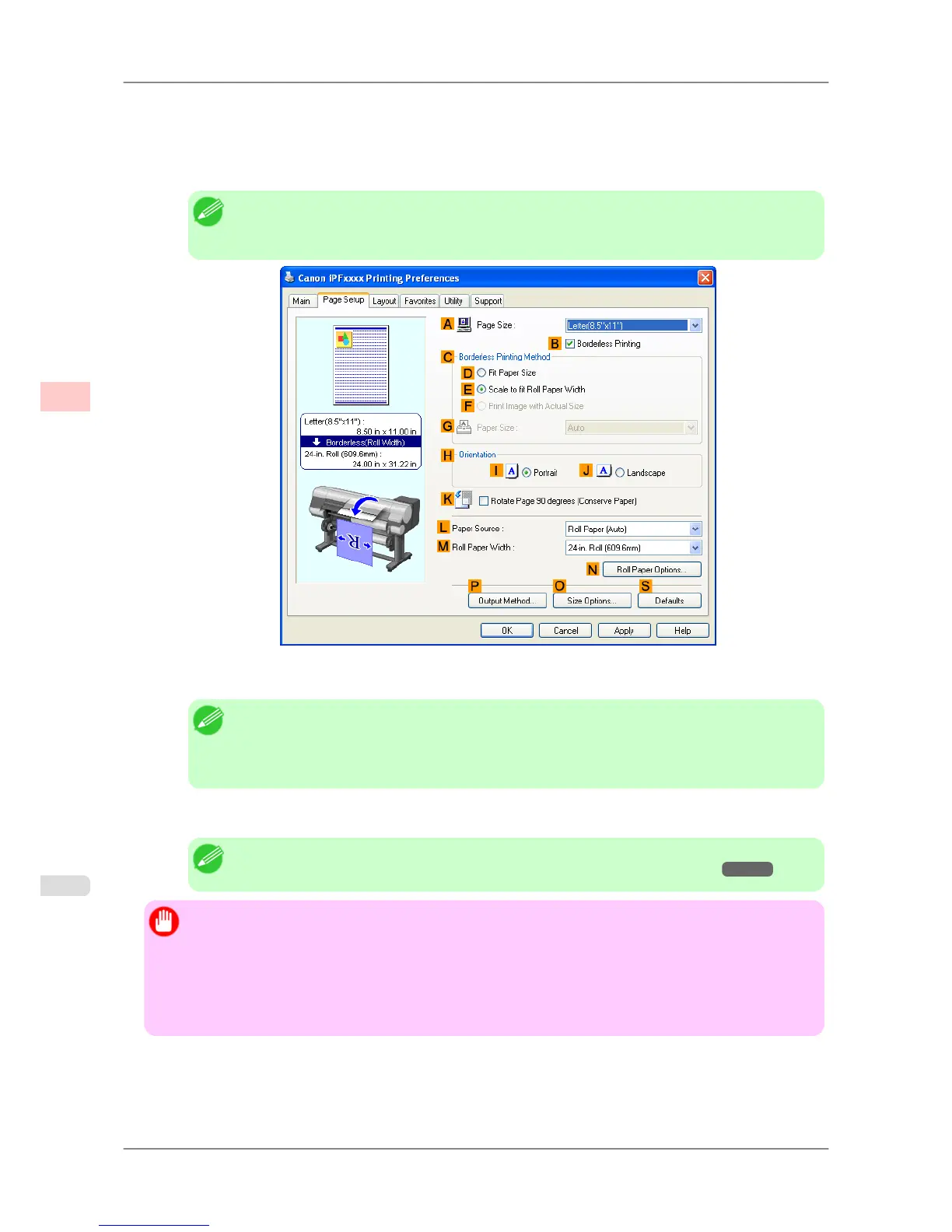
8. In the A Page Size list,
click the size of the original as specified in the application. In this case, click ISO A4 or
Letter (8.5"x11").
9. Select the CEnlarged/Reduced Printing check box.
Note
• If
the C Enlarged/Reduced Printing check box is not displayed on the Page Setup sheet, clear
the BBorderless Printing check box.
10. Click EFit Roll Paper Width.
Note
• After
you click E Fit Roll Paper Width, the Information dialog box is displayed. Select the
width of the loaded roll in the Roll Paper Width list and click OK.
• Make sure the roll paper width you specify matches the width of the loaded roll.
11. Confirm the print settings and print as desired.
Note
• For tips on confirming print settings, see "Confirming Print Settings (Windows) →P.196 "
Important
• When
the following three settings are configured simultaneously, printing is always performed from roll
1 (the upper roll).
• Automatically switch paper sources (paper size priority) is enabled on the Device Settings sheet.
• Fit Roll Paper Width is selected in Enlarged/Reduced Printing.
• Roll Paper (Auto) is selected in Paper Source.
Enhanced Printing Options
>
Printing enlargements or reductions
>
Resizing Originals to Fit the Roll Width (Windows) iPF825
3
70














 To Next Page