EPSON EPL-N3000/AcuLaser M4000N Revision C
Troubleshooting Troubleshooting for Individual Units 136
Confidential
3.4.28 PWBA DUPLEX 3.4.29 MOTOR DUPLEX
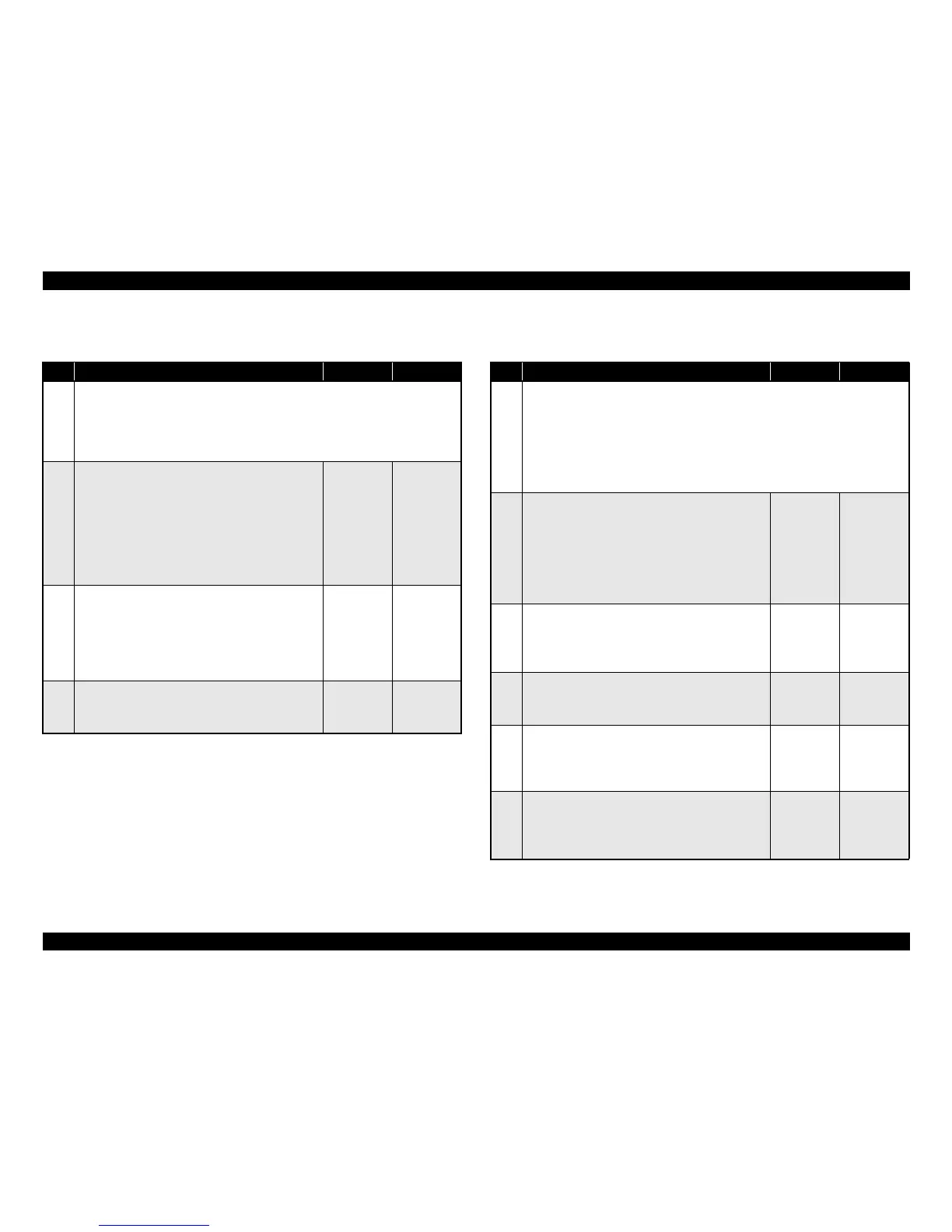
Table 3-87. Troubleshooting for PWBA DUPLEX
Step Action and Question Yes No
Parts below can be the source of this error (Chapter 4 Disassembly and Assembly)
• PWBA DUPLEX (p.347)
•HVPS/MCU (p.301)
• HARNESS ASSY LVPS
• HARNESS ASSY DUP (p.359)
1
HARNESS ASSY DUP
1. Remove the Option Duplex.
2. Disconnect P/J50 on the PWBA DUPLEX.
(Refer to “Connectors (p.406)”)
3. Check whether there is continuity between J2750 ↔
J50.
♦Does each wire between J2750 ↔ J50 have
continuity?
Go to Step 2
Replace the
HARNESS
ASSY DUP
2
HARNESS ASSY LVPS
1. Disconnect P/J27 on the HVPS/MCU.
2. Check whether there is continuity between J27 ↔
J2750.
♦Does each wire between J27 ↔ J2750 have
continuity?
Go to Step 3
Replace the
HARNESS
ASSY LVPS
3
PWBA DUPLEX
1. Replace the PWBA DUPLEX. (p.347)
♦After replacing, has the trouble been cleared?
Problem
solved
Replace the
HVPS/MCU
Table 3-88. Troubleshooting for MOTOR DUPLEX
Step Action and Question Yes No
Parts below can be the source of this error (Chapter 4 Disassembly and Assembly)
• MOTOR DUPLEX (p.355)
• PWBA DUPLEX (p.347)
• HVPS/MCU (p.301)
• HARNESS ASSY LVPS
• COVER HARNESS, HARNESS ASSY DUP (p.359)
•LVPS (p.287)
1
HARNESS ASSY DUP
1. Remove the Option Duplex.
2. Disconnect P/J50 on the PWBA DUPLEX.
(Refer to “Connectors (p.406)”)
3. Check continuity between J2750 ↔ J50.
(Refer to “Connectors (p.406)”)
♦Is there continuity between J2750 ↔ J50?
Go to Step 2
Replace the
HARNESS
ASSY DUP
2
HARNESS ASSY LVPS
1. Disconnect P/J27 on the HVPS/MCU.
2. Check continuity between J27 ↔ J2750.
♦Is there continuity between J27 ↔ J2750?
Go to Step 3
Replace the
HARNESS
ASSY LVPS
3
MOTOR DUPLEX
1. Replace the PWBA DUPLEX. (p.347)
♦Has the trouble been cleared?
Problem
solved
Go to Step 4
4
Power supply to the MOTOR DUPLEX
1. Measure the voltage between P/J27-8 ↔ P/J27-7 on
the HVPS/MCU.
♦24 VDC between P/J27-8 ↔ P/J27-7?
Go to 3.4.28
PWBA
DUPLEX
(p.136)
Go to Step 5
5
Continuity of the HVPS/MCU
1. Disconnect P/J10 and P/J27 on the HVPS/MCU.
2. Check continuity between P10-1 ↔ P27-8.
♦Is there continuity between P10-1 ↔ P27-8?
Go to 3.4.1
LVPS (p.111)
Replace the
HVPS/MCU



 To Next Page