HI-FI System
T-40
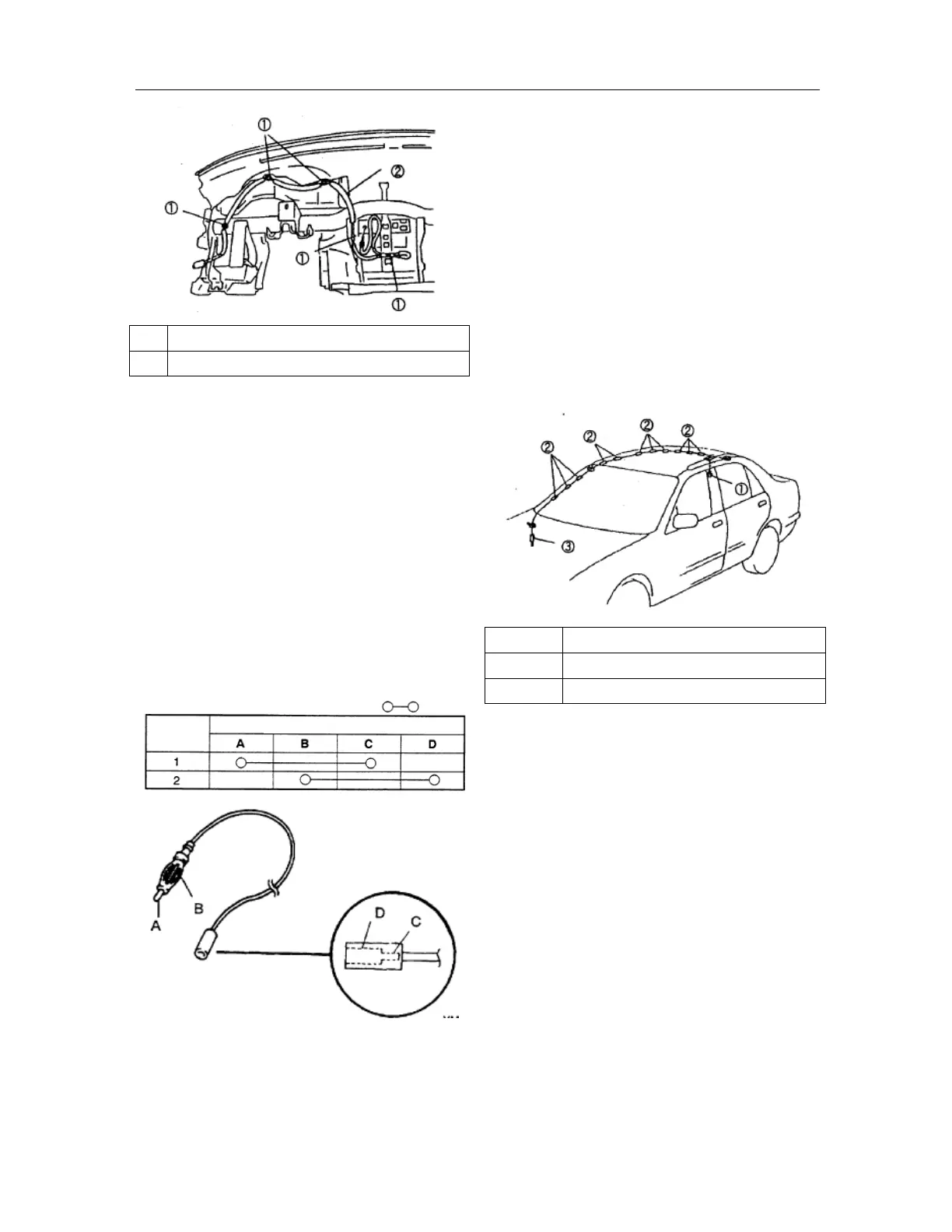
1 Clamp
2 Signal line of front antenna
Check of the signal line of front antenna
1. Remove the audio unit;
2. Remove the side panel of instrument panel at
driver side;
3. Disconnect the connection between the signal
lines of front/rear antennae;
4. Confirm by use of an ohmmeter that there is no
continuity between the signal line terminals A
and B of front antenna;
5. Confirm by use of an ohmmeter the continuity
between the signal line terminals of front
antenna; replace the dashboard harness if it
fails to meet the technique requirements
Removal/installation of signal line of rear
antenna
1. Remove the negative cable of battery;
2. Remove the audio unit;
3. Remove the inner trim panel on the
occupant-sided column A;
4. Remove the roof lining;
5. Disconnect the connection between the signal
lines of front/rear antennae;
6. Remove in the order indicated in the Table;
7. The installation procedure is in reverse order
with that of the removal.
1 Screws
2 Clamp
3 Signal line of rear antenna
Steps
Terminal
: Continuity



 To Next Page