Operation
R-Concept
114 / 564
Call up the saved machine settings
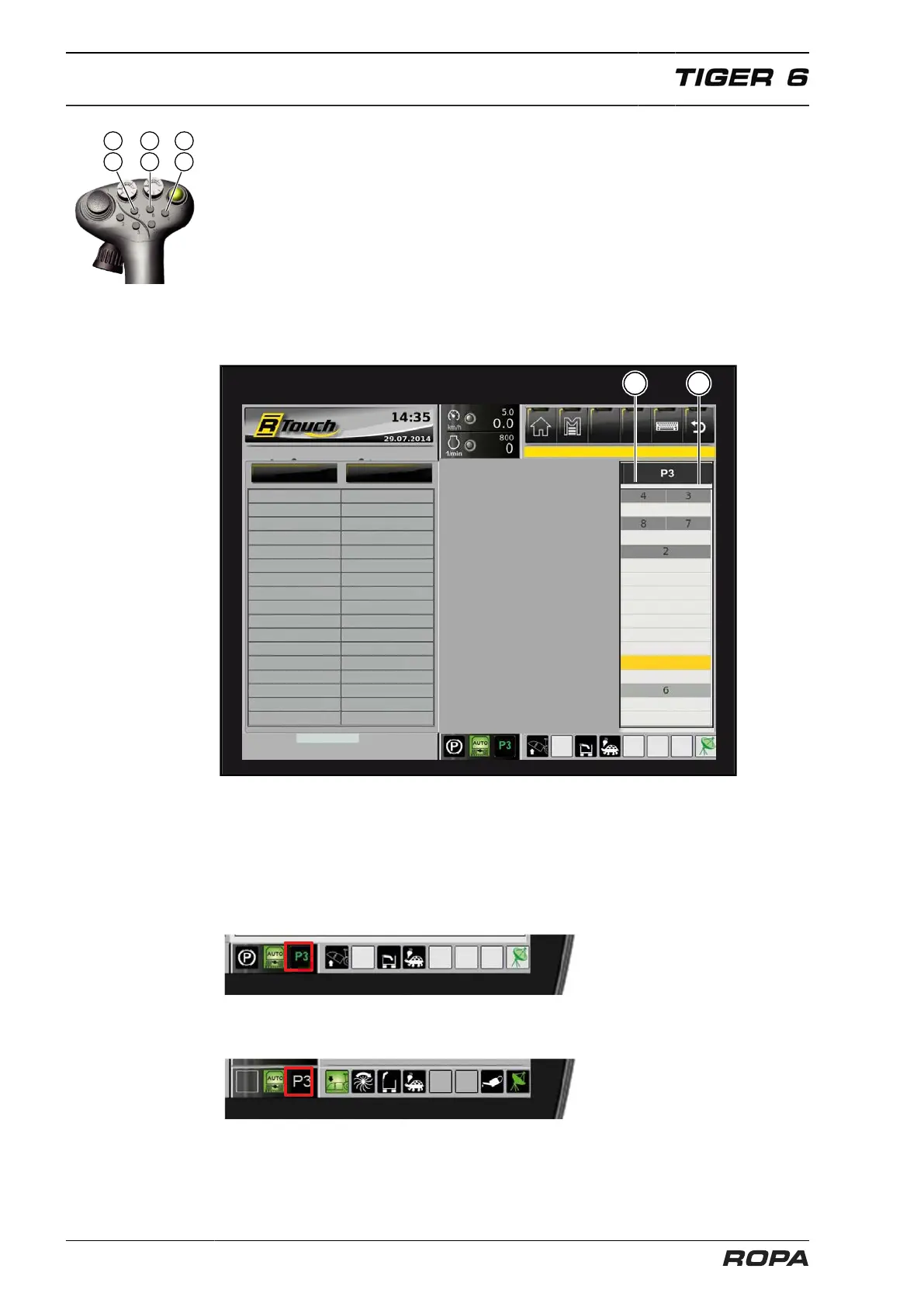
Pressing on one of three programmable keys P1 (7), P2 (8), P3 (9) you can activate
one of three different machine settings. It enables you to call up the optimum settings
for specific - recurrent - lifting conditions or ground types by pressing just one key.
After pressing one of the programmable keys P1, P2 or P3, a brief overview of the
machine settings appears on the R-Touch.
Programmable keys (P1/P2/P3)
defoliator depth
spreader speed
Infeed conveyor stage
lifting rollers stage
depth-contr. sh. stage
Pinch roller on/off
Share depth
Scalper
depth-contr. wh. height
defoliat. discharge act.
no memory
emergency operation
no memory
no memory
memory (teach)
no memory
memory (teach)
no memory
(1) Values on the left side
(2) Values on the right side
The machine settings stored on the respective programmable key are shown in the
field with the black surround. These values are set on the machine upon pressing the
programmable key. On the R-Touch at the status indicators the icon for the program-
mable key is displayed in green.
Once you change a set with the programmable key value manually, the icon on the R-
Touch, e.g. "P3", will be highlighted grey.



 To Next Page