Operation
Bunker
318 / 564
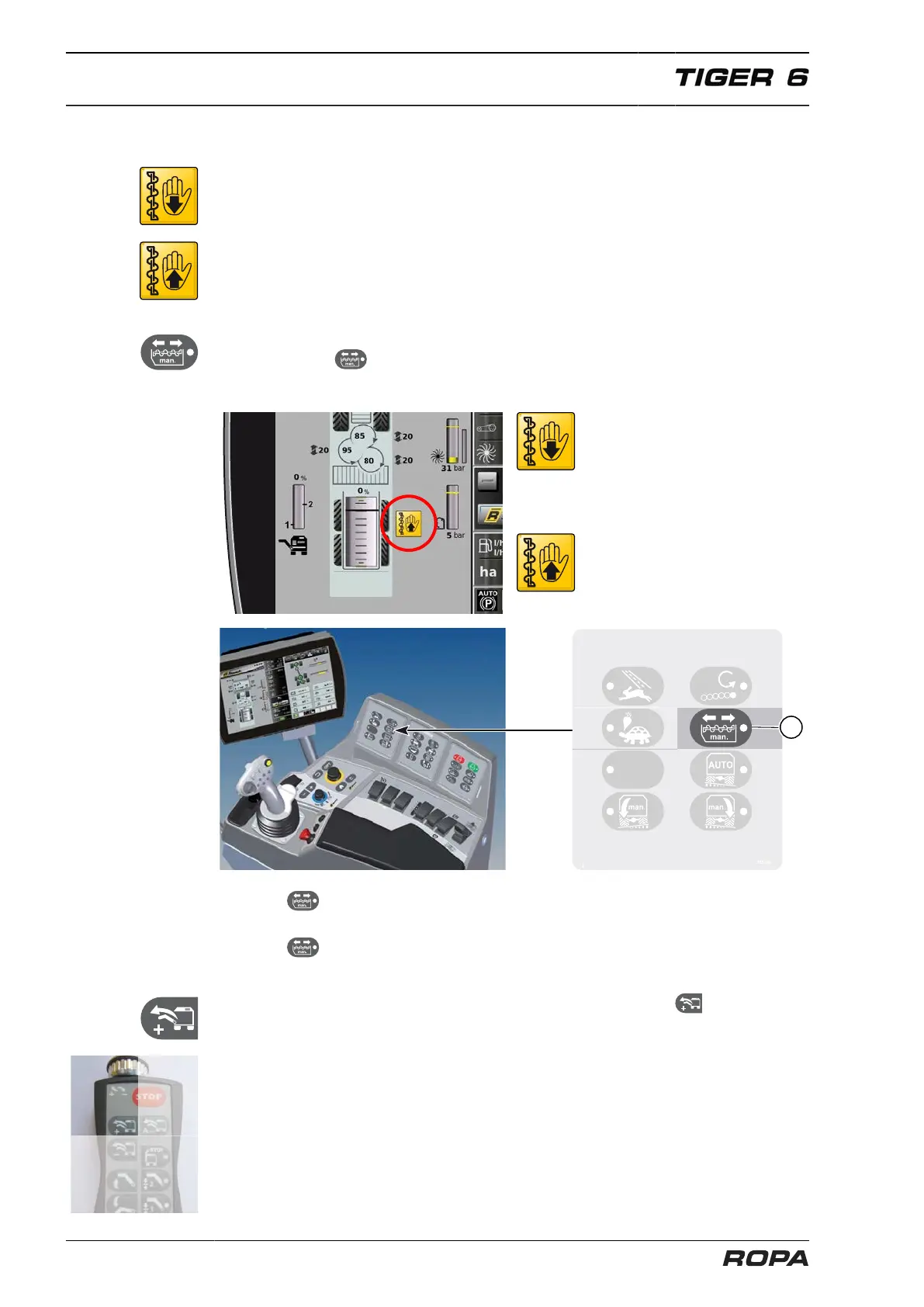
6.18.5 Switching auger rotating direction manually
In case of need, the conveying direction of the auger may also be switched manually.
If the conveying direction of the auger is manually switched, then the automatic sys-
tem is inoperable. The conveying direction is displayed on the R-Touch, if it is switched
manually so that the rear part of the bunker is filled up, then every 5 sec. a beeping
sound reminds the driver of monitoring bunker filling by vision control. If the convey-
ing direction of the auger is manually set to fill up the front part of the bunker, a note
appears on the R-Touch, but without beeping sound. Then the attentive driver should
switch the conveying direction before sugar beets fall out of the bunker.
Manual switching of the rotating direction of the auger is performed at the keypad I by
pressing the key (16) "Manually switch auger forward/backward". If the LED in
the key is lit, then manual control has been selected.
Bunker auger manual to the rear
Bunker auger manual to the front
If the key is pressed once, then the rotating direction of the auger is switched
manually.
If the key is pressed again, then the current rotating direction of the auger is
reversed again.
Automatic rotating direction control is restored by pressing the key on the bunker
unloading operating panel.



 To Next Page