Operation
Chassis
218 / 564
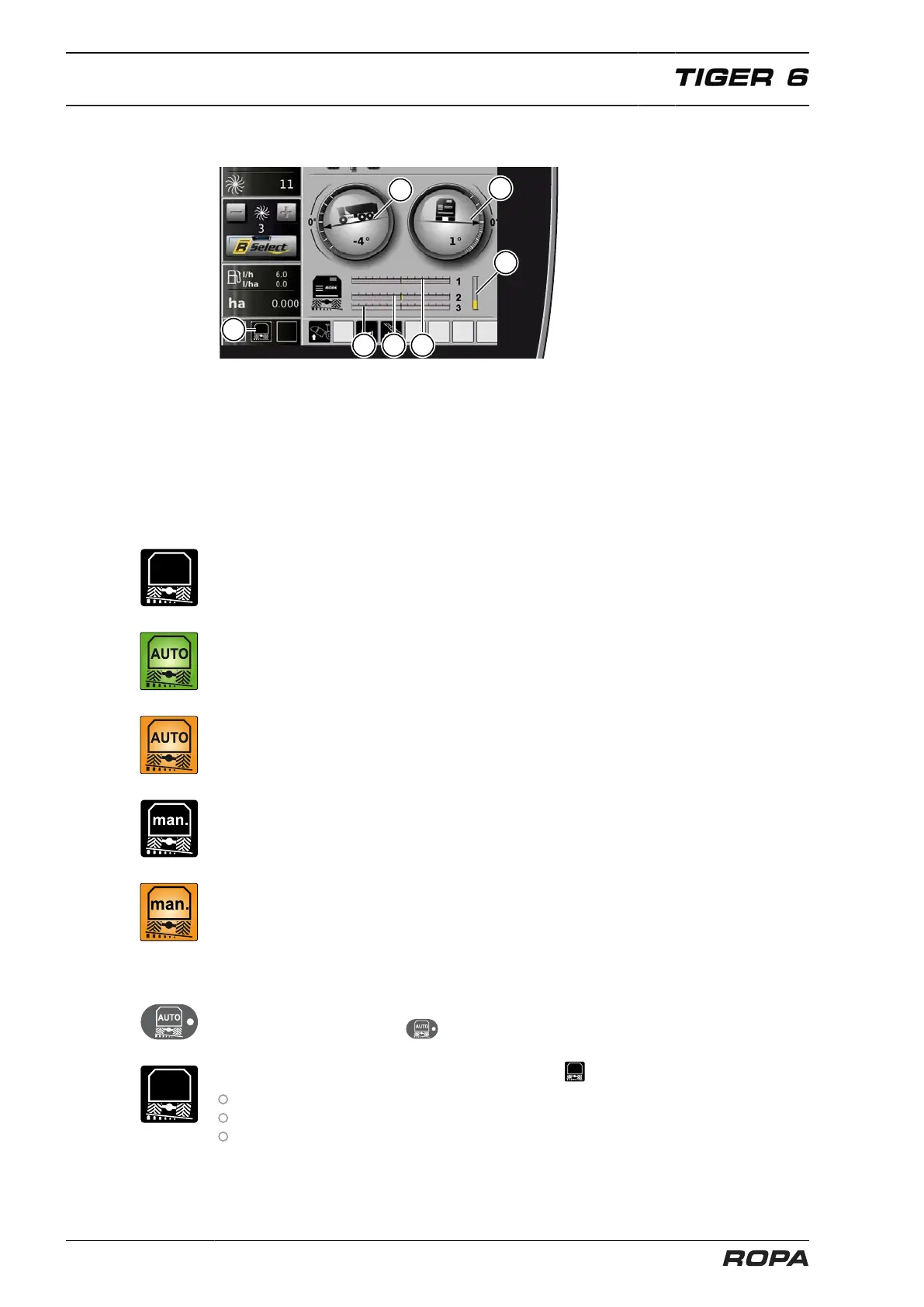
6.11.1 Chassis display field on R-Touch
(1) Indicator machine longitudinal axle inclination
(2) Indicator machine transverse axle inclination
(3) Indicator swing position front axle
(4) Indicator swing position rear axles
(5) Status indicator, inclination system
(6) Indicator chassis height level (middle value both rear axles)
Possible status indications:
The incline system is turned off, the machine does not incline actively according to the
ground profile. Activate the chassis (See Page 218).
Automatic incline system is turned on, the machine inclines automatically on the swing
axles opposite to the ground profile in horizontal position.
Automatic incline system is turned on, the ground profile can not be further compen-
sated by the incline system. The incline system is at the control end.
The machine is inclined manually to the right or left.
The machine is inclined manually to the right or left. The incline system is at the control
end.
6.11.2 Chassis activation
After starting the machine, the inclination system and height regulation of the chassis
are off. The LED in the key flashes.
The status indicator "Inclination system is off" appears:
after the engine start
if the automatic inclination system is switched off
if in the menu "Special functions", the line "Chassis control" is on NOTACTIVE (See
Page 220).



 To Next Page