Operation
Steering
197 / 564
6.10.1.3 Synchronise articulation steering
– Select operating mode "Road"
– Synchronize articulation steering, to do it:
– Unlock the main steering switch (44)
– Drive at a speed of 1-10km/h
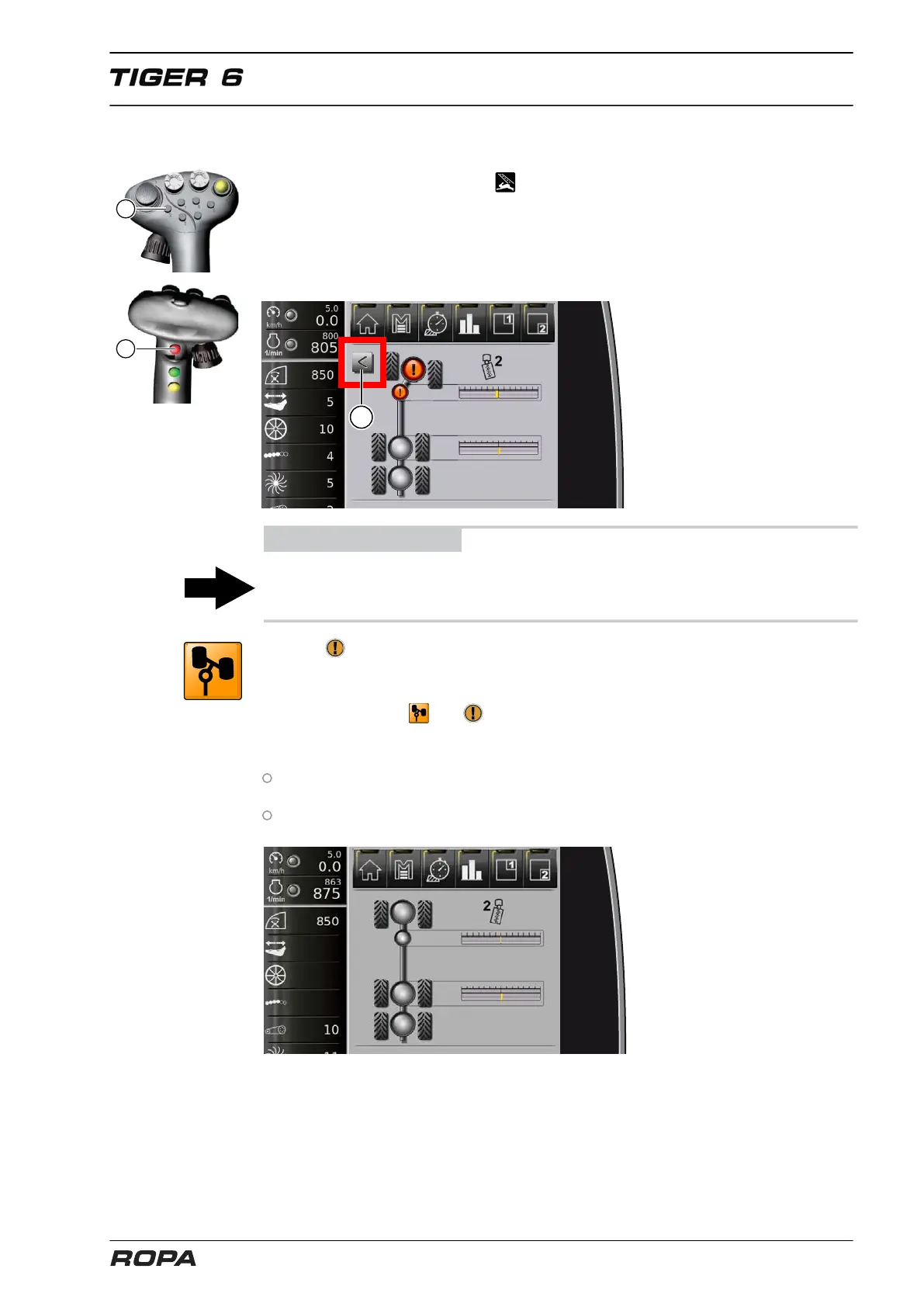
– Simultaneously press the key (2) and multi-key (11) on the joystick
– The synchronization mode is active
ADVICE
If the key (2) and multi-key (11) are pressed simultaneously, then the articulation and
the rear wheels are set immediately and automatically straight.
The icon in the display field 'Steering' flashes and an arrow (1) in the display area
shows in which direction you should steer the front axle in order to synchronize the
articulation and the front axle in the straight position.
As soon as the icons and disappear from the R-Touch, then the articulation and
front axle are synchronized in straight position. A successful synchronization will be
confirmed with an advisory tone.
In case these icons do not disappear, then the front axle and articulation are not
synchronized. The process as described above must then be repeated.
Lock the main steering switch.
Display in case of successful synchronization



 To Next Page