Operation
Printer
358 / 564
6.27 Printer
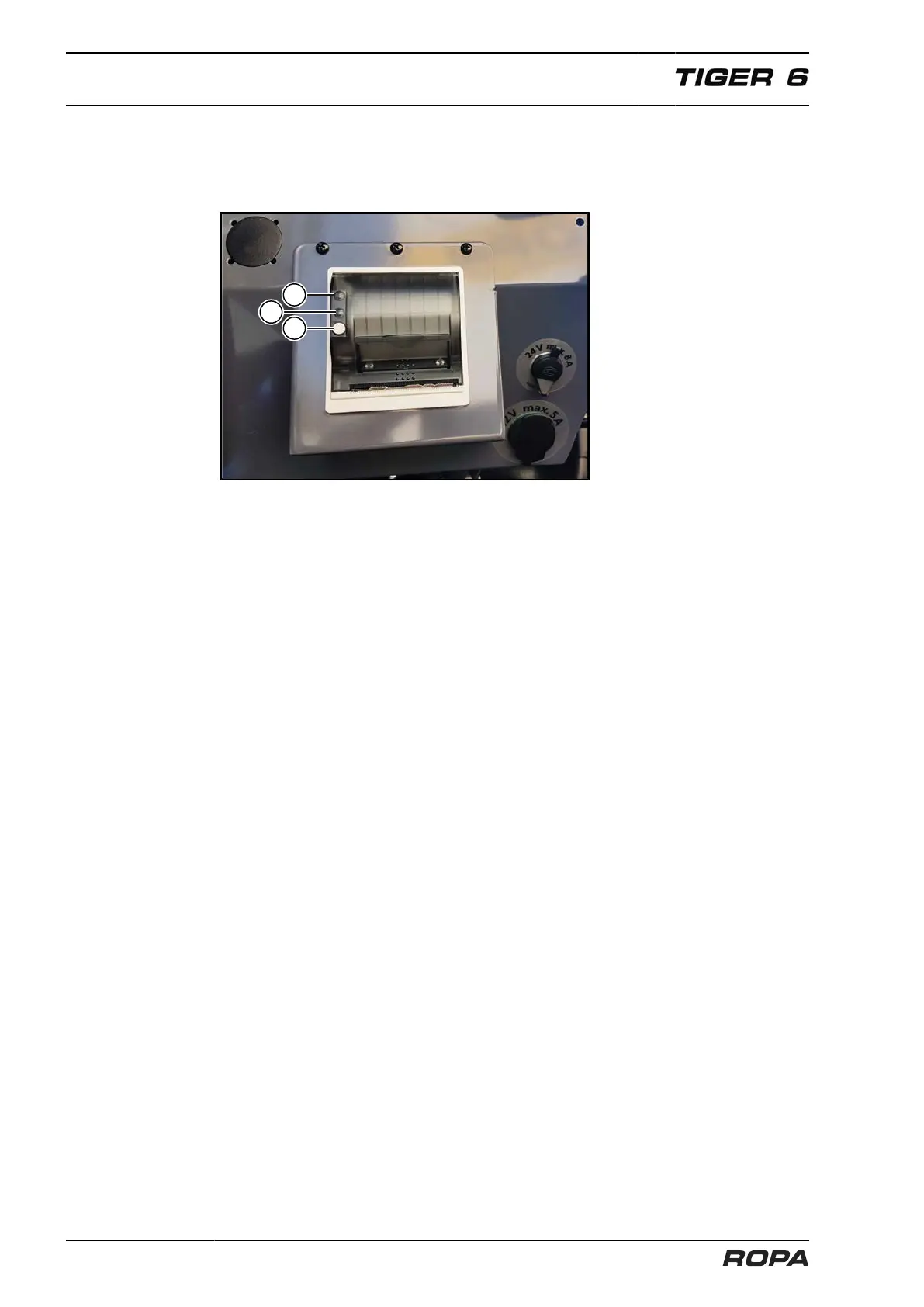
6.27.1 Description of the keyboard functions
(1) Status LED
(2) Key FEED/ENTER
(3) Key OFF/NEXT
(1) Error lamp
(2) Power lamp
(3) Key FEED/ENTER
When the feed key (3) is pressed, at first one line of the currently set font is fed and, if
pressed for more than 2 sec., then feeding is performed constantly.
Self-test:
The printer is tested for functioning by starting a printout in self-test. For this purpose,
when waking the printer from power OFF, the feed key {FEED} (3) is pressed for at
least 3 sec.
6.27.2 Which thermally-sensitive paper suits?
The printer is designed for a paper width of 57.5 ± 0.5 mm, at 60 g/m
2
. ROPA offers a
suitable paper roll as standard equipment (ROPA item no. 207015500). Other paper
may cause malfunctions.
Which side of the thermally-sensitive paper can be printed on? On the paper roll,
almost always the outside is the printable side. If you should still have doubts, make
the finger nail test: quickly run over the paper with the tip of a finger nail, exerting pres-
sure. The thermally-sensitive side is blackened due to the frictional heat.



 To Next Page