Operating Components
Operating panel bunker emptying
88 / 564
5.7 Operating panel bunker emptying
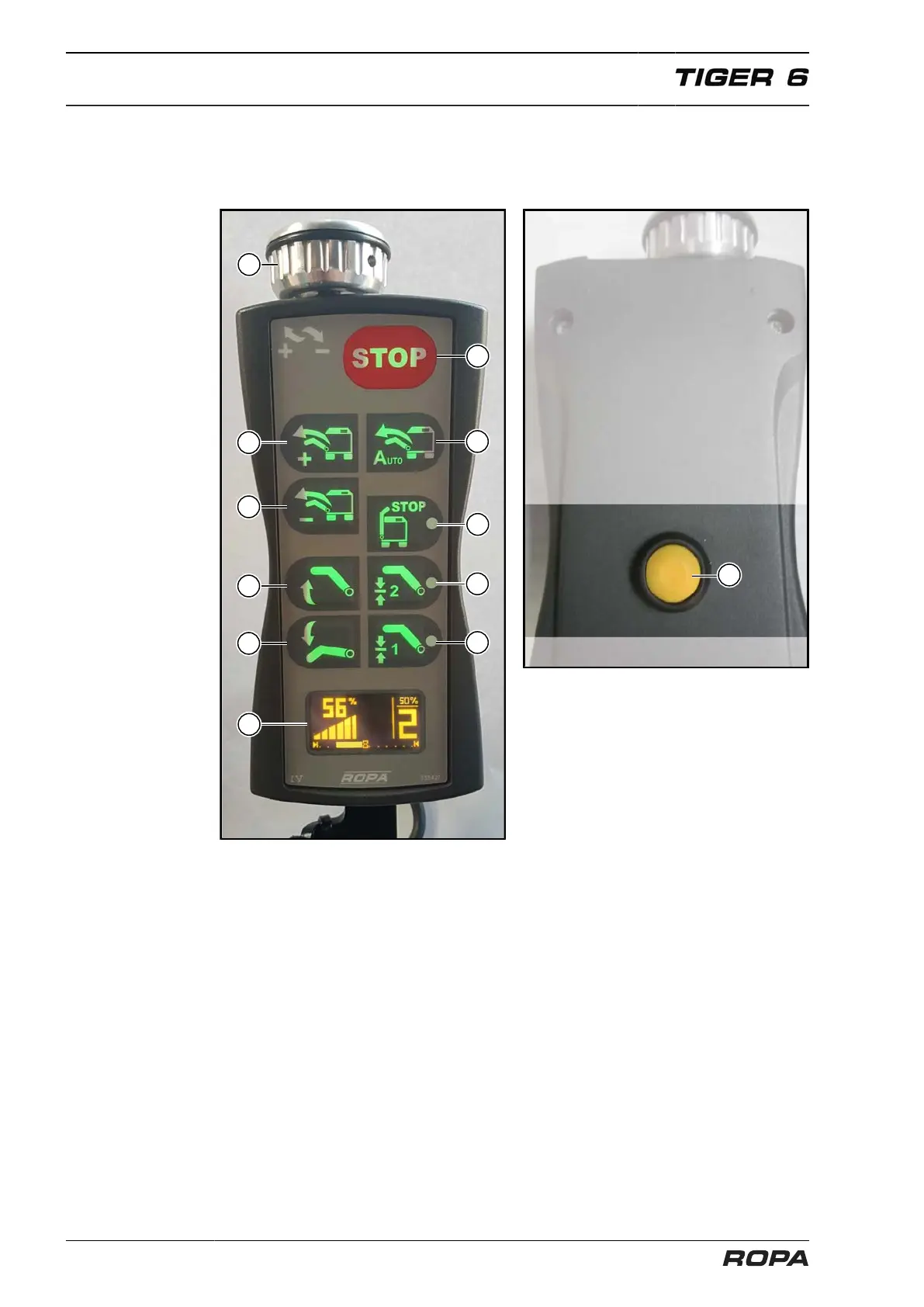
The bunker is emptied with this operating panel.
(45) Rotating wheel to adjust speed of the bunker unloading
(46) Bunker unloading +: This key is used to switch on bunker unloading in stages.
(See Page 332)
(47) Bunker unloading -: This key is used to switch off bunker unloading in stages.
(See Page 332)
(48) Automatic mode bunker unloading: (See Page 332)
(49) STOP unloading conveyor
(50) Raise unloading conveyor: If this key is pressed for longer than 2 seconds,
then a beep sounds and the unloading conveyor automatically moves com-
pletely up. (See Page 328)
(51) Lower unloading conveyor: As long as this key is pressed, the unloading con-
veyor is lowered. (See Page 328)
(52) Memory key unloading conveyor height 1: (See Page 329)
(53) Memory key unloading conveyor height 2: (See Page 329)
(54) End of bunker unloading: (See Page 332)
(55) Display: (See Page 330)
(56) Multi-key bunker unloading: for unload conveyor articulation 2.



 To Next Page