3.68
SEL-400 Series Relays Instruction Manual Date Code 20171006
Basic Relay Operations
Operating the Relay Inputs and Outputs
Assigning Control Outputs for Tripping and Closing
The procedure in the following steps shows a method for setting the relay to
operate the trip bus and the close bus at a typical substation. This procedure
assigns a close output at OUT106. This example is specific to the SEL-451 relay,
but similar configuration changes can be made in all SEL-400 series relays.
This example assumes that you have successfully established communication
with the relay (see Making an EIA-232 Serial Port Connection on page 3.4). In
addition, you must be familiar with relay access levels and passwords (see
Changing the Default Passwords in the Terminal on page 3.10 to change the
default access level passwords). You should also be familiar with QuickSet (see
Section 2: PC Software).
Step 1. Start QuickSet and establish a connection with the relay. See Step 1
and Step 2 of Checking Relay Status in QuickSet on page 3.12 for
detailed steps.
Step 2. Click File > Read.
The relay sends all configuration and settings data to QuickSet.
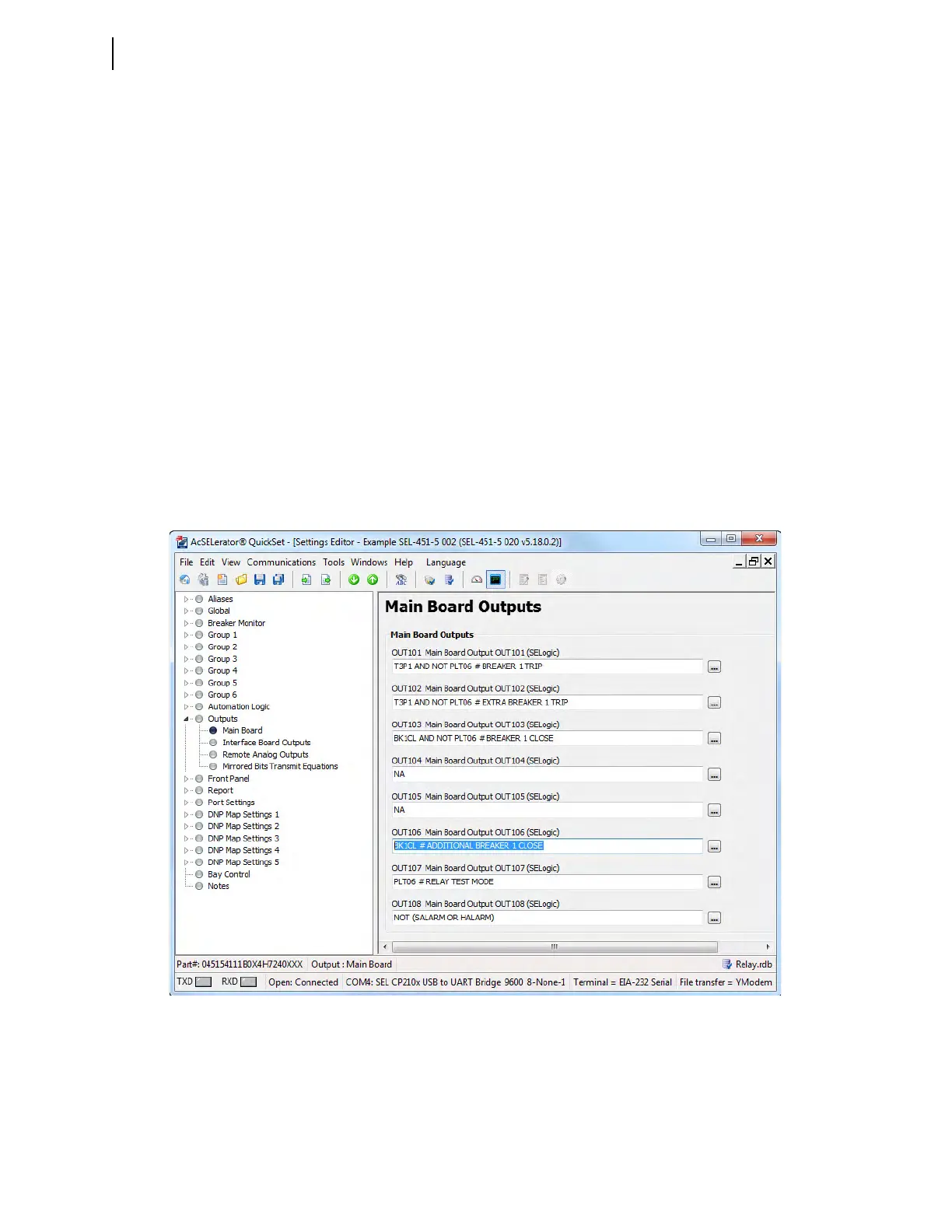
Step 3. Access the Main Board output settings.
a. Expand the Outputs branch of the Settings tree view.
b. Click Main Board (see Figure 3.61).
Figure 3.61 Assigning an Additional Close Output in QuickSet



 To Next Page