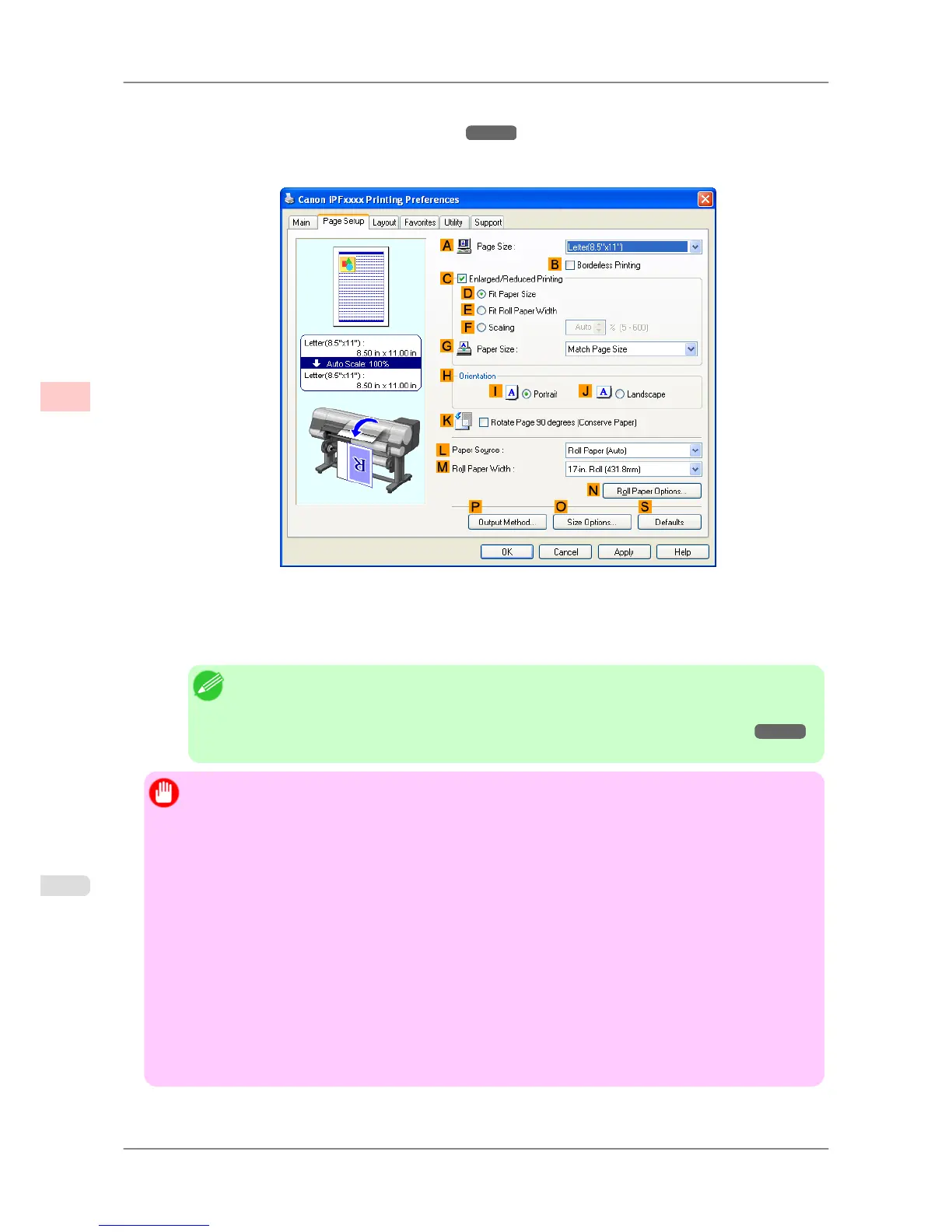
8. Select
the printer in the dialog box, and then display the printer driver dialog box. (See "Accessing the Printer
Driver Dialog Box from Applications (Windows)
→P.200 ")
9. Click the Page Setup tab to display the Page Setup sheet.
10. Click Roll Paper (Auto) in the LPaper Source list.
11. Select the KRotate Page 90 degrees
(Conserve Paper) check box as necessary.
Note
• When Rotate
Page 90 degrees (Conserve Paper) is turned on, even more paper can be con-
served depending on the paper size because pages created in portrait can be printed in landscape.
(Refer to "Conserving Roll Paper by Rotating Originals 90 Degrees (Windows)
→P.158 "
for details on Rotate Page 90 degrees (Conserve Paper).)
Important
• Always
use the same media type in the upper and lower rolls of the printer. You cannot print if different
media types are loaded.
• Always click the Acquire Status button on the Device Settings sheet to acquire roll paper width infor-
mation. You might not be able to print correctly if the roll paper width is not set correctly.
• Always select Roll Paper (Auto) in Paper Source on the Page Setup sheet. You cannot use this func-
tion if Roll Paper (Auto) is not selected.
• If Fit Roll Paper Width is selected in Enlarged/Reduced Printing and Roll Paper (Auto) is selected
in Paper Source on the Page Setup sheet while you are performing enlarged/reduced printing with Au-
tomatically switch paper sources (paper size priority) enabled, printing is always performed from roll
1 (the upper roll).
• If you are performing borderless printing with Automatically switch paper sources (paper size priori-
ty) enabled, only Scale to fit Roll Paper Width can be selected in Borderless Printing Method on the
Page Setup sheet. In this case, printing is always performed from roll 1 (the upper roll). If a paper size or
media type that does not support borderless printing is loaded in roll 1, you cannot perform borderless
printing.
Enhanced Printing Options
>
Other useful settings
>
Switching the Paper Source of Roll Paper to Match the Paper Size iPF825
3
190














 To Next Page