282 01-6203-01R3, CG Drives & Automation
Stop method = "Quick stop ramp [2]"
Same behaviour as with the stop method "Standard ramp [1]", except that the motor is
decelerated with the quick stop ramp instead of the standard ramp.
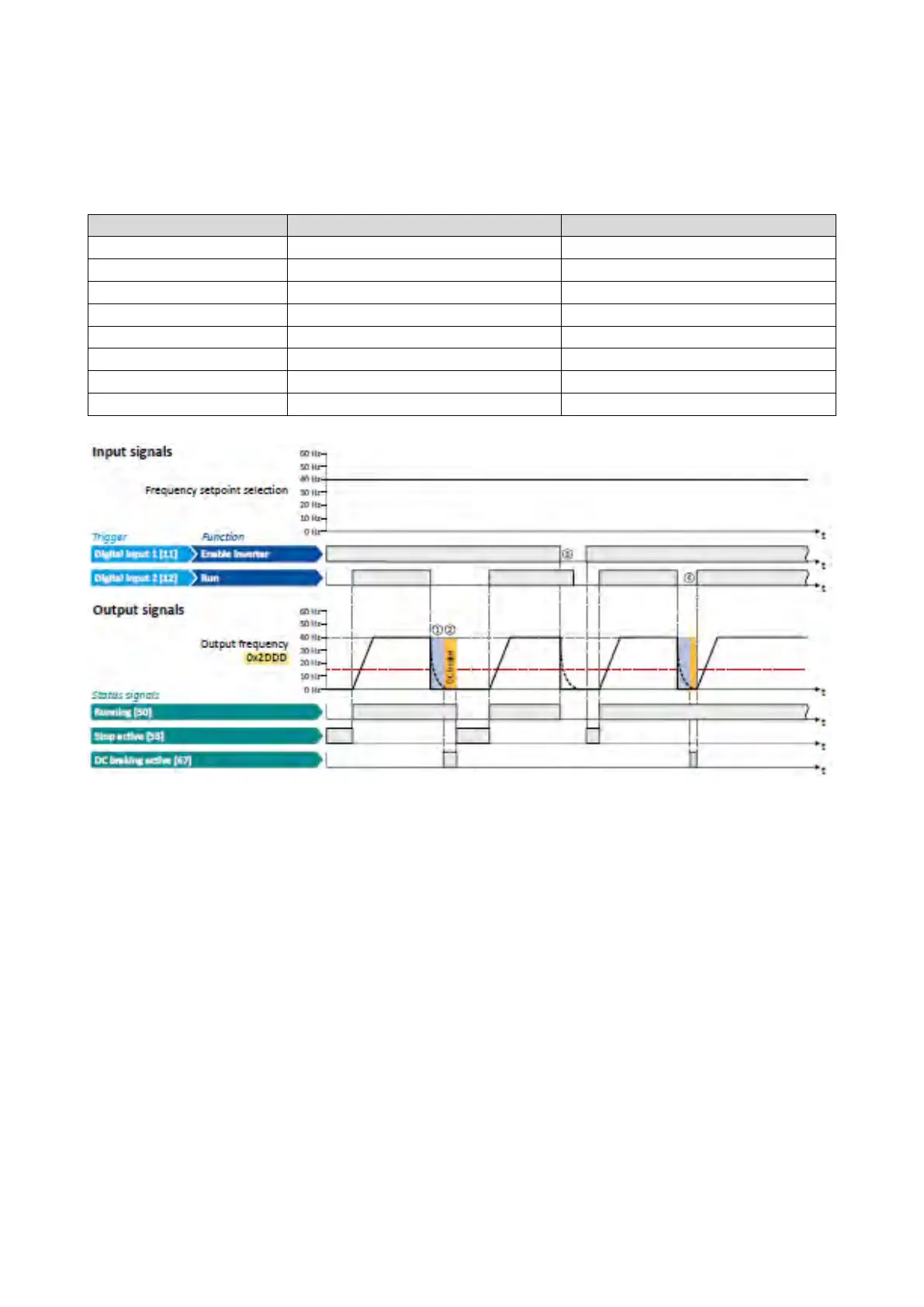
Stop method = "Coasting [0]"
Parameter
Name
Setting for this example
Frequency control: Default setpoint source
0x2911:001 (P450.01)
Frequency setpoint presets: Preset 1
40 Hz
Automatic operating threshold
The status signals can be assigned
to
digital outputs.
Configuration of digital outputs
429
① With the stop method "Coasting [0]", the motor first coasts for a specified time. This
"demagnetising time" serves to reduce the induced voltage.
② The DC braking becomes active for the hold time set in 0x2B84:002 (P704.02).
③ If the inverter is disabled, the motor coasts. (DC braking is only possible if the
inverter is enabled.)
④ If there is a new start command within the hold time, the DC braking is cancelled.
The motor is accelerated to the setpoint again.



 To Next Page