372 01-6203-01R3, CG Drives & Automation
Start of sequence mode 0x4040 (P820.00)
• The start of sequence mode defines the action after the motor is stopped and
restarted or
• after the motor has been restarted after an error occurred.
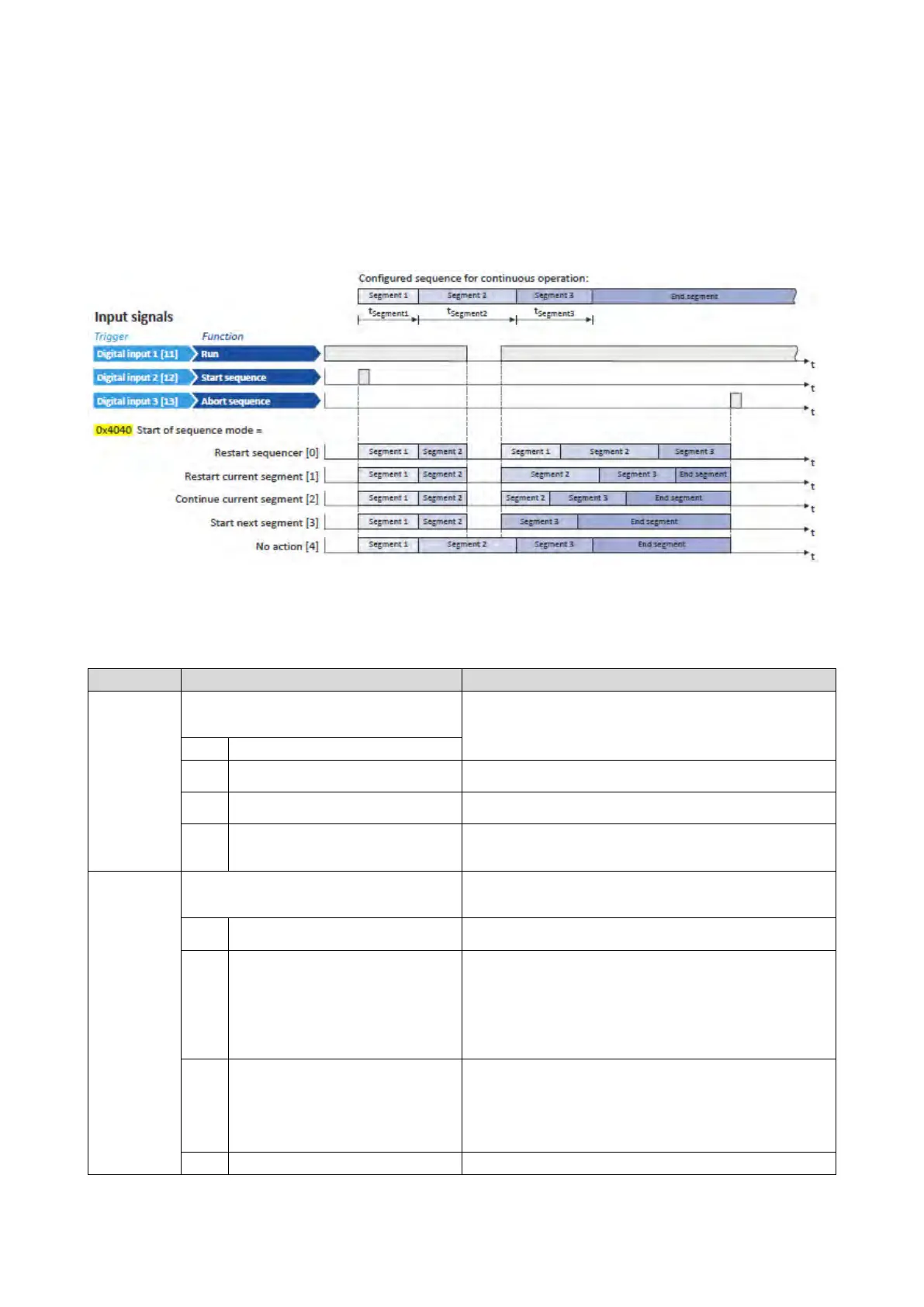
• In the default setting "Restart sequencer [0]", the currently selected sequence is
restarted.
• The following diagram demonstrates the different start of sequence modes:
Name / value range / [default setting]
(P800.00)
(Sequencer mode)
Selection of the sequencer mode.
(from version 03.00)
The switch-over to the next step of the sequence is made after the time
set for the current segment has elapsed.
(from version 03.00)
The switch-over to the next step of the sequence is made via the trigger
assigned in 0x2631:032 (P400.32) to the "Next sequence step" function.
(from version 03.00)
The switch-over to the next step of the sequence is made via the trigger
assigned in 0x2631:032 (P400.32) to the "Next sequence step" function,
but no later than after the time set for the current segment has elapsed.
(P824.00)
(End of seq. mode)
Selection of the action after the sequence has been completed, i. e.,
after the steps configured for the sequence have been passed through
with the set numbers of cycles.
The setpoint set for the end segment is continuously transmitted to the
motor control until the sequence is aborted.
1
Stop
The motor is stopped with the stop method set in 0x2838:003
(P203.03). The setpoint is continued to be controlled by the sequencer.
In order to return to the normal setpoint control, the sequence must be
aborted.
Note!
After returning to the normal setpoint control, a start command is
required to restart the motor.
The motor is stopped with the stop method set in 0x2838:003 (P203.03).
After standstill is reached, it is automatically returned to the normal
setpoint control.
Note!
After returning to the normal setpoint control, a start command is
required to restart the motor.
Return to the normal setpoint control without stopping the motor.



 To Next Page