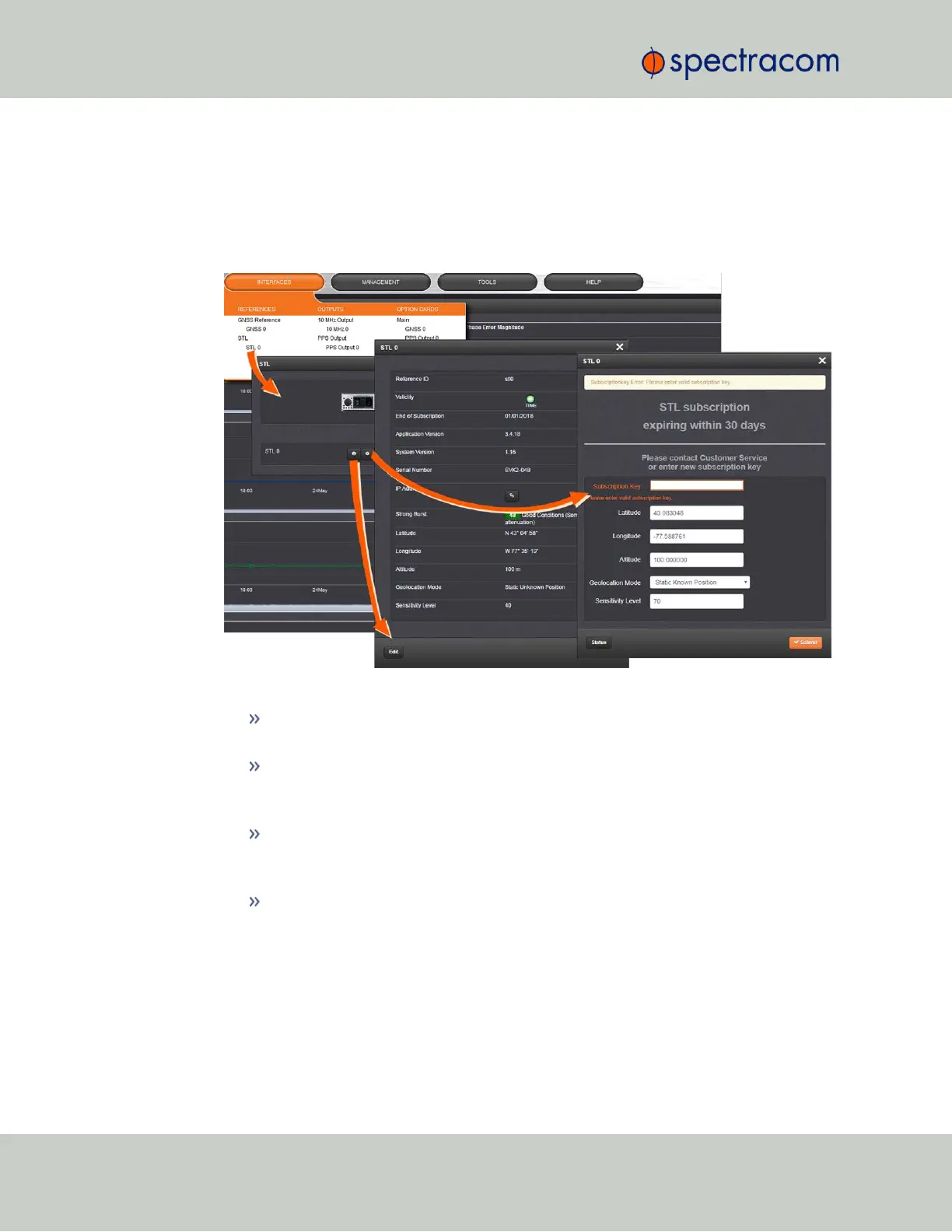
To configure STL settings:
1.
Log into the Web UI, and navigate to INTERFACES > OPTION CARDS: STL 0. The STL 0
status window will be displayed.
2.
In the STL 0 status window, click on the Edit button to open the STL 0 setup window.
In the STL 0 setup window, you can configure the following parameters:
Subscription Key: [required] Enter the key obtained from customer service in order
to activate STL access.
Latitude, Longitude, Altitude: [decimal degrees, meters] Actual geographic position
of SecureSync's STL antenna. For help determining your actual position, see
"Determining Your Position" on page200.
Geolocation Mode: Static Known Position/Static Unknown Position [default]/Pseudo
Static/Dynamic: This parameter refers to how the STL receiver handles position
estimation. The default setting is recommended for most applications.
Sensitivity Level: [default = 40] This value determines the sensitivity of the STL
receiver towards the STL signal bursts transmitted by the satellites. The lower the
number, the more responsive the receiver will be to acknowledge the bursts. The
default value is optimized for an indoor antenna. A higher value can be used for
490 SecureSync User Reference Guide
APPENDIX



 To Next Page