FuelsManager Defense
136 Administrator Manual
Engineering Units Conversion
The Source Units defined on the Select Data Source dialog box instructs
FuelsManager what engineering units the data value being received from the I/O
points are expressed in. So, if FuelsManager receives a value of 30.5 and the
Source Units are set to feet, FuelsManager knows to treat this as 30.5 feet.
Engineering unit conversions can be associated with any database point via the
Select Data Source dialog box.
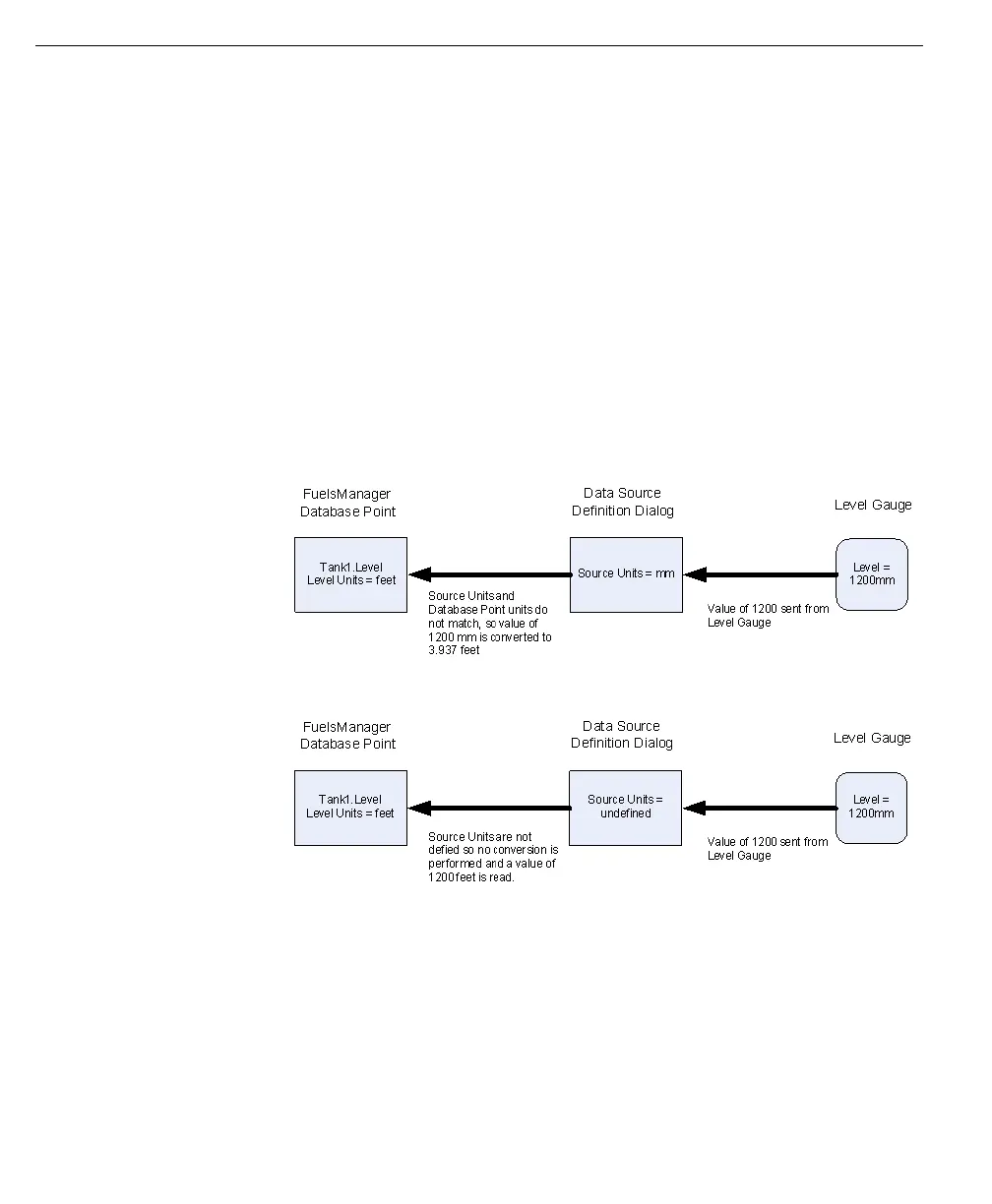
If the engineering units for the FuelsManager database point do not match those
defined for the I/O point (Source Units), it will automatically be converted the
engineering units defined for the FuelsManager database point.
If Source Units are not defined, FuelsManager assumes that the data received
from the I/O point is in the same units as the FuelsManager database point and no
unit conversion is performed.
The following example shows data received by FuelsManager, the same
functionality applied to data transmitted by FuelsManager.



 To Next Page