Creating and editing tank points
ADM003GVAE1005 109
Volume information
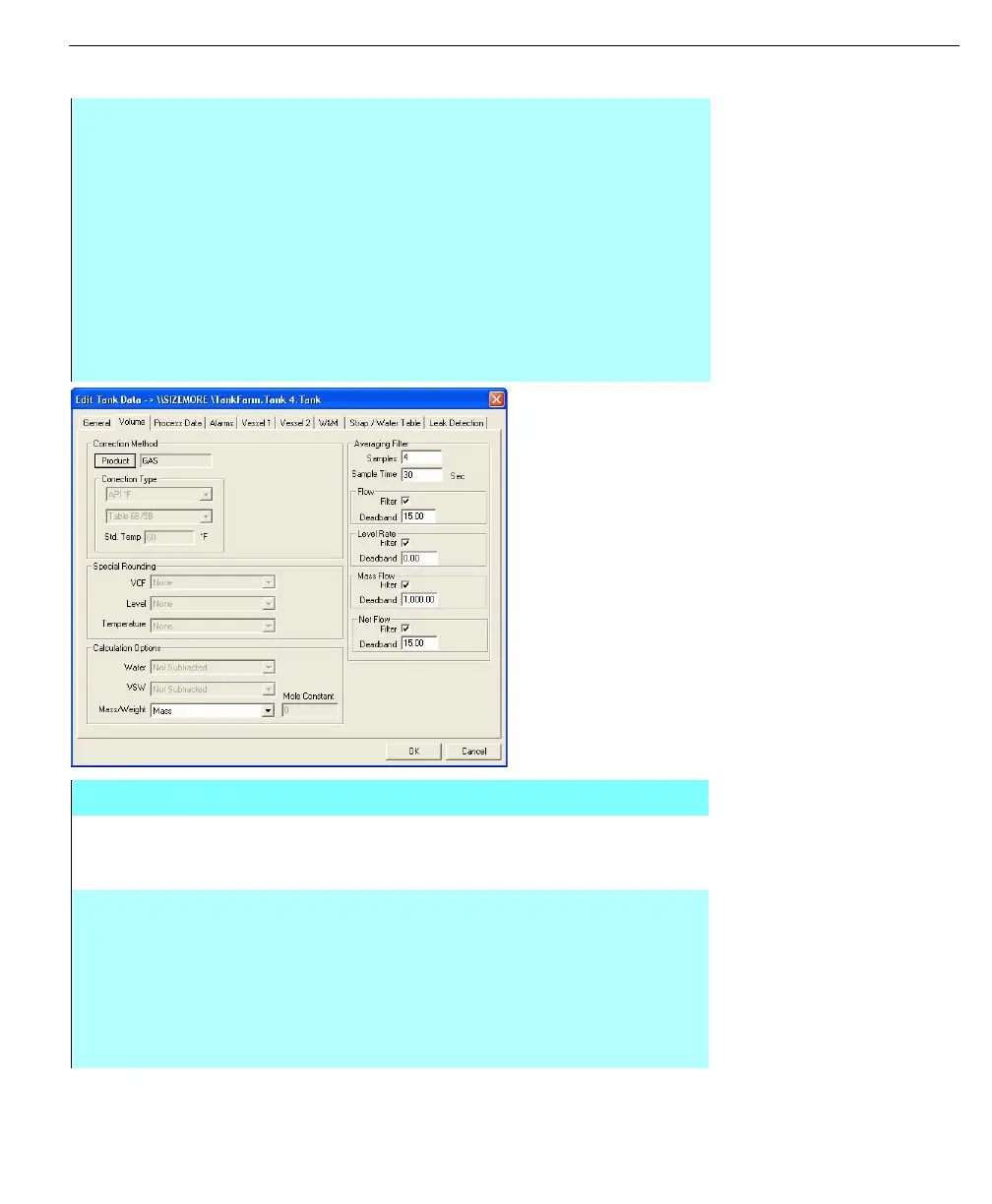
Edit Tank Data dialog
box - Volume tab
Step-by-Step
• To select a product, Click on the Product button
• Highlight a product from the Select A Product dialog box and then click
Select. Refer to the Adding Products section for further information on
creating a product list
• If the selected product does not define the correction method to be used,
select the required correction type and any optional correction techniques
as required in the Special Rounding and Calculation Option sections
• As required, enter the Samples, Sample Time, and Deadband for the Flow,
Level Rate, Mass Flow and Net Flow. There is no set formula to determine
these values. The user must consider the tank geometry, pipeline sizes and
other factors before entering these parameters
Edit Tank Data dialog box - Volume tab
PRODUCT The Product button opens the Select A Product dialog box,
allowing the user to pick the tank product from a list of pre-
defined products, or add additional products
CORRECTION
TYPE
These controls allow you to select of the correction algorithm
to be used in the calculation of corrected volume for this
tank. The selection of the major correction type (in the upper
list box), restricts the minor correction types available (in the
lower list box). In addition, if your system administrator
associated a correction method with the product, the
correction type is selection is made automatically based on
the product chosen



 To Next Page