FuelsManager Defense
140 Administrator Manual
Configuring bit field data sources
The concept of Bitfields allows the user to configure how individual bits within an
integer value are manipulated. To enable bitfield processing the user selects the
Bitfield Data option on the Input, Output or Triggered edit point dialogs; this option
is only available for integer type data formats, including:
•Char
• Byte
• Short
•Word
• Long
•DWORD
When the Bitfield Data option is enabled for a particular point the Start Bit, Number
of Bits and Start Data Source Bit parameters on the Select Source dialog are
enabled.
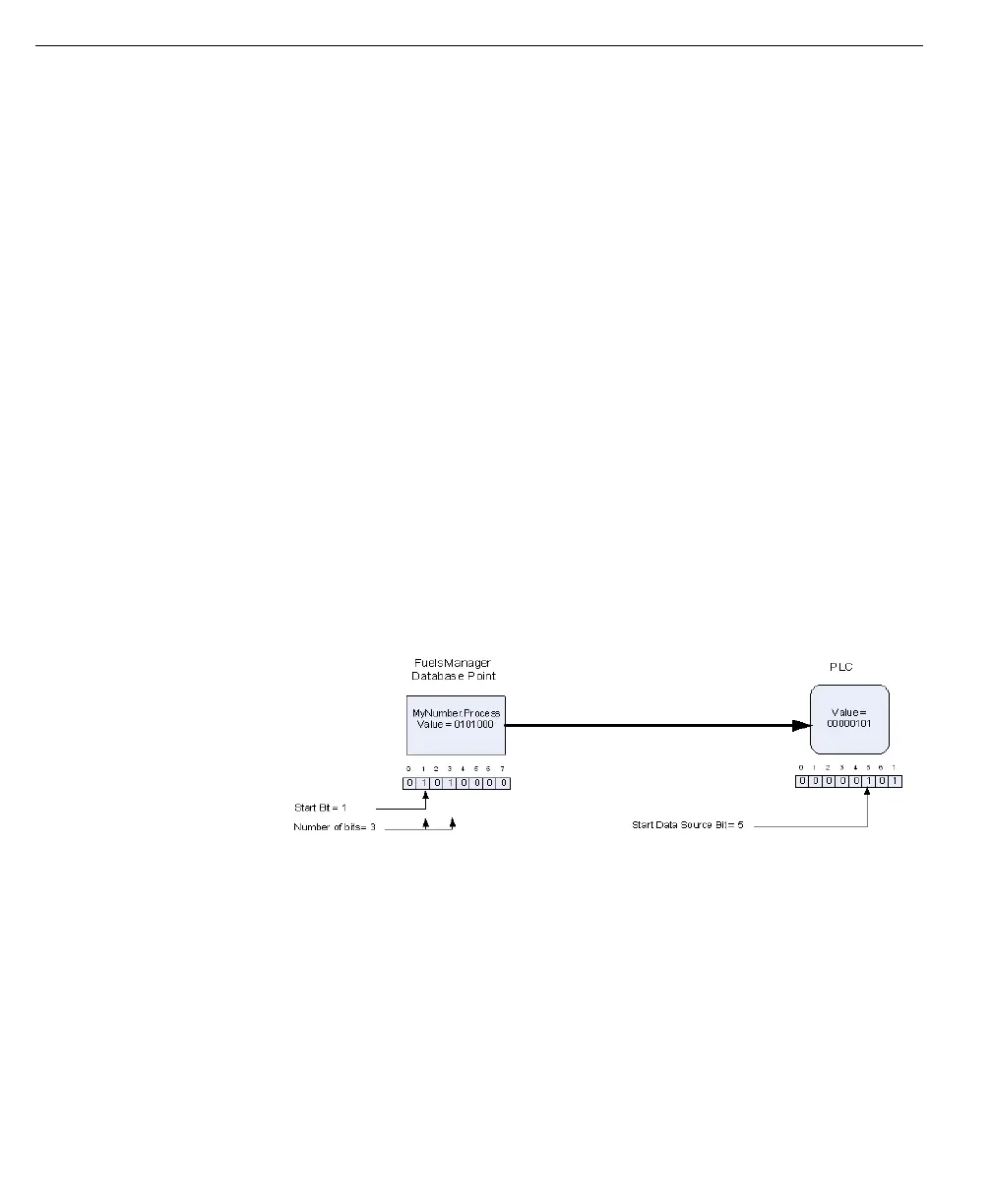
The Start Bit value defines the first bit position in the FuelsManager database
point that should be processed.
The Number of Bits value defines how many bits in the FuelsManager database
point should be processed, starting with the Start Bit.
The Start Data Source Bit value defines the first bit position in the I/O point that the
start bit (and subsequent number of bits) should be written to.
The following example shows data transmitted by FuelsManager, the same
functionality applied to data received by FuelsManager.
Note! In the above example only 3
bits in the FuelsManager database
value are define. However,
FuelsManager will write the entire
word to the PLC. This means that
any data stored in bit 0 through 4 in
the PLC word will be overwritten by
zeros when bits 5, 6 and 7 are
written. It is the engineer’s
responsibility to ensure that writing
bitfields does not cause
unexpected operations in the PLC.
Points with the Bitfield Data option enabled allow up to 32 independent data
source assignments. This allows the combination of multiple bits into a single
integer or the writing of single bits, from multiple integers, into a single PLC
register.
Again the following example shows data transmitted by FuelsManager, the same
functionality applied to data received by FuelsManager.



 To Next Page