3. Introduction
ThepurposeofthisdocumentistoprovidesimpleandcompleteinformationonhowtouseCordex®
HighPerformance(CXCHP)systemcontrollerandsoftware.Itcontainsanoverviewofthesoftware
features,on-sitesetup,andoperationofthecontroller,aswellasinformationoncreating,configuringand
maintainingyoursystemusingthecontroller.
3.1. Using the Cordex® CXC HP Controller Software Manual
3.1.1. Purpose and audience
Theaudienceofthisdocumentaretechniciansandorfacilityoperatorstaskedwithinstalling,
programmingandcommissioning,maintainingortroubleshootingthepowersystem.Whenusingthe
controllerthereareavarietyofwaystoperformmosttasks.Thisdocumentcoversusingthetouchscreen
display,aswellasthewebinterface.
3.1.2. Knowledge and permissions
Weassumeyouhaveagoodworkingknowledgeof,andaccessto,thefollowing:
•
EthernetcablesandTCP/IPsettingsneededtoconnectyourcomputertothecontroller
•
CurrentversionofMicrosoftEdge,GoogleChrome,MozillaFirefox,orAppleSafari
• Powersystemthatthecontrolleriscontrolling
•
Controllerloginpasswordsandtheappropriatelevelofpermissions
3.2. Product overview
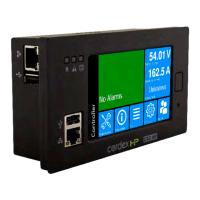
Thissectionprovidesanintroductiontothecontroller,thecontrollersoftware,aswellasabriefoverview
ofwhatthecontrollerdoes,howitworks,andanimageofatypicalnetworkconfiguration.TheCordex®
CXCHPcontroller(2RUmodel)hasthefollowingfeatures:
•
Front touchscreen: Fullcolortouchscreenliquidcrystaldisplay(LCD),toaccesscontrolsand
menuitemsbyusingfingertiptouchorastylus.
•
Home button: Providestheabilitytogodirectlybacktothehomescreenfromanymenu.
•
Front panel reset: Foremergencyuseonlytorestartthecontrolleriftheunittouchscreenorhome
buttonarenotresponding.
•
Front panel LEDs: Foralarms,progressandstatusindication.
•
Audio speaker: Built-inaudiospeakertonesduringactivealarmsandcanbedisabledifrequired.
•
Ethernet: Dual10/100BASE-TEthernetportsforconnectiononboththefrontandrearofthe
controllerforremoteorlocalcommunication.
0350058-J0 Rev AL Page 31


 To Next Page
 Loading...