214323 92 Revision A
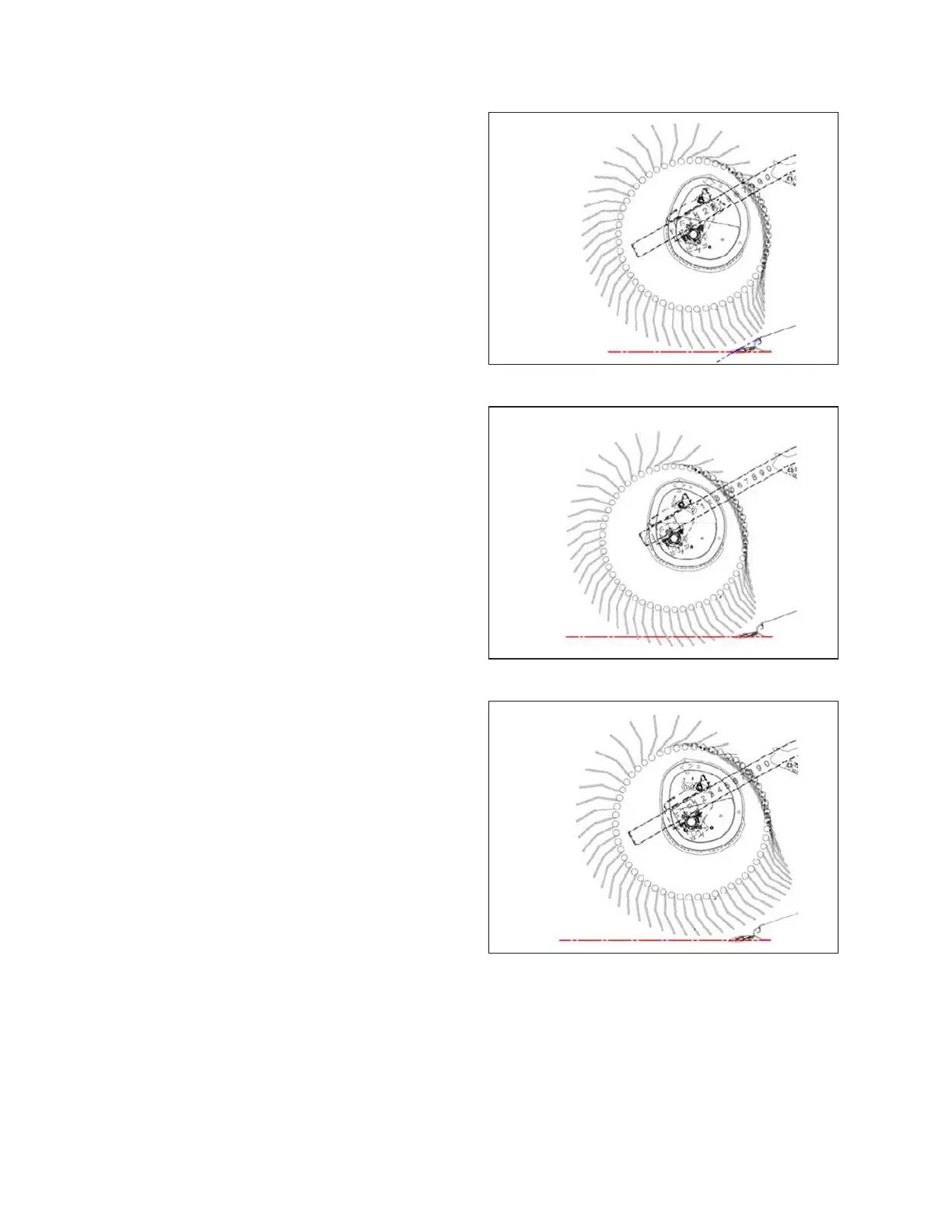
Figure 3.104: Finger Profile – Position 1
Cam Position 1, Reel Position 6 or 7 delivers the most
even crop flow onto the drapers without fluffing up or
disturbing the material.
• This setting will release crop close to the cutterbar and
works best if the cutterbar is on the ground.
• Some crops will not be delivered past the cutterbar when
the cutterbar is raised off the ground and the reel is
pushed forward; therefore, set the initial reel speed
approximately equal to the ground speed.
Figure 3.105: Finger Profile – Position 2
Cam Position 2, Reel Position 3 or 4 is the recommended
starting position for most crops and conditions.
• If the crop is stalling on the cutterbar when the reel is in
the forward position, increase the cam setting to push the
crop past the rear edge of the cutterbar.
• If the crop is getting fluffed or if there is a disruption to the
flow across the drapers, decrease the cam setting.
• This setting generates a fingertip speed that is
approximately 20% faster than the reel speed.
Figure 3.106: Finger Profile – Position 3
Cam Position 3, Reel Position 6 or 7 is mainly used to
leave long stubble.
• This position allows the reel to reach forward and lift the
crop across the knife and onto the drapers.
• This setting generates a fingertip speed that is
approximately 30% faster than the reel speed.
OPERATION









 To Next Page