214323 155 Revision A
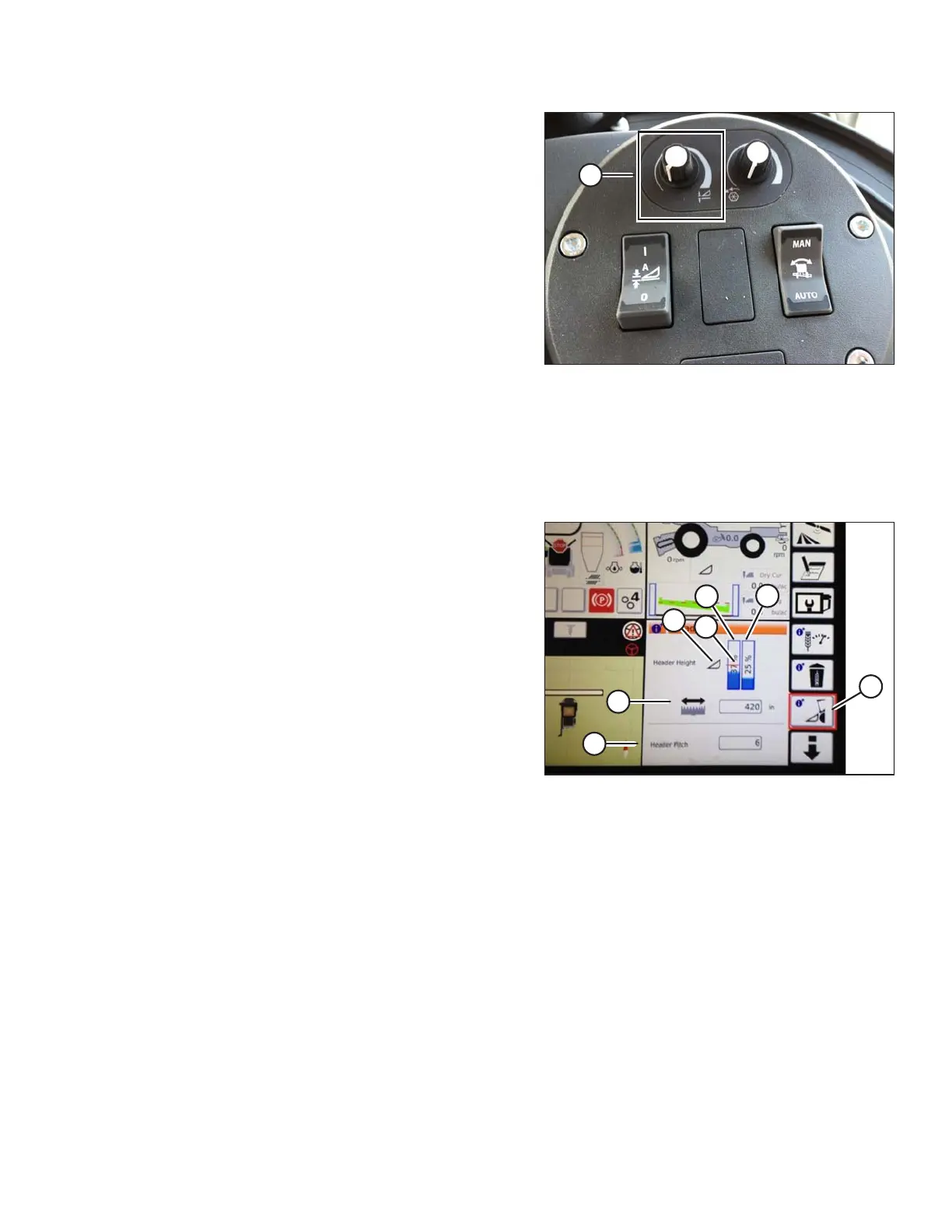
Figure 3.236: Header Control Cluster
4. Use HEADER HEIGHT SETPOINT control dial (A) as
necessary to fine-tune setpoint position.
Header In-Field Settings
NOTE:
Changes may have been made to combine controls or display since this document was published. Refer to
combine operator’s manual for updates.
Figure 3.237: Header Groups
1. To quickly view header group settings, touch HEADER
icon (A) that is second from bottom on right of Tyton
terminal home page.
2. The display area shows:
• (B) – The left header height indicator is current
position of header.
• (C) – The red line on current header height position
indicator (B) shows setpoint cut-off position.
• (D) – Adjust setpoint cut-off position by touching
HEADER symbol and using scroll wheel on right of
Tyton terminal. As scroll wheel is moved, position of
cut-off will move.
• (E) – The right indicator is set cut height for AHHC.
Fine-tune cutting height with header height setpoint
control dial on header control cluster. As control is
adjusted, cut height indicator will move.
• (F) – The header working width.
• (G) – Header pitch.
3. Touching a field opens on-screen keyboard so that
values can be adjusted. Enter new value and touch
green check mark when complete.
OPERATION









 To Next Page