214323 130 Revision A
Calibrating Auto Header Height Control (Gleaner R62/R72)
For best performance of the auto header height control (AHHC), perform these procedures with center-link set to D.
When setup and calibration are complete, adjust center-link back to desired header angle. Refer to 3.7.4 Header
Angle, page 76.
NOTE:
Changes may have been made to the combine controls or display since this document was published. Refer to
combine operator’s manual for updates.
To calibrate auto header height control, follow these steps:
CAUTION
Never start or move the machine until you are sure all bystanders have cleared the area.
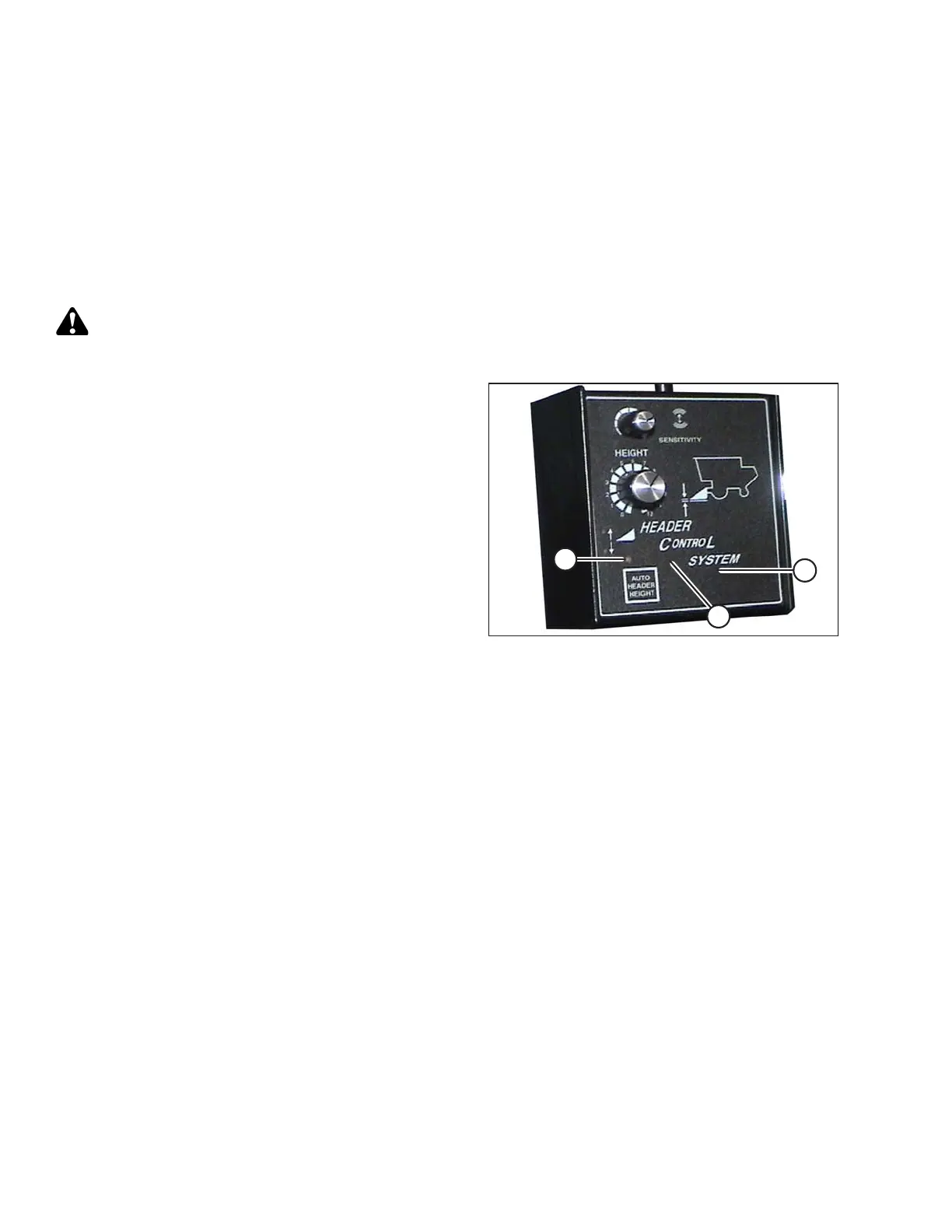
Figure 3.187: Combine Header Control System
1. Ensure center-link is set to D.
2. Start combine engine, and press and hold hidden C1
button (A) until LED light (B) flashes briefly.
3. Lower feeder house as far as it will go.
4. Press and hold hidden L2 button (C) until LED light (B)
flashes briefly. The AHHC system is now calibrated.
Setting Sensitivity of Auto Header Height Control (Gleaner R62/R72 Series)
NOTE:
Changes may have been made to combine controls or display since this document was published. Refer to
combine operator’s manual for updates.
OPERATION









 To Next Page