214323 235 Revision A
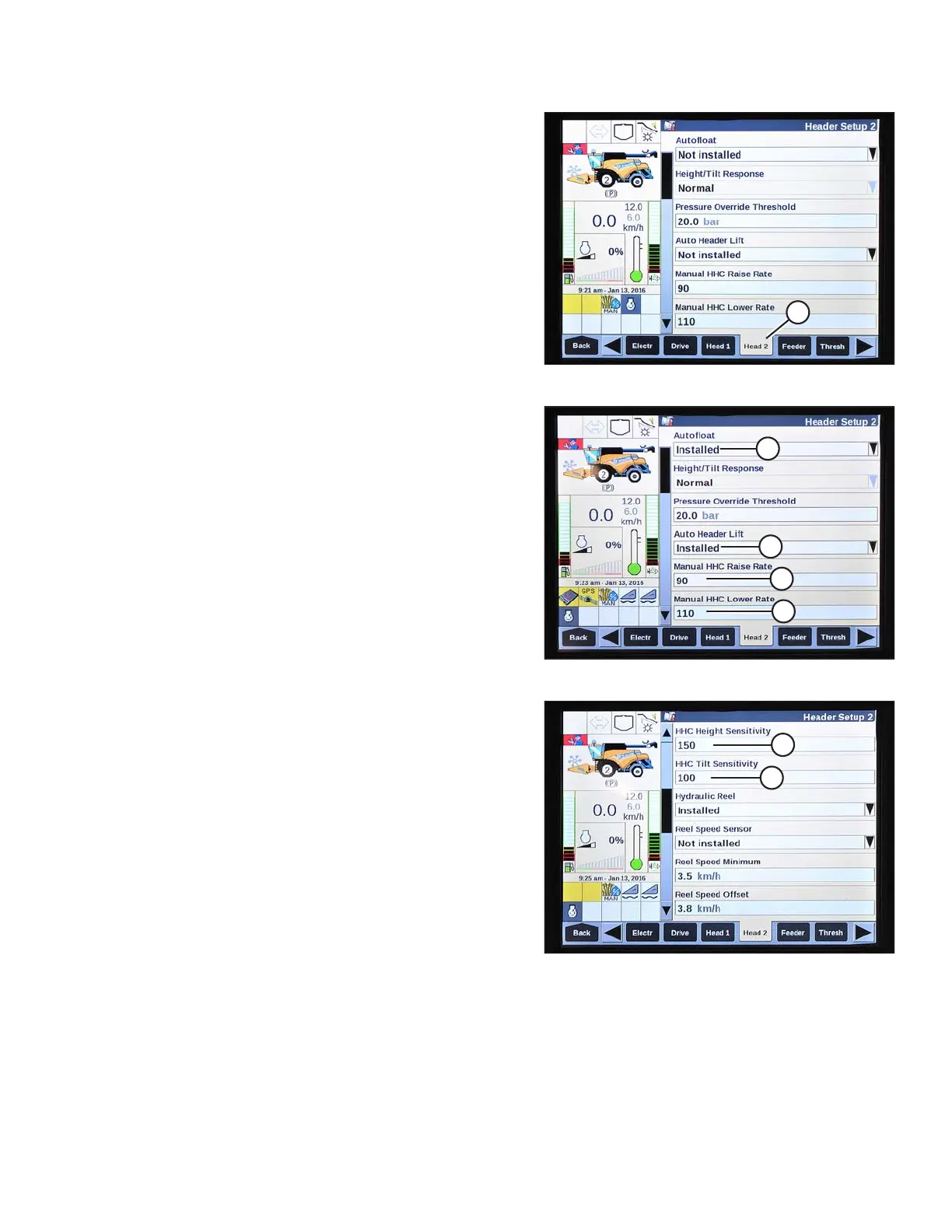
Figure 3.414: New Holland Combine Display
8. Select HEAD 2 (A). The HEADER SETUP 2 page
displays.
Figure 3.415: New Holland Combine Display
9. Select AUTOFLOAT drop-down arrow and set
AUTOFLOAT to INSTALLED (A).
10. Select AUTO HEADER LIFT drop-down arrow and set
AUTO HEADER LIFT to INSTALLED (B).
NOTE:
With AUTO HEADER LIFT installed and AHHC
engaged, header will lift up automatically when you pull
back on GSL.
11. Set values for MANUAL HHC RAISE RATE (C) and
MANUAL HHC LOWER RATE (D) for best performance
according to ground conditions.
Figure 3.416: New Holland Combine Display
12. Set values for HHC HEIGHT SENSITIVITY (A) and
HHC TILT SENSITIVITY (B) for best performance
according to ground conditions.
Checking Voltage Range from Combine Cab (New Holland CR Series)
NOTE:
Changes may have been made to the combine controls or display since this document was published. Refer to the
combine operator’s manual for updates.
OPERATION









 To Next Page