214323 114 Revision A
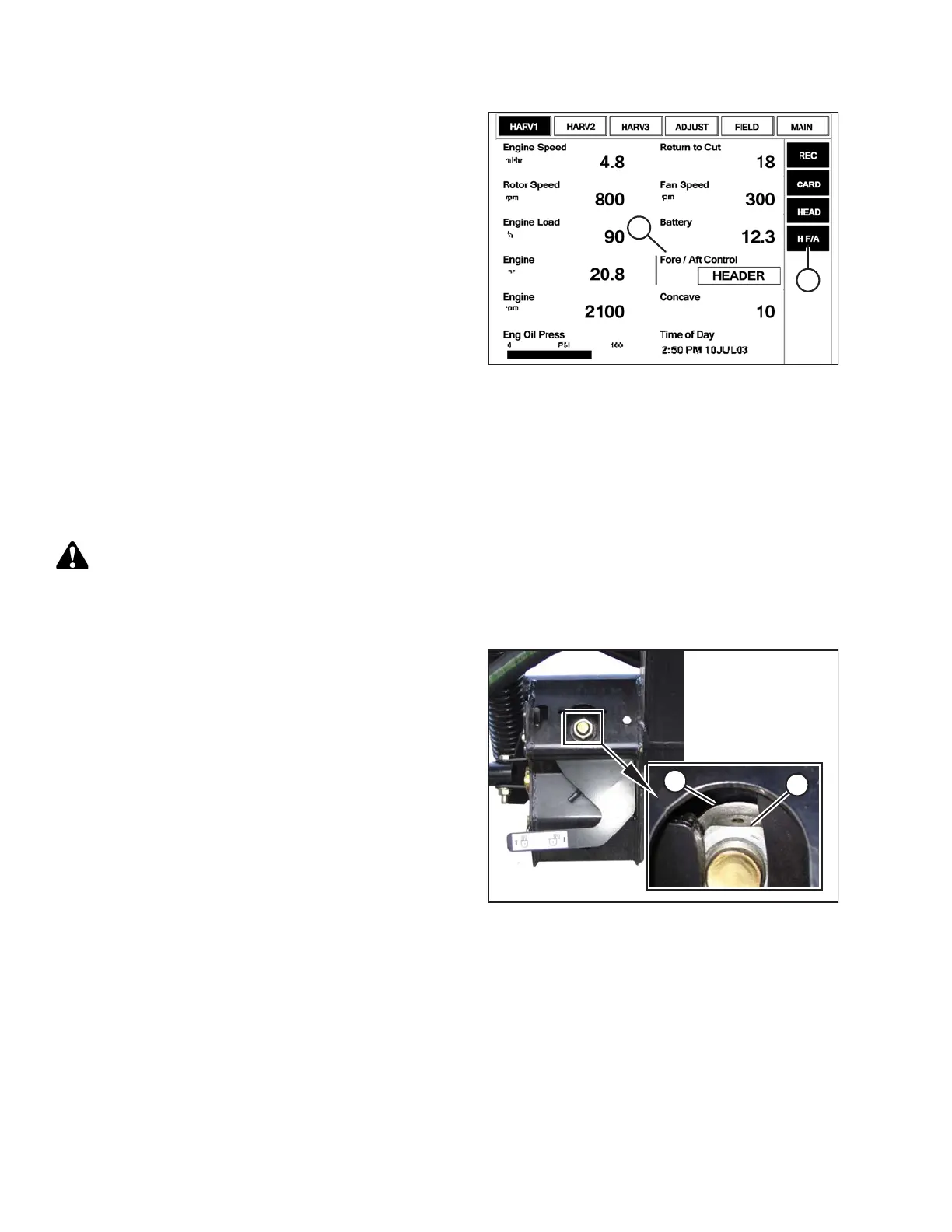
Figure 3.149: Case Combine Display
1. To be able to swap between reel fore/aft controls and
header fore/aft tilt controls, go to the LAYOUT tab,
select FORE/AFT CONTROL (A) from the legend, and
place it on one of the operator configurable screens—
HARV1, HARV2, HARV3 or ADJUST under the
RUN menu.
NOTE:
H F/A (B) is displayed on the status bar on the right of
the screen when HEADER is selected with the
FORE/AFT CONTROL.
2. If HEADER is selected with the FORE/AFT CONTROL,
press the reel aft button on the GSL to tilt the header
rearward, or press the reel fore button on the GSL to tilt
the header forward.
Checking Voltage Range from Combine Cab (Case IH 5130/6130/7130, 7010/8010;
7120/8120/9120; 7230/8230/9230)
NOTE:
Changes may have been made to combine controls or display since this document was published. Refer to
combine operator’s manual for updates.
CAUTION
Check to be sure all bystanders have cleared the area.
1. Position header 150 mm (6 in.) above ground, and unlock adapter float.
Figure 3.150: Float Lock
2. Check that float lock linkage is on down stops
(washer [A] and nut [B] cannot be moved) at both
locations.
NOTE:
If header is not on down stops during next two steps,
voltage may go out of range during operation causing a
malfunction of AHHC system.
OPERATION









 To Next Page