214323 469 Revision A
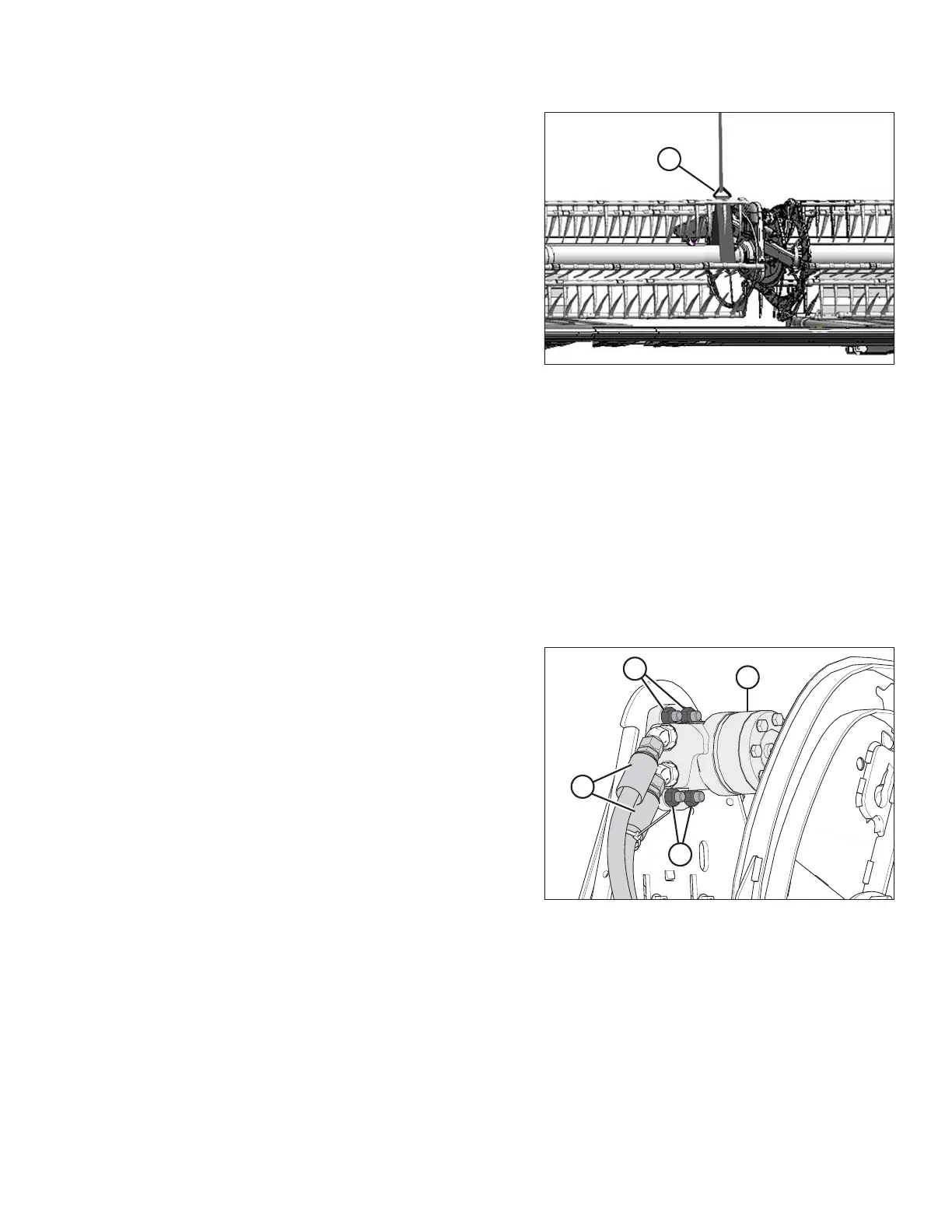
Figure 5.298: Supporting Reel
6. Remove temporary reel support (A).
7. Install the drive cover. Refer to Installing Reel Drive Cover, page 462.
5.14.5 Replacing Reel Drive Motor
The reel drive motor does not require regular maintenance or servicing. If problems occur with the motor, remove it
and have it serviced at your MacDon Dealer.
Removing Reel Drive Motor
1. Shut down the combine, and remove the key from the ignition.
2. Loosen the drive chain. Refer to Loosening Reel Drive Chain, page 463.
3. Remove the drive sprocket. Refer to Removing Reel Drive Sprocket, page 465.
Figure 5.299: Reel Motor and Hoses
4. Disconnect hydraulic lines (A) at motor (B). Cap or plug
open ports and lines.
NOTE:
Mark the hydraulic lines (A) and their locations in motor
(B) to ensure correct reinstallation.
5. Remove four nuts and bolts (C) and remove motor (A).
Retrieve the spacer (not shown) from between
motor (B) and the motor mount (if installed).
MAINTENANCE AND SERVICING









 To Next Page