214323 377 Revision A
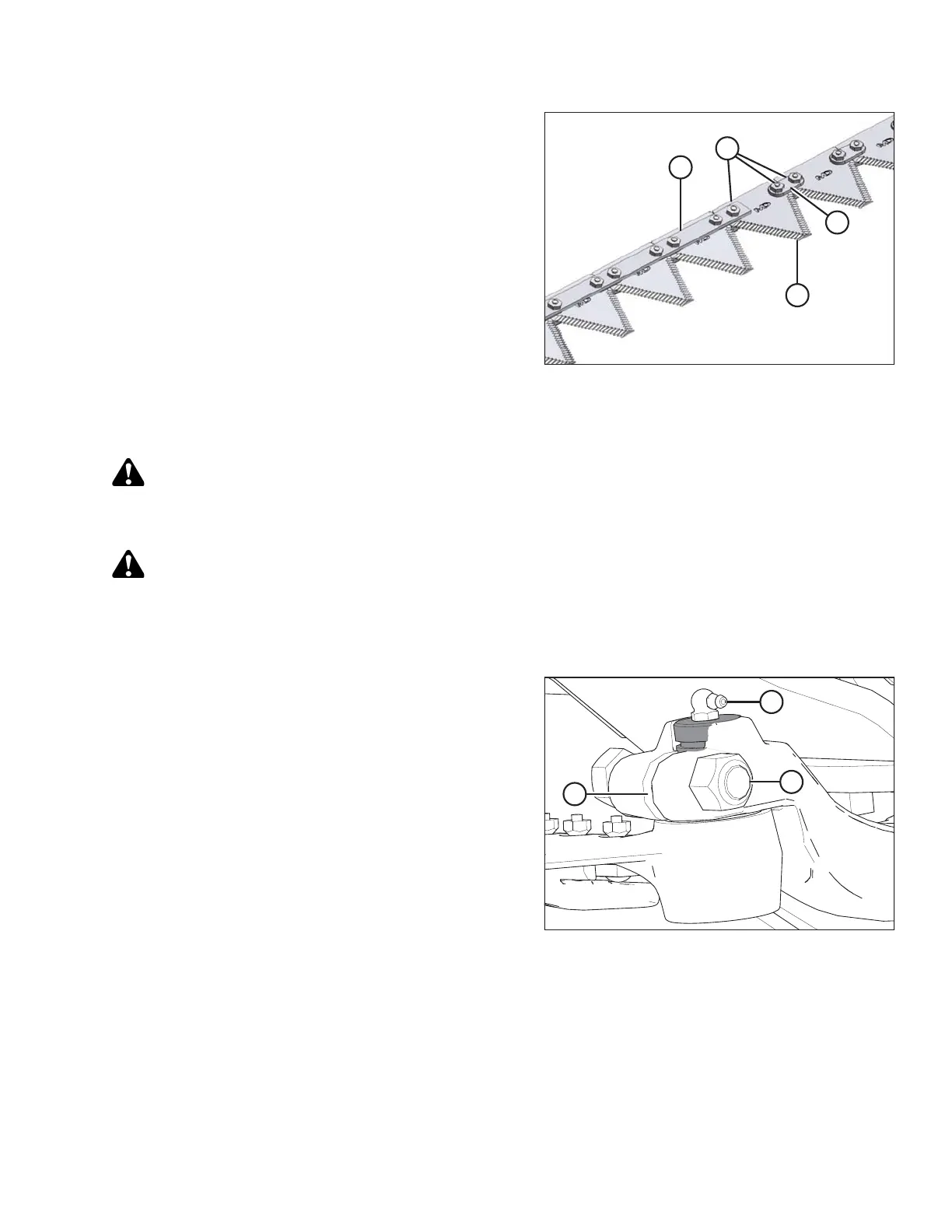
Figure 5.101: Knife Bar
7. Reposition bars (C) and/or (D) on knife (A) and install
lock nuts (B).
NOTE:
If replacing screws, ensure they are fully inserted. Do
not use nuts to draw screws into the knife bar.
8. Torque nuts to 9.5 Nm (7 lbf∙ft).
5.8.2 Removing Knife
WARNING
To avoid bodily injury or death from unexpected start-up or fall of raised machine, always stop engine,
remove key, and engage safety props before going under machine for any reason.
WARNING
Stand to rear of knife during removal to reduce risk of injury from cutting edges. Wear heavy gloves when
handling knife.
1. Stop engine and remove the key from ignition.
Figure 5.102: Knifehead
2. Stroke the knife manually to its outer limit.
3. Clean the area around the knifehead.
4. Remove bolt (A).
5. Remove grease zerk (B) from the pin.
6. Use a screwdriver or chisel in slot (C) to release the
load on the knifehead pin.
7. Use a screwdriver or chisel to pry the pin upwards in the
pin groove until the pin is clear of the knifehead.
8. Push the knife assembly inboard until it is clear of the
output arm.
9. Seal the knifehead bearing with plastic or tape unless it
is being replaced.
10. Wrap a chain around the knifehead and pull out
the knife.
MAINTENANCE AND SERVICING









 To Next Page