214323 238 Revision A
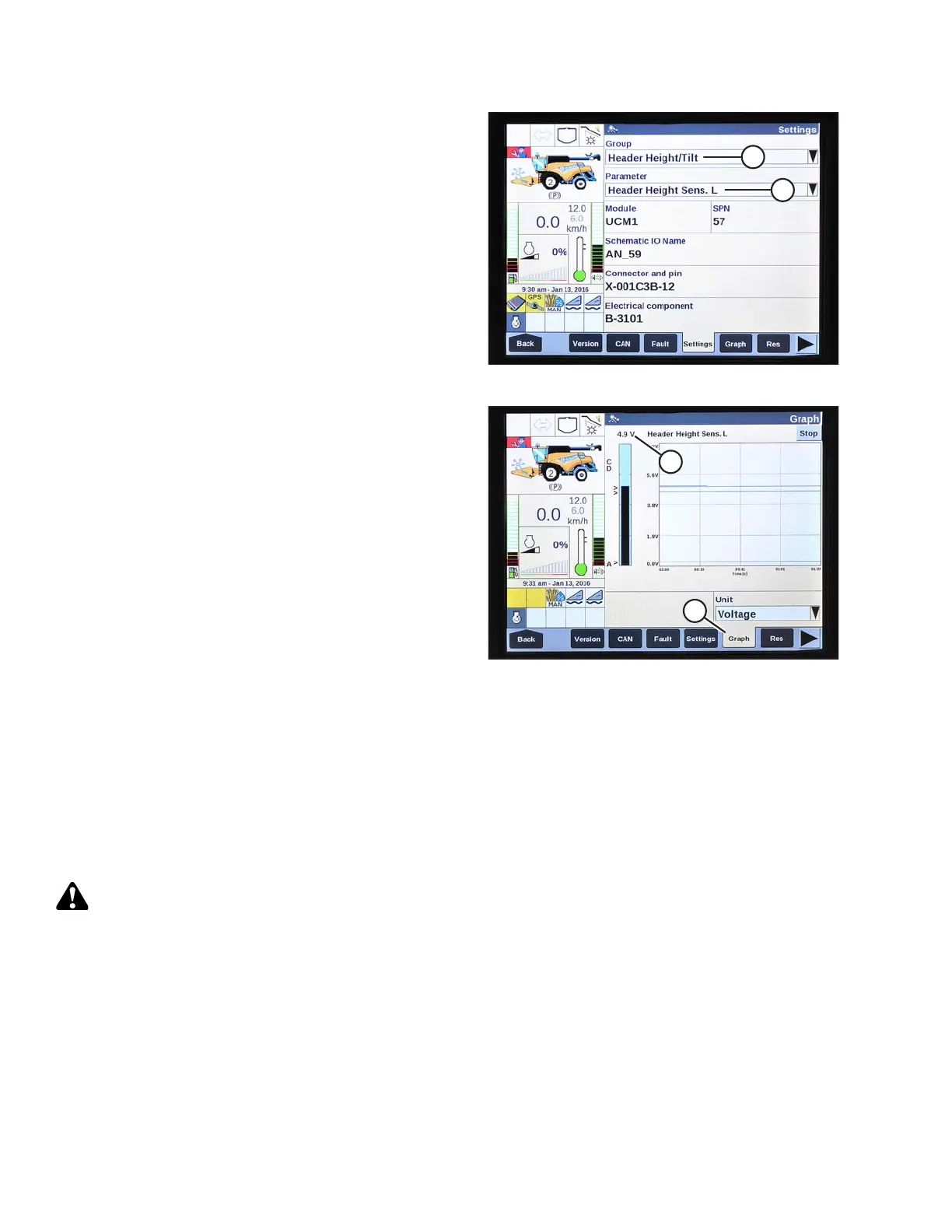
Figure 3.422: New Holland Combine Display
7. Select HEADER HEIGHT/TILT (A) from GROUP
drop-down menu.
8. Select HEADER HEIGHT SENS. L (B) from
PARAMETER drop-down menu.
Figure 3.423: New Holland Combine Display
9. Select GRAPH (A). The exact voltage (B) is displayed
at top of page.
10. Raise and lower header to see full range of voltage
readings.
11. Adjust voltage limits (refer to Adjusting Voltage Limits,
page 105) if sensor voltage is not within low and high
limits or if range between low and high limits is
insufficient (refer to Table 3.13, page 103).
Calibrating Auto Header Height Control (New Holland CR Series)
For best performance of auto header height control (AHHC), perform these procedures with center-link set to D.
When setup and calibration are complete, adjust center-link back to desired header angle. Refer to 3.7.4 Header
Angle, page 76.
NOTE:
Changes may have been made to the combine controls or display since this document was published. Refer to the
combine operator’s manual for updates.
CAUTION
Check to be sure all bystanders have cleared the area.
Check following conditions before starting header calibration procedure:
• The header is attached to combine.
• The combine is on level ground, with header level to ground.
• The header is on down stops, and center-link is set to D.
• The engine is running.
• The combine is not moving.
OPERATION









 To Next Page