214323 147 Revision A
NOTE:
Changes may have been made to combine controls or display since this document was published. Refer to
combine operator’s manual for updates.
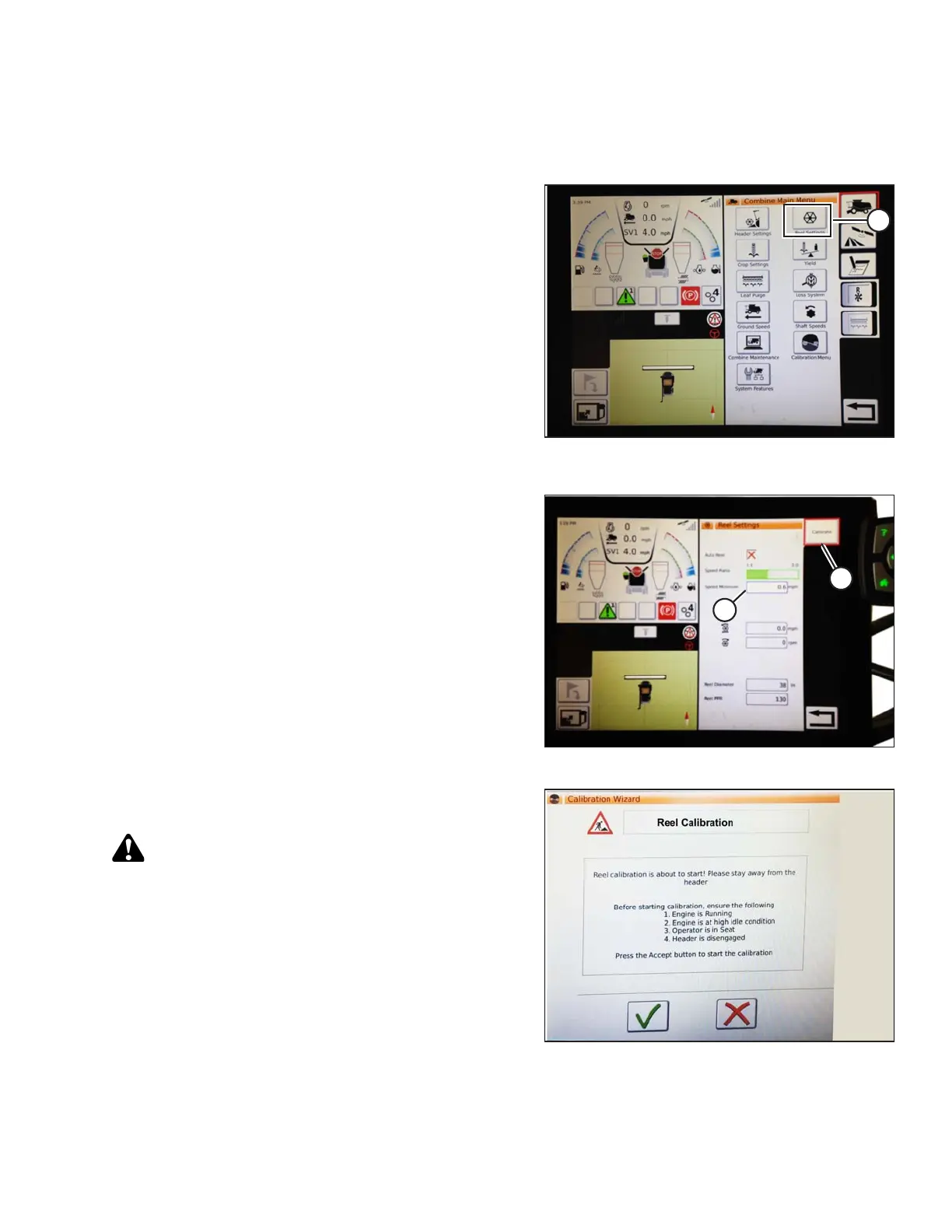
Figure 3.216: Reel Settings on Combine
Main Menu
1. From COMBINE MAIN MENU, touch REEL
SETTINGS (A) to open REEL SETTINGS page.
Figure 3.217: Reel Settings Calibration
2. To set minimum reel speed, touch SPEED MINIMUM
FIELD (B). The on-screen keyboard displays. Enter
desired value. Touch green check mark to accept new
value, or red X to cancel. The reel speed (in mph) and
rpm are shown.
NOTE:
At bottom of REEL SETTINGS page, reel diameter and
reel pulses per revolution are displayed. These values
have already been set in HEADER SETTINGS page.
3. Reel speed is calibrated in REEL SETTINGS page by
touching CALIBRATE button (A) in top right of page.
Figure 3.218: Calibration Wizard
4. The CALIBRATION WIZARD opens and displays a
hazard message warning page.
CAUTION
Clear the area of other persons, pets, etc. Keep children
away from machinery. Walk around the machine to be
sure no one is under, on, or close to it.
5. Make sure all conditions listed on CALIBRATION
WIZARD warning page are met. Press green check
mark to accept and start reel calibration. Pressing red X
will cancel calibration procedure.
OPERATION









 To Next Page